<?xml version="1.0" encoding="utf-8"?><feed xmlns="http://www.w3.org/2005/Atom" xml:lang="en_US"><generator uri="https://jekyllrb.com/" version="3.10.0">Jekyll</generator><link href="https://sudodrift.github.io/feed.xml" rel="self" type="application/atom+xml" /><link href="https://sudodrift.github.io/" rel="alternate" type="text/html" hreflang="en_US" /><updated>2026-11-06T10:33:05-05:00</updated><id>https://sudodrift.github.io/feed.xml</id><title type="html">sudodrift</title><subtitle>Plain-language breakdowns of real security breaches, with the commands to check your own systems. By sudodrift, a Linux sysadmin who builds small open source security tools.</subtitle><author><name>sudodrift</name></author><entry><title type="html">Your host got breached. Now check your own servers.</title><link href="https://sudodrift.github.io/posts/host-breached-check-yours/" rel="alternate" type="text/html" title="Your host got breached. Now check your own servers." /><published>2026-11-06T00:00:00-05:00</published><updated>2026-11-06T00:00:00-05:00</updated><id>https://sudodrift.github.io/posts/host-breached-check-yours</id><content type="html" xml:base="https://sudodrift.github.io/posts/host-breached-check-yours/"><![CDATA[<p><em>By sudodrift</em></p>

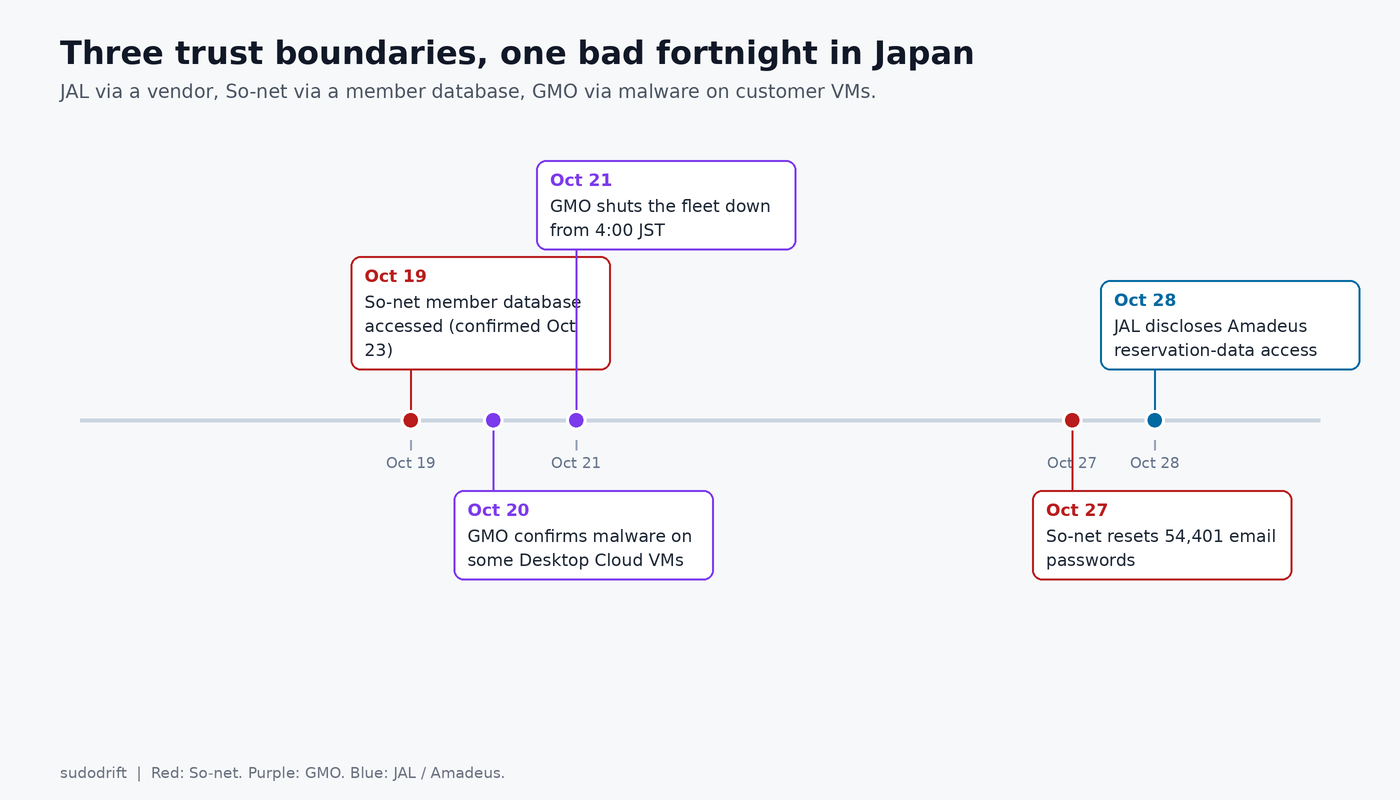
<p>On October 28 The Record <a href="https://therecord.media/japan-airlines-warns-of-breach-country-grapples-with-incidents">summarized</a> a pile-up of Japanese incidents that has the prime minister talking about emergency measures. I am not going to re-report every one. Three of them share a shape that matters to anyone who rents a server from somebody else.</p>

<h2 id="three-incidents-three-trust-boundaries">Three incidents, three trust boundaries</h2>

<p><strong>Japan Airlines, via Amadeus.</strong> JAL said Amadeus, which runs its reservation, ticketing and check-in systems, told it that attackers accessed a portion of customer reservation data. About 92,000 customers were affected. For about 2,000 of them the data included passport numbers, frequent flyer numbers, email addresses and phone numbers. Flight operations and card numbers were not hit. The breached system was a vendor’s, not JAL’s own data center. The data was still JAL’s customers.</p>

<p><strong>Sony Network Communications / So-net.</strong> Help Net Security’s <a href="https://www.helpnetsecurity.com/2026/10/28/sony-network-communications-data-breach-so-net/">write-up</a> of the company notice: attackers hit the So-net member database on October 19, confirmed October 23. More than 2.58 million current and former customer records (names, phones, emails, user IDs, dates of birth, gender, connection IDs), plus 54,401 email addresses with their passwords, plus 16 bank account records without PINs. Passwords on the email side were reset October 27. NURO and other services were not in the leak, per Sony.</p>

<p><strong>GMO Onamae.com Desktop Cloud.</strong> GMO’s own <a href="https://internet.gmo/en/news/article/246">October 21 notice</a> says a third party installed malicious programs in some customers’ server environments. Up to 26,739 servers were potentially affected. The company shut the fleet down starting 4:00 JST on October 21. Later reporting (TechRadar citing BleepingComputer) says attackers demanded roughly $50 million, GMO refused, data leaked, and customers were told to scan, back up, disconnect and shut down their own PCs. Login credentials for MetaTrader 4 and 5 were among what was taken, and some customers reported trades they did not recognize. I have not independently confirmed the ransom figure from GMO’s own English notices; treat that number as coming from secondary reporting.</p>

<p><img src="/assets/posts/host-breached-check-yours/2026-10-29-host-breached-check-yours-timeline.png" alt="Three Japanese incidents in October, and which trust boundary each one broke" /></p>

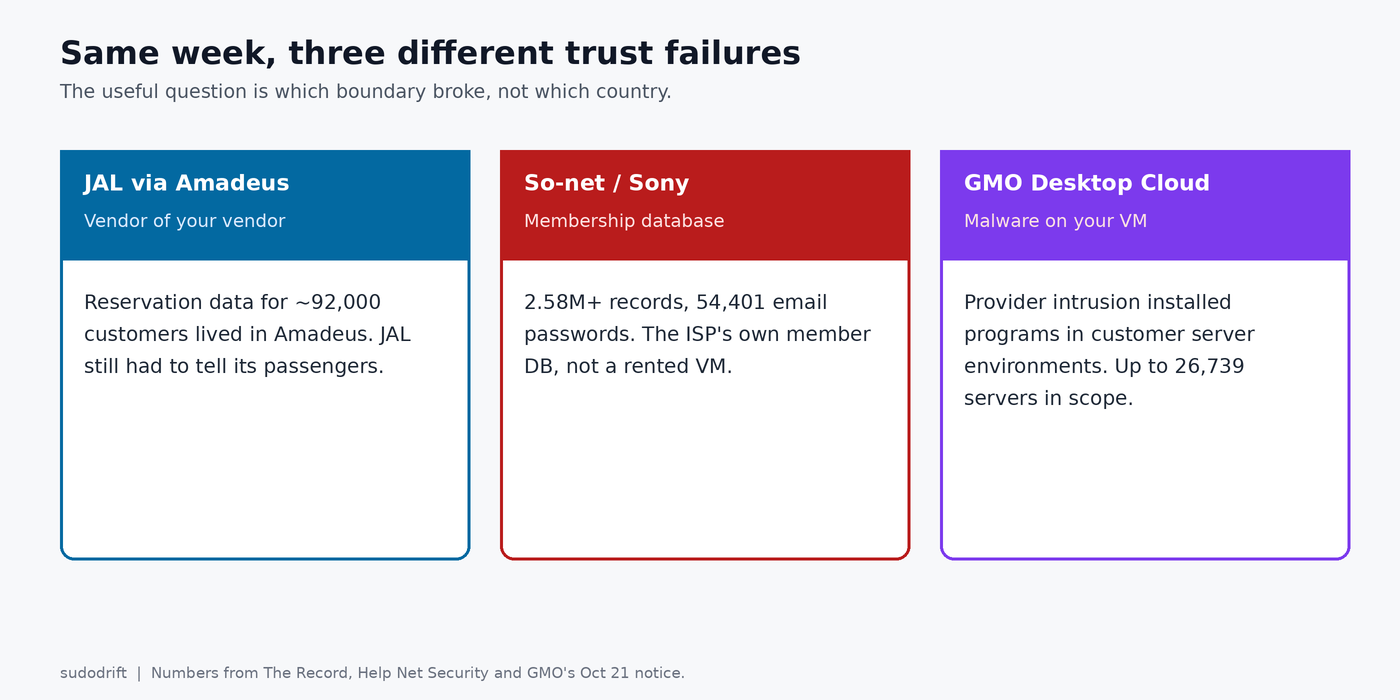
<p><img src="/assets/posts/host-breached-check-yours/2026-10-29-host-breached-check-yours-terminal.png" alt="JAL, So-net and GMO as three different trust failures" /></p>

<h2 id="the-angle-that-travels">The angle that travels</h2>

<p>JAL is a vendor-of-your-vendor story. So-net is a membership-database story. GMO is the one that should change how you think about a rented desktop or VPS: the provider’s intrusion became malware on the customer’s server.</p>

<p>If you rent a machine from anyone, the question after their incident is not “did they rotate their keys.” It is “what do I still trust on the box they handed back.”</p>

<h2 id="what-i-would-check-on-my-own-servers">What I would check on my own servers</h2>

<p>Assume the provider’s timeline is incomplete. Work from the box you can still reach, or from the replacement they gave you.</p>

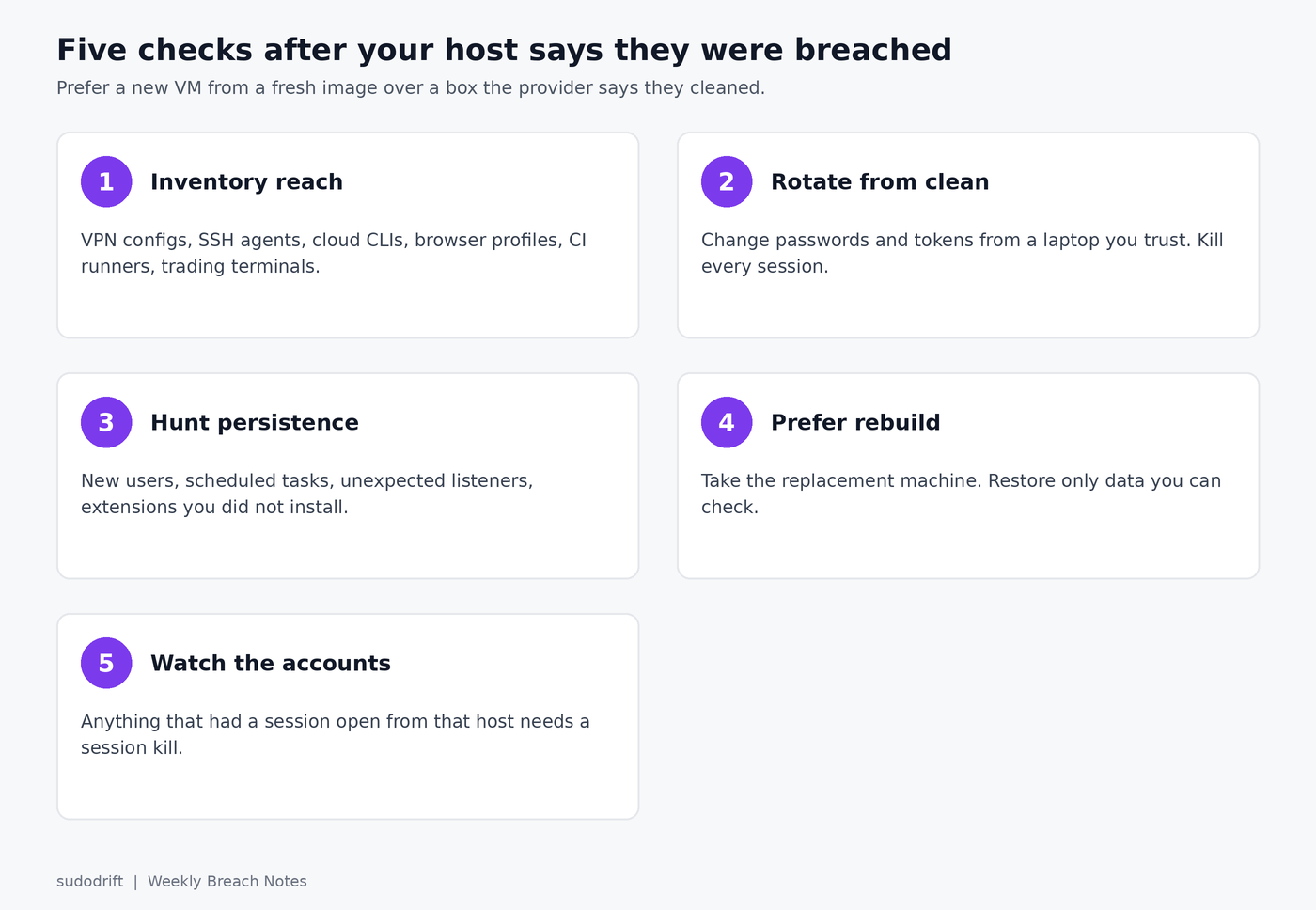
<ol>
  <li><strong>Inventory what the box could reach.</strong> Outbound VPN configs, SSH agent sockets, cloud CLI profiles, browser profiles, saved RDP files, trading-platform terminals, CI runner registrations. Anything with a credential that still works after the host is “cleaned.”</li>
  <li><strong>Rotate from a clean machine.</strong> Do not rotate from the rented desktop. From a laptop you trust, change every password and token that lived on that host, end every session, and revoke every API key. GMO’s own notice told customers to change credentials stored on the server and anywhere they reused them. That is the floor, not the ceiling.</li>
  <li><strong>Look for what the malware left.</strong> New local users, new scheduled tasks or systemd units, unexpected listening ports, browser extensions you did not install, outbound connections to places that are not your broker. On a Windows rented desktop, Autoruns and a full offline AV scan; on Linux, the usual persistence places plus <code class="language-plaintext highlighter-rouge">dpkg --verify</code> / <code class="language-plaintext highlighter-rouge">rpm -V</code> for system packages.</li>
  <li><strong>Treat “we cleaned it” as unproven.</strong> Prefer a new VM from a fresh image, then restore only the data you can check. If the provider offers a replacement machine, take it.</li>
  <li><strong>Watch the accounts that ran there.</strong> MetaTrader customers saw unrecognized trades. SaaS accounts that had a session open from that host need a session kill and a password change, even if the provider says the data did not include those passwords.</li>
</ol>

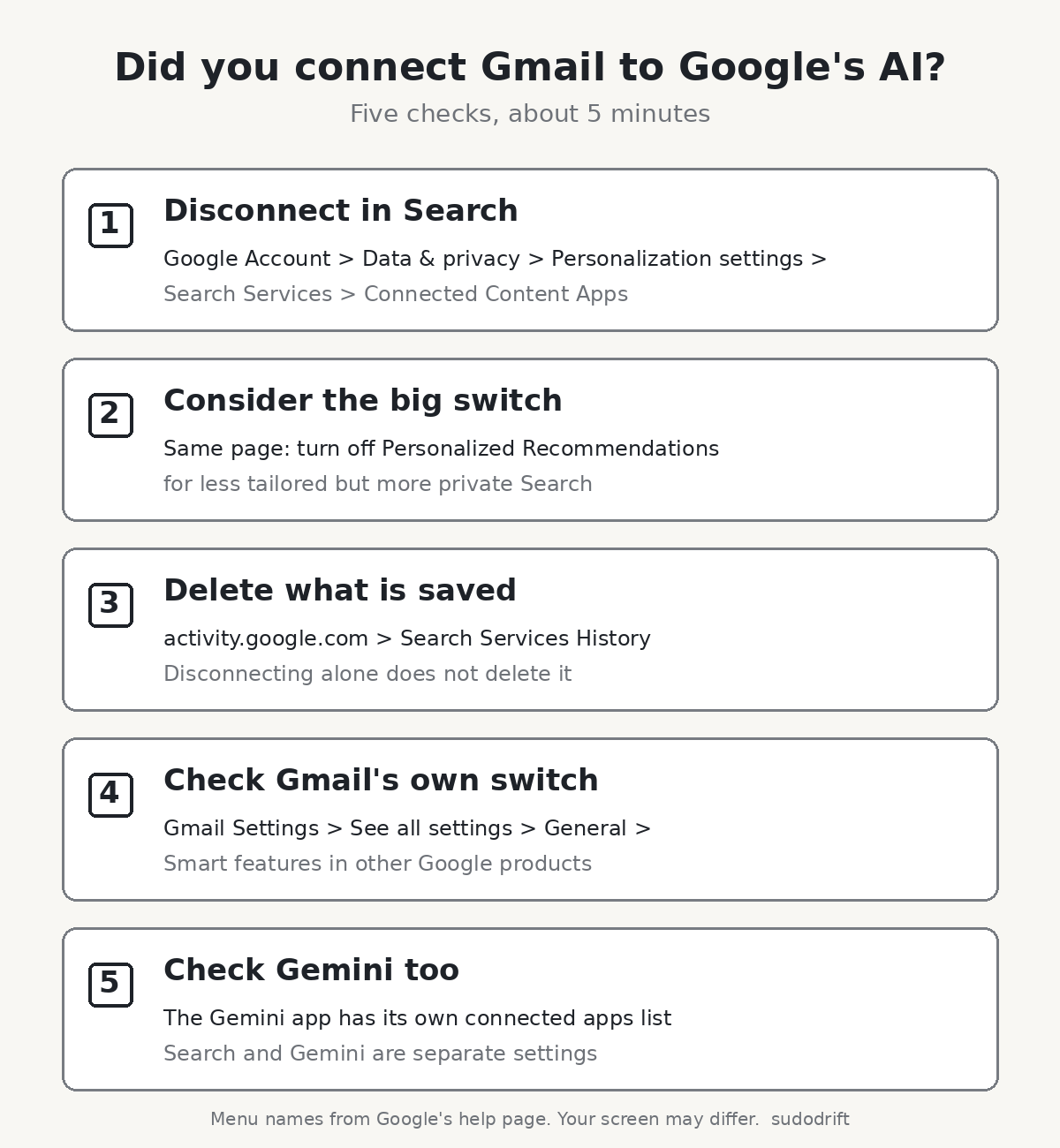
<p><img src="/assets/posts/host-breached-check-yours/2026-10-29-host-breached-check-yours-steps.png" alt="Five checks after your hosting provider says they were breached" /></p>

<h2 id="for-the-friday-roundup">For the Friday roundup</h2>

<p>These three sit next to Burger King Japan (about 11 million) and Capcom (about 11.7 million) in The Record’s roundup. The hosting angle is the one worth a full note; the others are volume. Capcom and Burger King numbers are from The Record’s summary, which does not link their primary notices in the same piece, so confirm those against the companies’ own statements before you lean on the figures.</p>

<h2 id="sources">Sources</h2>

<ul>
  <li>The Record, <a href="https://therecord.media/japan-airlines-warns-of-breach-country-grapples-with-incidents">Japan Airlines warns of data breach as country grapples with multiple cyber incidents</a>, October 28, 2026</li>
  <li>Help Net Security, <a href="https://www.helpnetsecurity.com/2026/10/28/sony-network-communications-data-breach-so-net/">Data breach at Sony-owned internet provider compromises 2.6 million customer records</a>, October 28, 2026</li>
  <li>GMO Internet, <a href="https://internet.gmo/en/news/article/246">Apology and Notice Regarding Unauthorized Access to Onamae.com Desktop Cloud</a>, October 21, 2026</li>
  <li>TechRadar, <a href="https://www.techradar.com/pro/security/japanese-internet-giant-gmo-tells-customers-to-shut-down-and-disconnect-pcs-from-the-internet-following-data-breach-and-ransomware-threat">Japanese internet giant GMO tells customers to shut down</a>, October 28, 2026 (secondary source for the ransom demand and MetaTrader detail)</li>
</ul>]]></content><author><name>sudodrift</name></author><category term="breach" /><category term="hosting" /><category term="incident-response" /><category term="japan" /><category term="vps" /><summary type="html"><![CDATA[Japan just had a bad two weeks: JAL via Amadeus, Sony's So-net, GMO's Desktop Cloud with malware on customer VMs. The useful lesson is not "Japan has a problem." It is what you do when the people who run your box get broken into.]]></summary><media:thumbnail xmlns:media="http://search.yahoo.com/mrss/" url="https://sudodrift.github.io/assets/posts/host-breached-check-yours/2026-10-29-host-breached-check-yours-timeline.png" /><media:content medium="image" url="https://sudodrift.github.io/assets/posts/host-breached-check-yours/2026-10-29-host-breached-check-yours-timeline.png" xmlns:media="http://search.yahoo.com/mrss/" /></entry><entry><title type="html">Barclays Named AI in 5,000 Job Cuts. Here’s What the Bank Actually Said.</title><link href="https://sudodrift.github.io/posts/barclays-ai-job-cuts-what-they-said/" rel="alternate" type="text/html" title="Barclays Named AI in 5,000 Job Cuts. Here’s What the Bank Actually Said." /><published>2026-11-05T00:00:00-05:00</published><updated>2026-11-05T00:00:00-05:00</updated><id>https://sudodrift.github.io/posts/barclays-ai-job-cuts-what-they-said</id><content type="html" xml:base="https://sudodrift.github.io/posts/barclays-ai-job-cuts-what-they-said/"><![CDATA[<p>On October 22, Barclays said it expects to cut about 5,000 full-time jobs this year. That is roughly 5% of its staff. About 1,000 of those roles were already gone by the middle of the year, and the bank expects the other 4,000 to go by December (<a href="https://www.bbc.co.uk/news/articles/cm4g1p347qgxo">BBC</a>, <a href="https://www.bankingdive.com/news/barclays-cut-5000-employees-ai-q3-earnings-venkat/833747/">Banking Dive</a>).</p>

<p>Almost every headline put AI in the first line. I get why. But I wanted to know what Barclays itself said, in its own documents, so I read the script and slides from its results call. It turns out the bank is telling two stories in the same breath, and only one of them is about AI doing anyone’s job.</p>

<p>If you work in a bank, a support team or a software team, the difference matters. It changes what you should do next.</p>

<h2 id="what-barclays-said-in-its-own-words">What Barclays said, in its own words</h2>

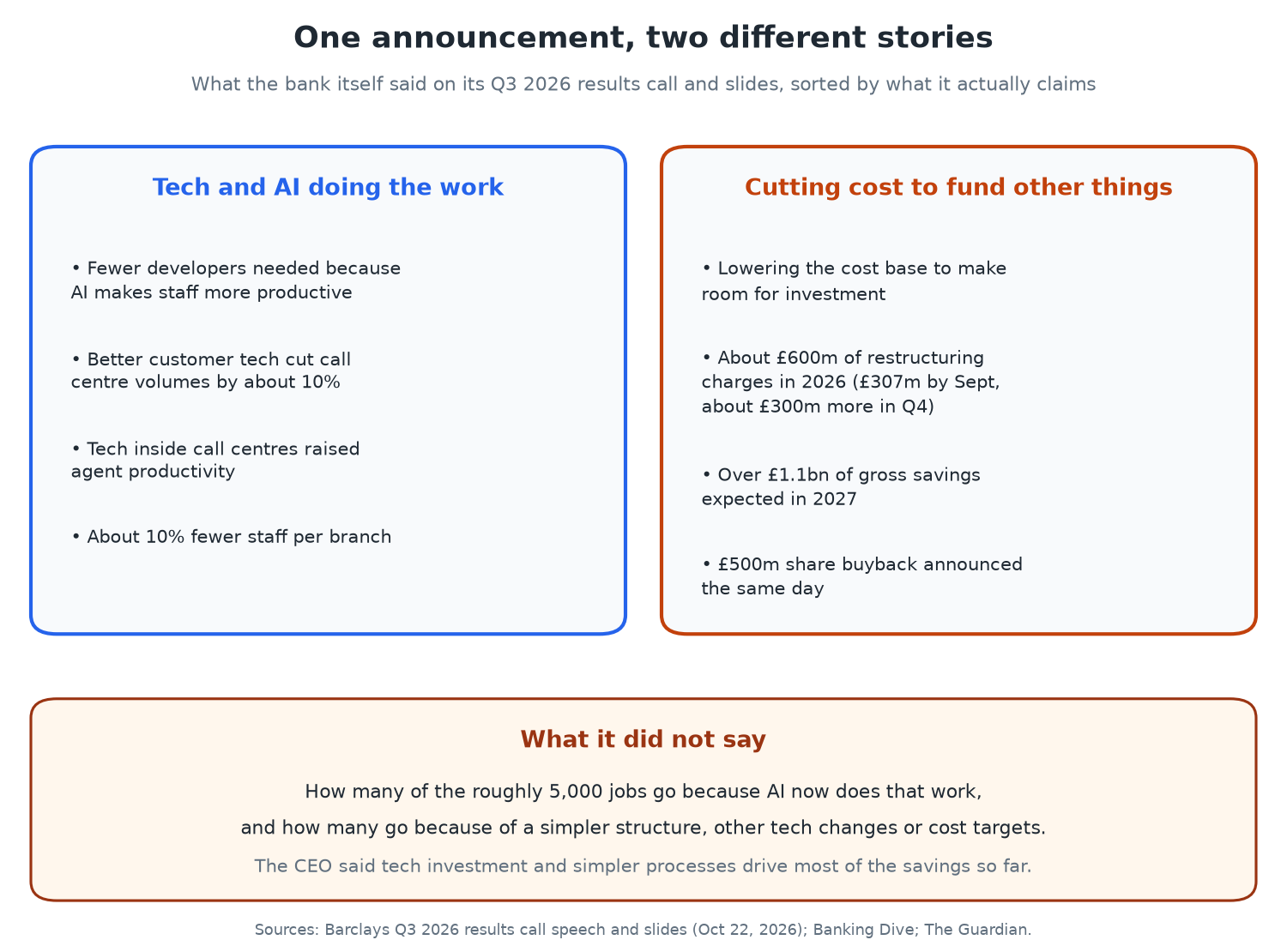
<p>Barclays published the speech its CEO and finance director gave to analysts, along with the slides (<a href="https://home.barclays/content/dam/home-barclays/documents/investor-relations/ResultAnnouncements/Q32026Results/Q326%20Results%20Call%20Management%20Speech.pdf">Barclays Q3 2026 call speech</a>). Here is what it says about the cuts, in my words.</p>

<ul>
  <li>The 5,000 figure comes from what Barclays calls structural cost actions taken in 2026. A footnote says the reduction is still subject to collective and individual consultation where that is required.</li>
  <li>Around 60% of the actions are in support functions, and that includes developers. The finance director, Anna Cross, put it this way: “fewer developers as AI makes our people more productive.”</li>
  <li>In the UK retail bank, better customer technology cut call centre volumes by about 10% over the past year. Technology inside the call centres made staff more productive. Branches now have about 10% fewer employees each.</li>
  <li>The bank expects more than £1.1bn of gross efficiency savings in 2027.</li>
</ul>

<p>The CEO, C.S. Venkatakrishnan, was asked how many of the cuts were directly down to AI. He did not give a number. He said deep investment in technology and simpler processes were behind most of the savings so far, and that AI was “the icing on the cake, not the cake” (<a href="https://www.theguardian.com/business/2026/oct/22/barclays-profits-up-as-uk-banks-brace-for-tax-increase-in-budget">The Guardian</a>).</p>

<p>So the bank named AI, but its own boss said AI is not the main driver yet.</p>

<h2 id="two-stories-in-one-announcement">Two stories in one announcement</h2>

<p><img src="/assets/posts/barclays-ai-job-cuts-what-they-said/2026-11-05-barclays-ai-job-cuts-what-they-said-two-stories.png" alt="Diagram: Barclays statements sorted into two boxes. Tech and AI doing the work: fewer developers as AI makes staff more productive, call centre volumes down about 10%, more productive call centre staff, about 10% fewer staff per branch. Cutting cost to fund other things: lowering the cost base to make room for investment, about £600m of restructuring charges in 2026, over £1.1bn of gross savings expected in 2027, a £500m share buyback the same day. Below: what it did not say, how many of the 5,000 jobs are because AI now does the work." /></p>

<p>When I sort Barclays’ statements, they fall into two piles.</p>

<p>The first pile is technology doing work people used to do. Fewer developers because AI tools speed up the ones who stay. Fewer calls because customers use better self-service technology. Fewer people per branch. Only the developer line names AI directly. The call centre and branch changes are described as technology in general.</p>

<p>The second pile is about money. The slide headline says Barclays is cutting its cost base to free up room for investment. The bank had spent £307m on these restructuring actions in the first nine months of 2026 and expects about £300m more in the fourth quarter. Banking Dive points out that the full year total, over £600m, is roughly twice what Barclays first planned. On the same day, Barclays announced a £500m share buyback and a 12% rise in quarterly pre-tax profit, to £2.3bn (<a href="https://www.cnbc.com/2026/10/22/barclays-ai-jobs-cuts.html">CNBC</a>).</p>

<p>The Unite union said Barclays was using AI as an excuse, and it opened urgent talks with the bank. Its global federation, UNI, pointed straight at the buyback announced on the same day as the cuts (<a href="https://uniglobalunion.org/news/uni-backs-unite-as-barclays-cuts-5000-jobs-and-hands-shareholders-500-million/">UNI Global Union</a>). I don’t think “excuse” is quite fair either. The developer line is a real claim about AI changing how much work one person can do. But the bank has not said how big that part is.</p>

<h2 id="what-todays-us-layoff-report-adds">What today’s US layoff report adds</h2>

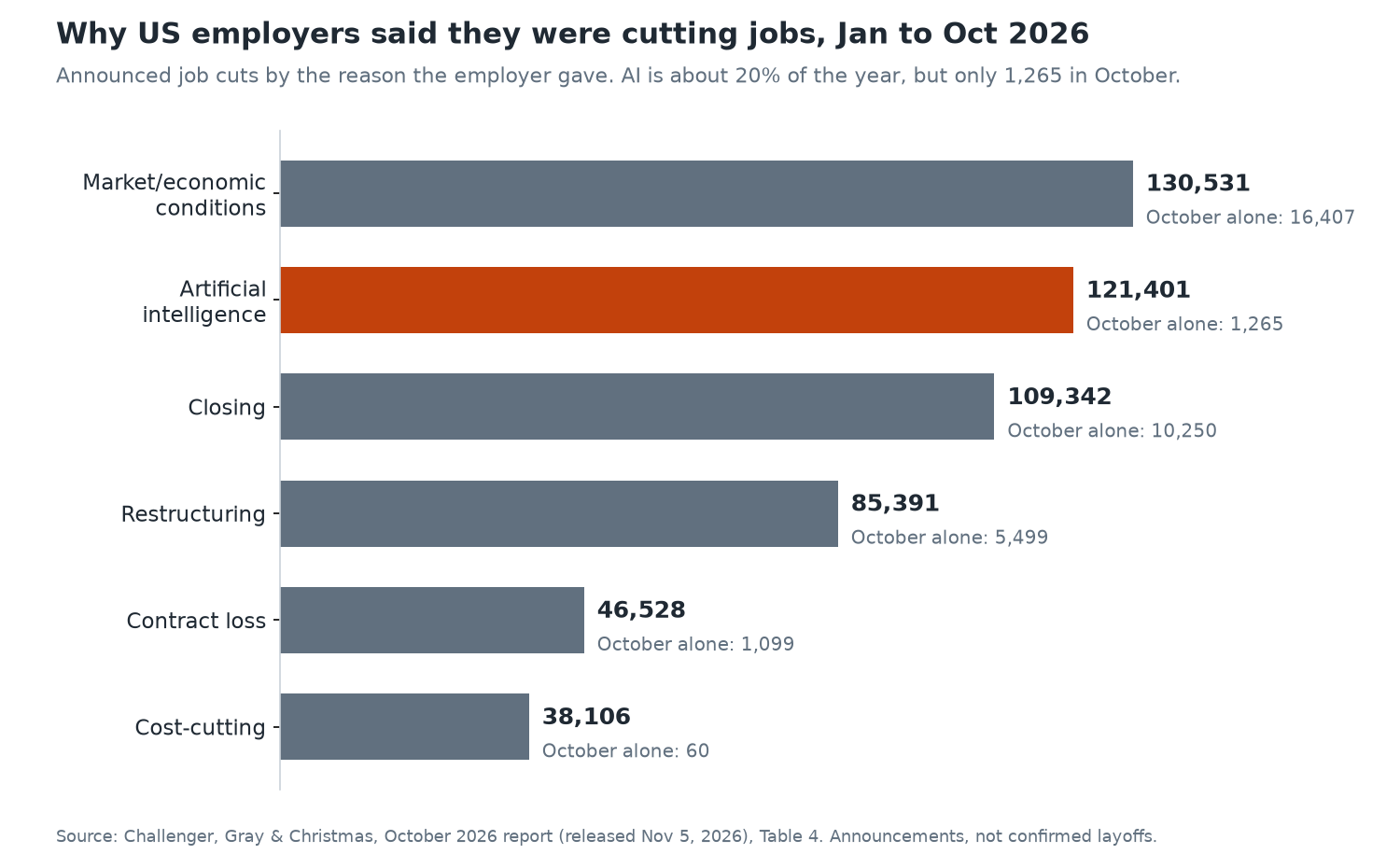
<p>This morning Challenger, Gray &amp; Christmas published its October report on US job cut announcements. It is one of the most quoted counts of layoffs where the employer names AI (<a href="https://www.challengergray.com/blog/october-layoffs-at-three-year-low-seasonal-hiring-plans-up-26/">Challenger, October 2026</a>). Barclays is a UK bank, so its cut is not what this report is about. But it shows the same pattern from the other side.</p>

<p><img src="/assets/posts/barclays-ai-job-cuts-what-they-said/2026-11-05-barclays-ai-job-cuts-what-they-said-reasons.png" alt="Bar chart: US announced job cuts by stated reason, January to October 2026. Market or economic conditions 130,531 (16,407 in October). Artificial intelligence 121,401 (1,265 in October). Closing 109,342 (10,250 in October). Restructuring 85,391 (5,499 in October). Contract loss 46,528 (1,099 in October). Cost-cutting 38,106 (60 in October)." /></p>

<p>The numbers, checked against the report itself:</p>

<ul>
  <li>October’s US total was 43,994 announced job cuts. That is the lowest October since 2023 and down 71% from October 2025.</li>
  <li>Employers cited AI for 1,265 of those cuts. That is AI’s lowest month of 2026.</li>
  <li>For the year so far, AI has been cited for 121,401 cuts, about 20% of the total. That is a lot. But “market and economic conditions” has now passed it as the top reason, at 130,531.</li>
  <li>Technology companies have announced 171,501 cuts this year, 28% of all cuts and already more than all of 2025.</li>
  <li>FinTech is small but up sharply: 11,979 cuts so far this year, against 1,863 by this point last year.</li>
</ul>

<p>Andy Challenger said the reasons employers give have moved from technology toward the economy. Here is the part I keep coming back to. Challenger counts the reason the employer states. If a company says “restructuring” when AI is part of it, it lands in restructuring. If a company says “AI” when the real driver is cost, it lands in AI. The count tells you what companies chose to say, which is useful, but it is not proof of what caused the cut.</p>

<h2 id="what-the-official-survey-data-says">What the official survey data says</h2>

<p>The UK’s Office for National Statistics asked businesses directly. In its July 2026 analysis, among businesses using AI to improve how they run, 63% said their headcount had not changed because of it, 6% said it went down and 1% said it went up. The most common way firms said they were bringing in AI skills was training or retraining the staff they already had (<a href="https://www.ons.gov.uk/businessindustryandtrade/business/businessservices/articles/artificialintelligenceinukbusinesses/2023to2026">ONS</a>).</p>

<p>One honest catch. That survey leaves out finance and insurance. So it cannot tell us much about banks specifically, which is exactly where Barclays, NatWest and others are now making cuts.</p>

<h2 id="confirmed-and-not-known">Confirmed and not known</h2>

<p>Confirmed, from Barclays’ own documents or on-record statements:</p>

<ul>
  <li>About 5,000 full-time roles, about 5% of staff, with about 1,000 already gone.</li>
  <li>Around 60% in support functions, including developers.</li>
  <li>Call centre volumes down about 10% and branch staffing down about 10% in the UK retail bank.</li>
  <li>A £500m buyback and £2.3bn quarterly pre-tax profit announced the same day.</li>
</ul>

<p>Not known:</p>

<ul>
  <li>How many of the 5,000 are because AI now does the work. The CEO was asked and did not give a figure.</li>
  <li>Exactly which teams and countries. The BBC reported that a significant share is expected in India, where some UK back office work is done, but no breakdown has been published that I could find.</li>
  <li>Whether some cuts will come through not refilling roles rather than layoffs. Barclays did not split that out.</li>
</ul>

<p>I also did not find any newer Barclays announcement since October 22 that changes these numbers. City AM reported on November 3 that NatWest’s staff count fell by 1,000 last quarter, but NatWest’s boss said no single change explained it (<a href="https://www.cityam.com/barclays-and-natwest-layoffs-signal-start-of-bankings-ai-job-squeeze/">City AM</a>).</p>

<h2 id="who-this-affects">Who this affects</h2>

<ul>
  <li>Bank staff in support and back office roles: operations, processing, internal IT, and the people who build and maintain internal software.</li>
  <li>Contact centre and branch staff, where Barclays already reports about 10% fewer people per branch and fewer calls.</li>
  <li>Developers in any large company. Barclays has now said on the record that AI tools mean it needs fewer of them.</li>
  <li>Workers at offshore service centres that do UK back office work.</li>
</ul>

<h2 id="what-i-would-do-if-i-worked-there">What I would do if I worked there</h2>

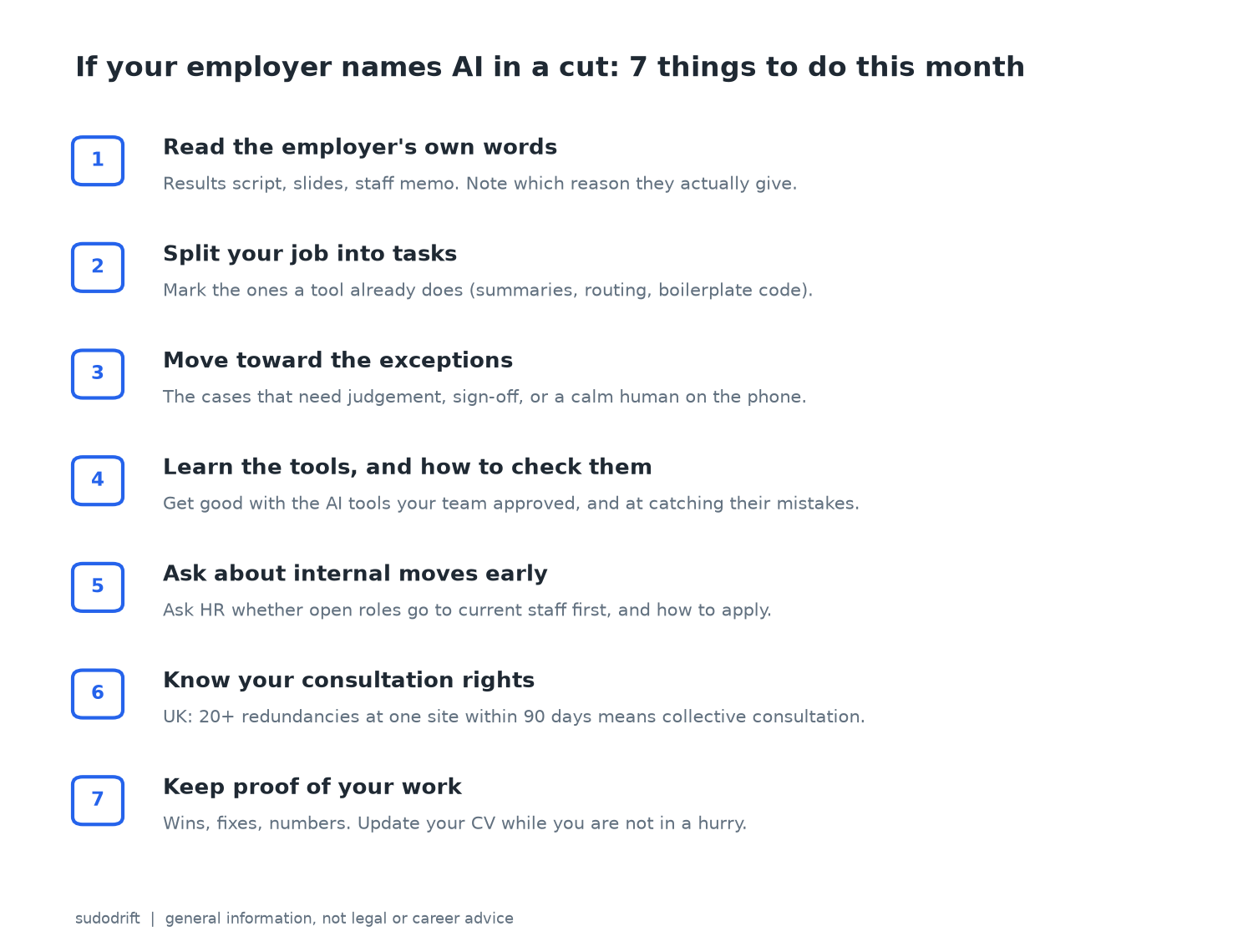
<p><img src="/assets/posts/barclays-ai-job-cuts-what-they-said/2026-11-05-barclays-ai-job-cuts-what-they-said-checklist.png" alt="Checklist: seven things to do this month if your employer names AI in a cut. Read the employer's own words. Split your job into tasks. Move toward the exceptions. Learn the tools and how to check them. Ask about internal moves early. Know your consultation rights. Keep proof of your work." /></p>

<p>I work in IT. I am not a career coach and this is not legal advice. But this is what I would actually do this month.</p>

<ol>
  <li>
    <p>Read the source, not the headline. Most listed companies publish their results script and slides. Search them for “efficiency”, “FTE” and “AI”. Note which reason they give for which cut. It tells you whether your team is in the “tech does the work” pile or the “cost target” pile.</p>
  </li>
  <li>
    <p>Break your job into tasks. Write down what you do in a week. Mark the parts a tool already does or could do soon: summarising calls, routing tickets, writing boilerplate code, filling standard forms. Be honest. Those tasks are where the headcount maths happens.</p>
  </li>
  <li>
    <p>Move toward the exceptions. The work that stays with people tends to be the messy part. The angry customer whose case does not fit the script. The payment that failed for a strange reason. The change that needs someone to sign off and own the outcome. Barclays itself says branch staff are now focused on higher value support. If you can be the person who handles what the tool cannot, you are harder to cut.</p>
  </li>
  <li>
    <p>Learn the tools your team is already using. If AI is making the developers who stay more productive, you want to be one of them. That means getting good with the coding assistant your company approved, and also getting good at checking its output. Someone has to catch the bug it wrote.</p>
  </li>
  <li>
    <p>Ask about internal moves now, not after the letter. According to Bloomberg, as reported by Banking Dive, Barclays told staff it would put about £150m into skills by 2030 and fill open jobs with existing staff first. Whatever your employer, ask HR how internal moves work and how to apply before cuts are final.</p>
  </li>
  <li>
    <p>Know your consultation rights. In the UK, an employer planning 20 or more redundancies at one site within 90 days must follow collective consultation rules, and must give written reasons and selection criteria to staff representatives (<a href="https://www.gov.uk/staff-redundant/redundancy-consultations">GOV.UK</a>). If you are in a union, talk to your rep. Outside the UK the rules differ, so check your own country’s labour office.</p>
  </li>
  <li>
    <p>Keep proof of your work. Save numbers on what you fixed, sped up or saved. Update your CV while you are calm, not in a panic the week the list comes out.</p>
  </li>
</ol>

<h2 id="my-take">My take</h2>

<p>I think the honest reading of the Barclays news is this. AI is real and it is already changing how many developers and call centre staff a big bank thinks it needs. But a large part of this cut looks like a normal cost programme at a profitable bank, and “AI” is the word that travels best in a headline. Today’s Challenger report shows US companies are now quieter about naming AI, even while technology companies keep cutting.</p>

<p>For workers, both stories end in the same place. The tasks that are routine and easy to measure are the ones at risk, whatever label the company puts on the cut. The skills that still hold are judgement on the hard cases, owning a result, knowing how your systems really work, and being the person who checks what the tool produced. I would rather build those now than wait to find out which pile my job is in.</p>

<p>Want one short email a week on breaches, AI and what to do about them? Subscribe to Weekly Breach Notes at weeklybreachnotes.substack.com.</p>

<h2 id="sources">Sources</h2>

<ul>
  <li>Barclays, Q3 2026 Results Analyst and Investor Conference Call Speech (with slides), Oct 22, 2026: https://home.barclays/content/dam/home-barclays/documents/investor-relations/ResultAnnouncements/Q32026Results/Q326%20Results%20Call%20Management%20Speech.pdf</li>
  <li>BBC News, “Barclays cutting 5,000 jobs as it increases reliance on AI,” Oct 22, 2026: https://www.bbc.co.uk/news/articles/cm4g1p347qgxo</li>
  <li>Banking Dive, “Barclays to cut 5,000 employees this year,” Oct 22, 2026: https://www.bankingdive.com/news/barclays-cut-5000-employees-ai-q3-earnings-venkat/833747/</li>
  <li>CNBC, “Barclays to slash 5,000 jobs in AI efficiency push,” Oct 22, 2026: https://www.cnbc.com/2026/10/22/barclays-ai-jobs-cuts.html</li>
  <li>The Guardian, “Barclays to cut 5,000 jobs as bank’s bosses hail AI productivity advances,” Oct 22, 2026: https://www.theguardian.com/business/2026/oct/22/barclays-profits-up-as-uk-banks-brace-for-tax-increase-in-budget</li>
  <li>UNI Global Union, “UNI backs Unite as Barclays cuts 5,000 jobs and hands shareholders £500 million,” Oct 23, 2026: https://uniglobalunion.org/news/uni-backs-unite-as-barclays-cuts-5000-jobs-and-hands-shareholders-500-million/</li>
  <li>City AM, “Barclays and Natwest layoffs signal start of banking’s AI job squeeze,” Nov 3, 2026: https://www.cityam.com/barclays-and-natwest-layoffs-signal-start-of-bankings-ai-job-squeeze/</li>
  <li>Challenger, Gray &amp; Christmas, “October Layoffs at Three-Year Low; Seasonal Hiring Plans Up 26%,” Nov 5, 2026: https://www.challengergray.com/blog/october-layoffs-at-three-year-low-seasonal-hiring-plans-up-26/ (full report PDF: https://www.challengergray.com/wp-content/uploads/2026/11/Challenger-Report-October-2026.pdf)</li>
  <li>Office for National Statistics, “Artificial intelligence in UK businesses: 2023 to 2026,” Jul 20, 2026: https://www.ons.gov.uk/businessindustryandtrade/business/businessservices/articles/artificialintelligenceinukbusinesses/2023to2026</li>
  <li>GOV.UK, “Making staff redundant: Redundancy consultations”: https://www.gov.uk/staff-redundant/redundancy-consultations</li>
</ul>]]></content><author><name>sudodrift</name></author><category term="ai" /><category term="jobs" /><category term="layoffs" /><category term="banking" /><category term="careers" /><summary type="html"><![CDATA[The bank's own call script tells two stories at once. Today's US layoff numbers help explain why that matters.]]></summary><media:thumbnail xmlns:media="http://search.yahoo.com/mrss/" url="https://sudodrift.github.io/assets/posts/barclays-ai-job-cuts-what-they-said/2026-11-05-barclays-ai-job-cuts-what-they-said-two-stories.png" /><media:content medium="image" url="https://sudodrift.github.io/assets/posts/barclays-ai-job-cuts-what-they-said/2026-11-05-barclays-ai-job-cuts-what-they-said-two-stories.png" xmlns:media="http://search.yahoo.com/mrss/" /></entry><entry><title type="html">CISA Says Assume Your Cold Storage Is a Target. Here’s How to Check Today.</title><link href="https://sudodrift.github.io/posts/cisa-freezer-cold-chain-check/" rel="alternate" type="text/html" title="CISA Says Assume Your Cold Storage Is a Target. Here’s How to Check Today." /><published>2026-11-05T00:00:00-05:00</published><updated>2026-11-05T00:00:00-05:00</updated><id>https://sudodrift.github.io/posts/cisa-freezer-cold-chain-check</id><content type="html" xml:base="https://sudodrift.github.io/posts/cisa-freezer-cold-chain-check/"><![CDATA[<p>Today the US put it in writing. CISA, the FBI, HHS, USDA and the Department of Transportation published a joint cybersecurity advisory about industrial refrigeration and cold chain monitoring systems. Their line is blunt: every organisation that depends on these systems should assume it could be a target (<a href="https://www.ic3.gov/CSA/2026/261105.pdf">CSA PDF</a>, <a href="https://techcrunch.com/2026/11/05/u-s-government-warns-of-ongoing-cyber-threat-amid-mass-hacks-of-industrial-retail-and-military-freezers/">TechCrunch</a>, <a href="https://www.cnbc.com/2026/11/05/us-warns-of-ongoing-cyber-threat-to-industrial-refrigeration-systems.html">CNBC</a>).</p>

<p>I work in endpoint and infrastructure security, not supermarket refrigeration. But I have spent enough years watching control panels land on the public internet to recognise the pattern. Someone leaves a temperature controller reachable. Someone leaves a default password. Someone never patches an end-of-life panel. Then an attacker turns the dial.</p>

<p>If you run grocery cold rooms, a blood bank fridge, a pharma warehouse, a refrigerated truck fleet, or the network those devices sit on, today is the day to check. Not next quarter.</p>

<h2 id="what-happened-in-order">What happened, in order</h2>

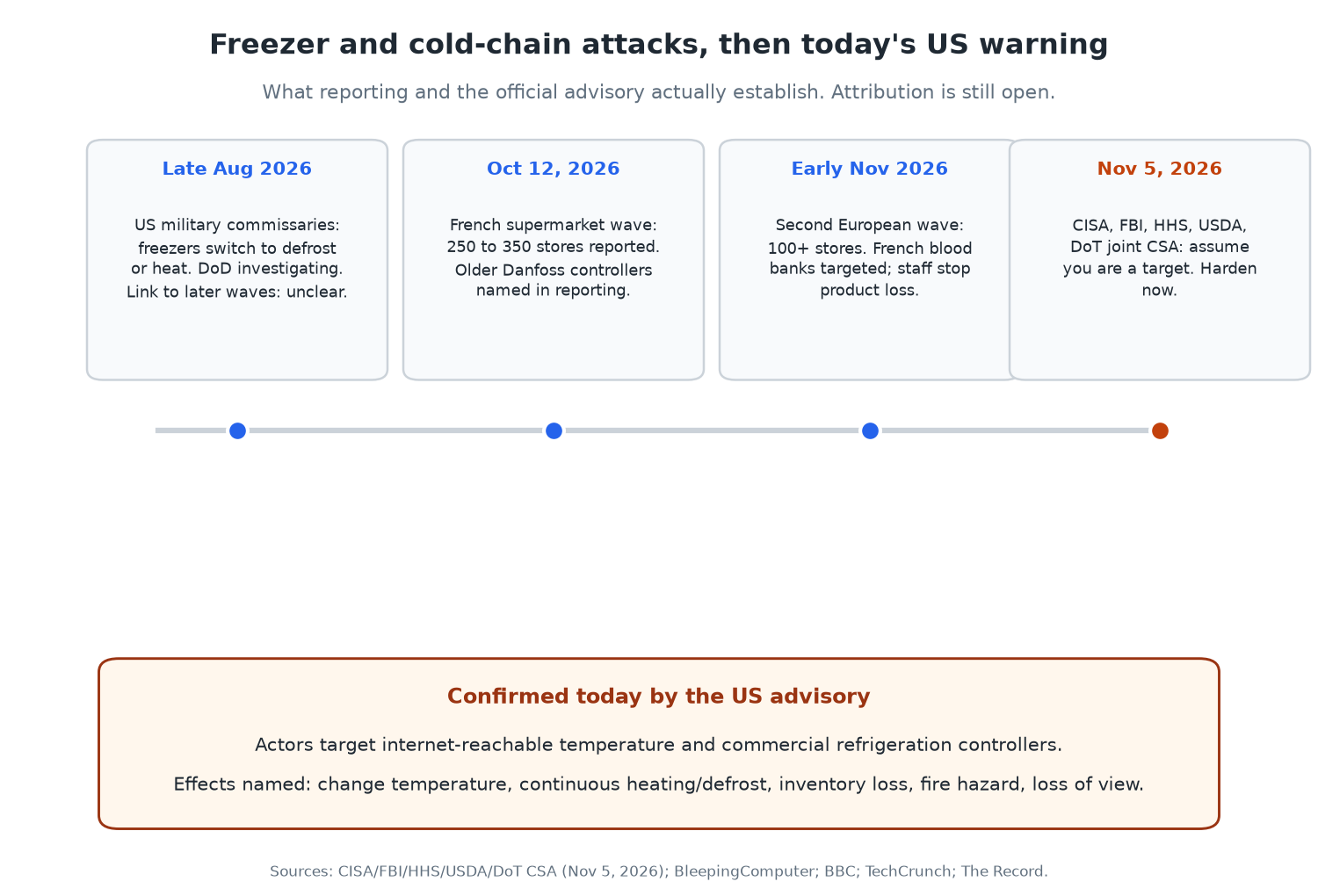
<p><img src="/assets/posts/cisa-freezer-cold-chain-check/2026-11-05-cisa-freezer-cold-chain-check-timeline.png" alt="Timeline of freezer and cold-chain attacks from late August 2026 through the November 5 US multi-agency advisory" /></p>

<p>The advisory sits on top of several public waves:</p>

<ul>
  <li><strong>Late August 2026.</strong> Freezers at US military commissaries switched into defrost or heating modes. The Defence Department is treating those incidents as a suspected cyberattack. The CSA does not say those events are part of the same campaign, and reporting still treats the link as unclear (<a href="https://www.militarytimes.com/pentagon/2026/10/29/pentagon-treating-military-base-freezer-malfunctions-as-suspected-cyberattack-officials-say/">Military Times</a>, <a href="https://therecord.media/cyberattacks-refrigeration-cisa-fbi">The Record</a>).</li>
  <li><strong>October 12, 2026.</strong> A wave against French supermarket refrigeration overnight. Reporting put the hit at about 250 to 350 stores across chains including Intermarché, Coopérative U, Carrefour Market, Monoprix, Leclerc and Super U. Older Danfoss controllers were named in that coverage. Paris prosecutors opened an investigation that included food losses and fires (<a href="https://www.bleepingcomputer.com/news/security/cyberattack-shuts-down-refrigerators-at-french-supermarkets/">BleepingComputer</a>).</li>
  <li><strong>Early November 2026.</strong> A second European wave hit more than 100 stores, per CNBC. Separately, the French Blood Establishment said cold rooms storing donated blood were targeted and temperatures were set to rise. Staff intervened. The EFS said no blood products were lost and no health impact was identified (<a href="https://www.bbc.co.uk/news/articles/c8vgxyvz6y9ro">BBC</a>, <a href="https://www.cnbc.com/2026/11/05/us-warns-of-ongoing-cyber-threat-to-industrial-refrigeration-systems.html">CNBC</a>).</li>
  <li><strong>November 5, 2026.</strong> The five US agencies publish the CSA and call the threat ongoing.</li>
</ul>

<p>Attribution is still open. Some Russian-linked hacktivist groups claimed related activity online. Analysts quoted by the BBC are sceptical of those claims, and Iranian-aligned actors, other groups, or copycats have also been discussed. The US advisory does not name a country or group. I am not going to either.</p>

<h2 id="what-the-us-advisory-actually-confirms">What the US advisory actually confirms</h2>

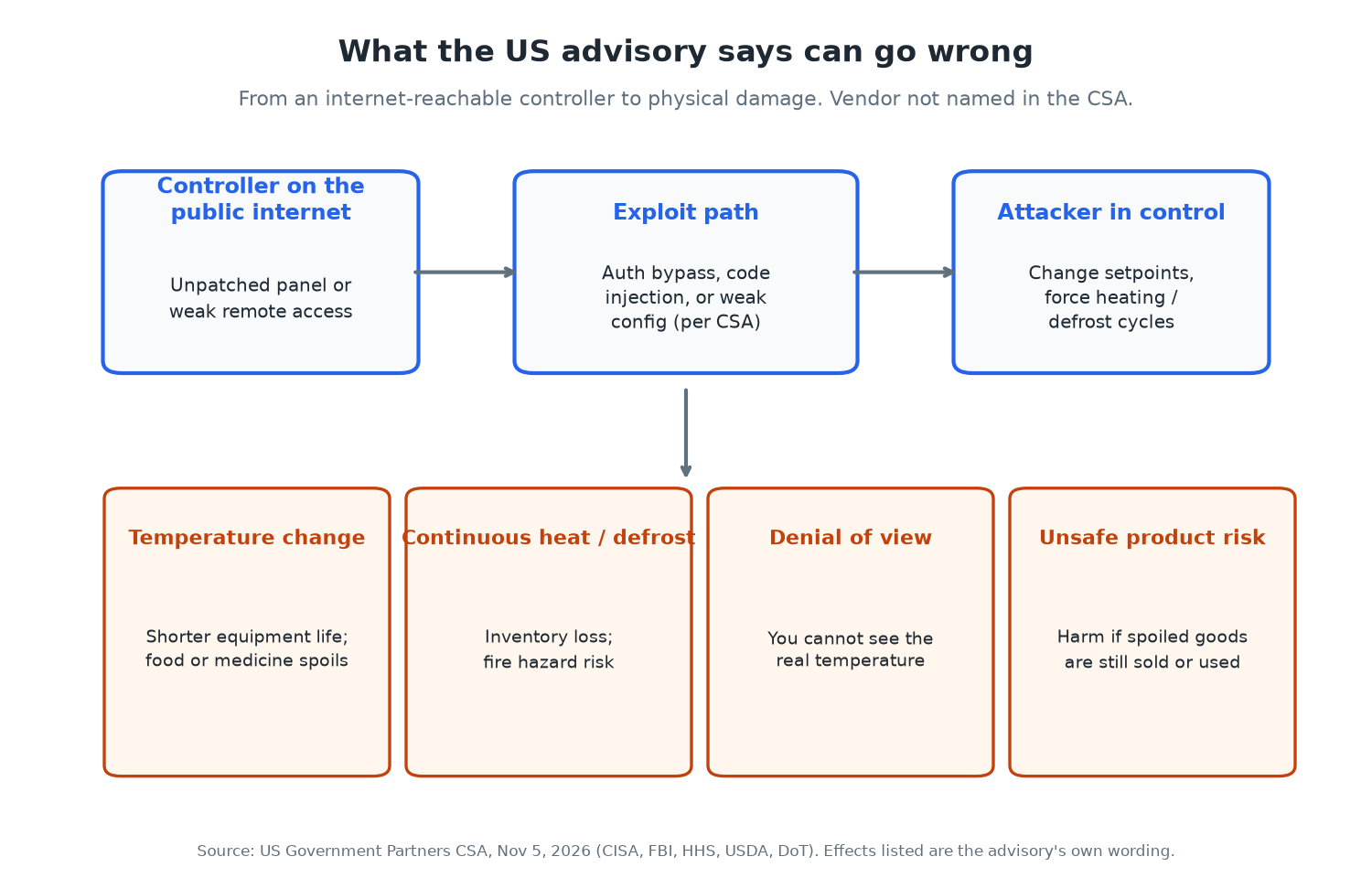
<p><img src="/assets/posts/cisa-freezer-cold-chain-check/2026-11-05-cisa-freezer-cold-chain-check-effects.png" alt="Flow diagram: internet-reachable controller, exploit path, attacker control, then temperature change, continuous heat or defrost, denial of view, and unsafe product risk" /></p>

<p>I read the CSA itself, not just the headlines. Here is what it states.</p>

<p><strong>Targets.</strong> Electronic temperature controllers and commercial refrigeration controllers in retail grocery and cold storage. The same class of systems is widely used in healthcare and public health, chemical, food and agriculture, and transportation, including refrigerated transport.</p>

<p><strong>How.</strong> Actors may exploit unpatched or internet-accessible controllers. The named vectors are authentication bypass, arbitrary code injection, and weak configurations.</p>

<p><strong>Effects if they get in.</strong></p>
<ul>
  <li>Change the temperature (shorter equipment life, fire hazard, inventory loss, or harm if unsafe product is later consumed).</li>
  <li>Force continuous heating and defrost cycles.</li>
  <li>Deny operators a view of the real temperature.</li>
</ul>

<p><strong>What it does not say.</strong> It does not name a vendor. It does not publish victim counts. It does not attribute the attacks. It does not claim the US military commissary incidents are confirmed as the same actors.</p>

<p>That gap matters. European reporting named older Danfoss controllers for the French supermarket wave, and CISA has previously published Danfoss AK-SM 8xxA advisories (CVE-2025-41450, CVE-2025-41451). Today’s CSA is vendor-agnostic on purpose. Treat every internet-reachable cold-chain controller as in scope until you prove otherwise.</p>

<h2 id="who-this-affects">Who this affects</h2>

<ul>
  <li>Grocery and convenience operators with remote refrigeration management.</li>
  <li>Cold storage warehouses and food distributors.</li>
  <li>Hospitals, blood banks, labs and anyone storing temperature-sensitive medicine or samples.</li>
  <li>Chemical and transport firms that rely on automated cold chain logging.</li>
  <li>The IT and OT people who keep those panels reachable for “convenience.”</li>
</ul>

<p>If you are a shopper, you are not the direct target. You are the person who ends up staring at empty frozen shelves or, worse, buying product that spent hours warm. The fix still sits with the operators.</p>

<h2 id="how-to-check-if-you-are-exposed-and-what-to-do">How to check if you are exposed, and what to do</h2>

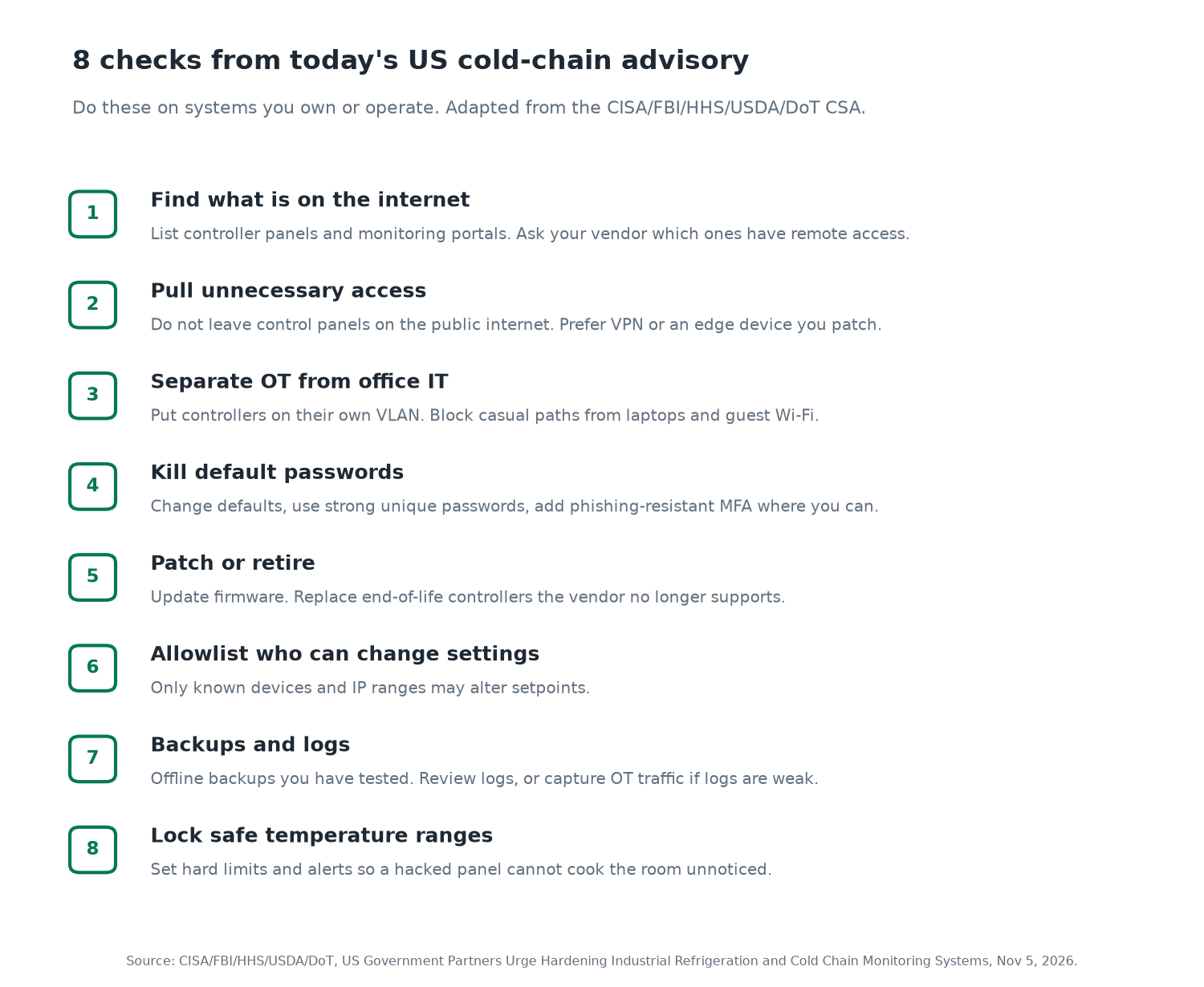
<p><img src="/assets/posts/cisa-freezer-cold-chain-check/2026-11-05-cisa-freezer-cold-chain-check-checklist.png" alt="Eight numbered checks from the US cold-chain advisory: find internet exposure, pull unnecessary access, separate OT, kill default passwords, patch or retire, allowlist changes, backups and logs, lock safe temperature ranges" /></p>

<p>The CSA’s mitigations map to Cross-Sector Cybersecurity Performance Goals. Here is how I would run them on a real site this afternoon. These are checks on systems you own or operate. Do not scan someone else’s gear.</p>

<h3 id="1-inventory-what-can-talk-to-the-internet">1. Inventory what can talk to the internet</h3>

<p>Walk the store, warehouse or plant with whoever maintains the fridges. Write down every temperature controller, gateway, BMS panel and cloud monitoring portal. Ask the refrigeration vendor, in writing, which devices have remote access and how that access is reached (VPN, cellular modem, direct port forward, vendor portal).</p>

<p>If you have a public IP inventory, search it for the controller ports and hostnames your vendor uses. Shodan and similar indexes have been used in reporting to show thousands of Danfoss-class devices reachable from the open internet. Use those tools only against addresses you control.</p>

<h3 id="2-pull-panels-off-the-public-internet">2. Pull panels off the public internet</h3>

<p>The CSA’s first mitigation is the important one: do not expose control system devices, especially controller panels, to the internet. If remote support is required, put it behind a firewall or edge device you keep patched. CISA’s own Internet Exposure Reduction and Defend the Edge guidance are linked from the advisory.</p>

<p>A quick self-check from a machine on your office network is not enough. Confirm from outside your network, or ask your ISP or MSP to show you inbound listeners on the controller IPs.</p>

<h3 id="3-separate-ot-from-office-it">3. Separate OT from office IT</h3>

<p>Put controllers on a dedicated OT VLAN. Block casual paths from staff laptops, guest Wi-Fi and the point-of-sale network. The goal is simple: a phishing email on a cashier PC should not be one hop from the freezer setpoints.</p>

<h3 id="4-kill-default-passwords-and-add-mfa">4. Kill default passwords and add MFA</h3>

<p>Change every default. Use unique, strong passwords. Turn on phishing-resistant multifactor authentication wherever the controller or the jump host supports it. If the panel cannot do MFA, put MFA on the VPN or bastion in front of it and stop exposing the panel itself.</p>

<h3 id="5-patch-or-retire-what-the-vendor-abandoned">5. Patch, or retire what the vendor abandoned</h3>

<p>Update firmware. Build a short list of end-of-life controllers and schedule replacement. Unsupported panels with known remote flaws are exactly what the European supermarket reporting described. CISA’s BOD guidance on prioritising updates and end-of-support edge devices is cited in the CSA for a reason.</p>

<h3 id="6-allowlist-who-may-change-settings">6. Allowlist who may change settings</h3>

<p>Only known devices and IP ranges should be able to alter setpoints. If your vendor needs remote access for a service call, open it for that window, then close it.</p>

<h3 id="7-backups-and-visibility">7. Backups and visibility</h3>

<p>Keep current backups offsite and offline, and test a restore. Enable logging and review it. Where OT logs are useless, capture the network traffic between the controllers and their management hosts instead. You cannot respond to a denial-of-view attack if you never had a second way to see the temperature.</p>

<h3 id="8-lock-safe-ranges-and-alerts">8. Lock safe ranges and alerts</h3>

<p>Define hard setpoint limits so a compromised panel cannot drive a room to cooking temperatures without an alarm. Alert on deviations. Have a human procedure for “the monitoring portal looks fine but the walk-in feels warm,” because denial of view is on the CSA’s effect list.</p>

<h3 id="commands-i-would-actually-run-on-my-own-gear">Commands I would actually run (on my own gear)</h3>

<p>These are examples for a Linux jump host that reaches your controller VLAN. Adjust to your environment. Do not point them at systems you do not own.</p>

<div class="language-bash highlighter-rouge"><div class="highlight"><pre class="highlight"><code><span class="c"># From an external vantage you control: which of YOUR public IPs answer on common management ports?</span>
<span class="k">for </span>ip <span class="k">in </span>203.0.113.10 203.0.113.11<span class="p">;</span> <span class="k">do
  for </span>p <span class="k">in </span>80 443 8080 8443 502 2222<span class="p">;</span> <span class="k">do
    </span><span class="nb">timeout </span>2 bash <span class="nt">-c</span> <span class="s2">"echo &gt;/dev/tcp/</span><span class="nv">$ip</span><span class="s2">/</span><span class="nv">$p</span><span class="s2">"</span> 2&gt;/dev/null <span class="se">\</span>
      <span class="o">&amp;&amp;</span> <span class="nb">echo</span> <span class="s2">"OPEN </span><span class="nv">$ip</span><span class="s2">:</span><span class="nv">$p</span><span class="s2">"</span>
  <span class="k">done
done</span>
</code></pre></div></div>

<div class="language-bash highlighter-rouge"><div class="highlight"><pre class="highlight"><code><span class="c"># On the OT jump host: what is listening locally, and what routes reach the controller subnet?</span>
ss <span class="nt">-tulpn</span>
ip route | <span class="nb">grep</span> <span class="nt">-E</span> <span class="s1">'10\.|172\.|192\.168\.'</span>
</code></pre></div></div>

<div class="language-bash highlighter-rouge"><div class="highlight"><pre class="highlight"><code><span class="c"># After you change passwords and firmware, record the evidence for your change ticket</span>
<span class="nb">date</span> <span class="nt">-u</span>
<span class="nb">echo</span> <span class="s2">"controller: WALK-IN-3"</span>
<span class="nb">echo</span> <span class="s2">"firmware_before: &lt;fill&gt;"</span>
<span class="nb">echo</span> <span class="s2">"firmware_after:  &lt;fill&gt;"</span>
<span class="nb">echo</span> <span class="s2">"default_password_removed: yes"</span>
<span class="nb">echo</span> <span class="s2">"remote_access: vpn-only"</span>
</code></pre></div></div>

<p>If something looks wrong, the CSA says US organisations should contact CISA at contact@cisa.dhs.gov or 1-844-729-2472, file with the FBI through IC3, and for healthcare supply impacts use HHSCyber@hhs.gov or the HHS operations centre.</p>

<h2 id="confirmed-versus-unknown">Confirmed versus unknown</h2>

<p><strong>Confirmed today, from the CSA:</strong></p>
<ul>
  <li>Five US agencies judge the threat to industrial refrigeration and cold chain monitoring to be real and ongoing.</li>
  <li>Internet-accessible or unpatched controllers are the entry they care about.</li>
  <li>Effects include temperature change, continuous heating or defrost, inventory loss, fire hazard, and loss of monitoring view.</li>
  <li>Recommended actions are exposure reduction, OT isolation, credential hygiene, patching, allowlisting, backups, logging and setpoint limits.</li>
</ul>

<p><strong>Confirmed from separate reporting, not from the CSA text:</strong></p>
<ul>
  <li>French supermarket wave around Oct 12 with roughly 250 to 350 stores named in coverage.</li>
  <li>Older Danfoss controllers named in that French wave.</li>
  <li>French blood bank cold rooms targeted; staff prevented product loss.</li>
  <li>US military commissary freezer anomalies under investigation.</li>
</ul>

<p><strong>Still unknown:</strong></p>
<ul>
  <li>Who is behind which wave, and whether the waves are one campaign or several.</li>
  <li>Exact US victim counts for commercial sites.</li>
  <li>Whether every vendor class beyond the ones named in European reporting is affected the same way.</li>
</ul>

<h2 id="my-take">My take</h2>

<p>I keep seeing the same OT mistake. A device that should only talk to a technician on site gets a public IP so someone can “check it from home.” That convenience is how you turn a fridge into a remote-controlled oven.</p>

<p>Today’s advisory is useful because it skips the drama and lists the boring fixes. Pull the panel off the internet. Patch or replace it. Separate the network. Lock the setpoints. If you do those four this week, you have already done more than most of the sites that made the news.</p>

<p>Want one short email a week on breaches, AI and what to do about them? Subscribe to Weekly Breach Notes at weeklybreachnotes.substack.com.</p>

<h2 id="sources">Sources</h2>

<ul>
  <li>CISA, FBI, HHS, USDA, DoT, “US Government Partners Urge Hardening Industrial Refrigeration and Cold Chain Monitoring Systems,” Nov 5, 2026: https://www.ic3.gov/CSA/2026/261105.pdf</li>
  <li>TechCrunch, “US government warns of ‘ongoing cyber threat’ amid mass hacks of industrial retail and military freezers,” Nov 5, 2026: https://techcrunch.com/2026/11/05/u-s-government-warns-of-ongoing-cyber-threat-amid-mass-hacks-of-industrial-retail-and-military-freezers/</li>
  <li>CNBC, “U.S. warns of ‘ongoing cyber threat’ to industrial refrigeration systems,” Nov 5, 2026: https://www.cnbc.com/2026/11/05/us-warns-of-ongoing-cyber-threat-to-industrial-refrigeration-systems.html</li>
  <li>The Record, “Harden cooling systems now, feds warn critical infrastructure operators amid attacks,” Nov 5, 2026: https://therecord.media/cyberattacks-refrigeration-cisa-fbi</li>
  <li>BleepingComputer, “Cyberattack shuts down refrigerators at French supermarkets,” Oct 12, 2026: https://www.bleepingcomputer.com/news/security/cyberattack-shuts-down-refrigerators-at-french-supermarkets/</li>
  <li>BBC News, “French blood storage impacted by freezer hacks as theories swirl about culprits,” Nov 4, 2026: https://www.bbc.co.uk/news/articles/c8vgxyvz6y9ro</li>
  <li>Military Times, “Pentagon treating military base freezer malfunctions as suspected cyberattack,” Oct 29, 2026: https://www.militarytimes.com/pentagon/2026/10/29/pentagon-treating-military-base-freezer-malfunctions-as-suspected-cyberattack-officials-say/</li>
</ul>

<h2 id="image-alt-text">Image alt text</h2>

<ul>
  <li>Timeline: “Timeline of freezer and cold-chain attacks from late August 2026 through the November 5 US multi-agency advisory. Late Aug: US military commissaries. Oct 12: French supermarket wave, 250 to 350 stores, older Danfoss controllers named in reporting. Early Nov: second European wave and French blood banks with no product loss. Nov 5: CISA, FBI, HHS, USDA, DoT CSA.”</li>
  <li>Effects: “Flow diagram: internet-reachable controller, then exploit path (auth bypass, code injection, or weak config), then attacker control. Effects: temperature change, continuous heat or defrost, denial of view, unsafe product risk. Source: Nov 5 CSA.”</li>
  <li>Checklist: “Eight numbered checks from the US cold-chain advisory: find internet exposure, pull unnecessary access, separate OT, kill default passwords, patch or retire, allowlist changes, backups and logs, lock safe temperature ranges.”</li>
</ul>]]></content><author><name>sudodrift</name></author><category term="OT" /><category term="Cold Chain" /><category term="CISA" /><category term="Freezers" /><category term="Critical Infrastructure" /><summary type="html"><![CDATA[A same-day US advisory after supermarket freezers, military commissaries and blood banks were hit. Confirmed facts, open questions, and the eight checks operators should run.]]></summary><media:thumbnail xmlns:media="http://search.yahoo.com/mrss/" url="https://sudodrift.github.io/assets/posts/cisa-freezer-cold-chain-check/2026-11-05-cisa-freezer-cold-chain-check-timeline.png" /><media:content medium="image" url="https://sudodrift.github.io/assets/posts/cisa-freezer-cold-chain-check/2026-11-05-cisa-freezer-cold-chain-check-timeline.png" xmlns:media="http://search.yahoo.com/mrss/" /></entry><entry><title type="html">A vendor app made itself Global Admin in five minutes. Here’s how to check your tenant.</title><link href="https://sudodrift.github.io/posts/vendor-app-global-admin/" rel="alternate" type="text/html" title="A vendor app made itself Global Admin in five minutes. Here’s how to check your tenant." /><published>2026-11-05T00:00:00-05:00</published><updated>2026-11-05T00:00:00-05:00</updated><id>https://sudodrift.github.io/posts/vendor-app-global-admin</id><content type="html" xml:base="https://sudodrift.github.io/posts/vendor-app-global-admin/"><![CDATA[<p><em>By sudodrift</em></p>

<p>Every Microsoft 365 tenant I’ve ever looked after has a few apps in it that nobody remembers adding. A backup service. A migration tool from three years ago. Something a reseller set up. They all got admin consent once, and nobody has looked at them since.</p>

<p>In the middle of October, one of those quiet apps woke up in other people’s tenants and started doing admin work. Microsoft now says an AI agent framework was driving it. I want to walk through what’s confirmed, what isn’t, and then the part I actually care about: how to check your own tenant, even if you’ve never used ConnectWise.</p>

<h2 id="what-happened">What happened</h2>

<p>ConnectWise Cloud Backup, which used to be called SkyKick, is a backup service that MSPs use for their clients’ Microsoft 365 data. To back up mail, OneDrive, SharePoint and Teams, its app gets broad read and write access in every tenant where it’s installed.</p>

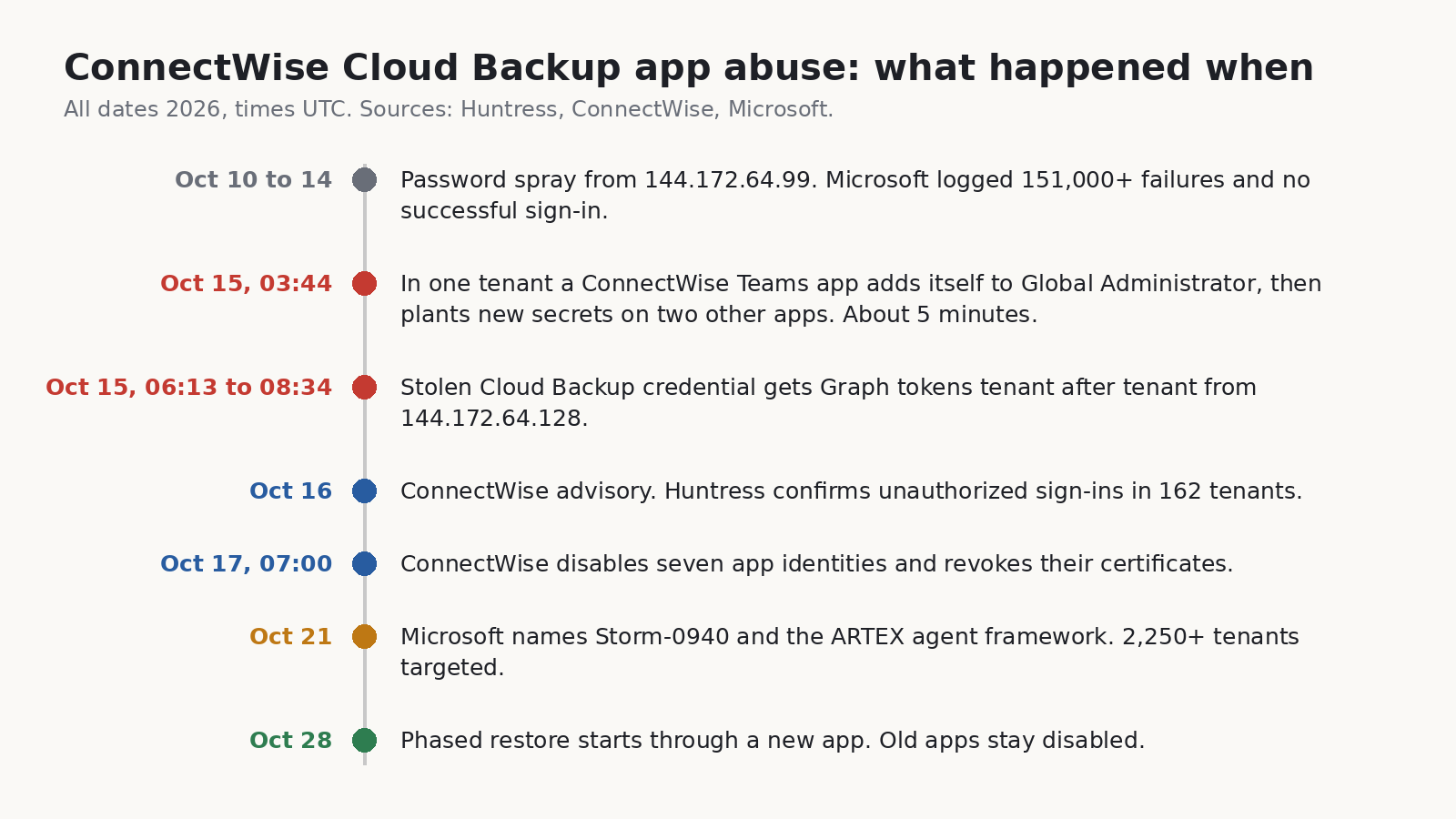
<p>On October 15, a credential belonging to that app was used from a hosting provider address (144.172.64.128) to get Microsoft Graph tokens in customer tenants. Huntress spotted it and published on October 16. By that evening they had confirmed unauthorized sign-ins in 162 tenants they could see. The credential type matters here: it was a client assertion, which is held on the vendor’s side. No setting in a customer tenant could have caused that or blocked it (<a href="https://www.huntress.com/blog/vendor-credential-enables-unauthorized-access">Huntress, Oct 16</a>).</p>

<p>The part that made me sit up was one tenant in Huntress’s write-up. There, a second ConnectWise app, the Cloud Management app for Microsoft Teams, put itself into the Global Administrator role. Then a Python script added fresh client secrets to two other apps in the same tenant, one of them Huntress’s own security app. The new secrets were good until 2028. The whole thing took about five minutes, starting at 03:44 UTC. A few days later Huntress found the same pattern in a second tenant, run 47 seconds after the first.</p>

<p>ConnectWise disabled seven of its app identities at 07:00 UTC on October 17 and revoked the certificates behind them. Its own advisory is careful to say that this stops new sign-ins through those apps but does not undo anything already changed inside a customer tenant (<a href="https://www.connectwise.com/company/trust/advisories">ConnectWise Trust Center</a>). On October 28 it started a phased restore through a new app, “ConnectWise Cloud Backup for M365”, that partners have to authorize tenant by tenant. By its November 4 update most features were back, and the old apps are meant to stay off.</p>

<p><img src="/assets/posts/vendor-app-global-admin/2026-11-02-vendor-app-global-admin-timeline.png" alt="Timeline of the ConnectWise Cloud Backup app abuse from the October 10 password spray to the October 28 start of the phased restore, all times UTC" /></p>

<h2 id="the-ai-part">The AI part</h2>

<p>On October 21, Microsoft put a name on it. It says a China-aligned group it tracks as Storm-0940 was behind the ConnectWise compromise, and that the group has been using ARTEX, an open-source framework where LLM agents run a penetration test from recon to data theft with little human input. Microsoft says the agents tried to sign in to more than 2,250 tenants with the stolen app access. Across the wider ARTEX campaign, it says there were multiple cases where the time from first targeting to privileged cloud access was under three hours (<a href="https://www.microsoft.com/en-us/security/blog/2026/10/21/storm-0940-uses-artex-agentic-ai-connectwise-supply-chain-compromise/">Microsoft Security blog</a>).</p>

<p>Microsoft also tied an earlier password spray (October 10 to 14, from 144.172.64.99) to the same group. That spray went after 327 accounts at eight organizations, logged more than 151,000 failed sign-ins and, by Microsoft’s count, zero successes. So the passwords weren’t what worked. The stolen app trust was.</p>

<p>Huntress did something I appreciated. They went back through their own logs and asked whether it actually looked like an agent (<a href="https://www.huntress.com/blog/connectwise-attack-ai">Huntress, Oct 26</a>). Their answer was careful. They saw plain scripts doing most of the work, plus something that changed the tooling between runs in under a minute. After a certificate upload failed, the next run 55 seconds later had retry logic that wasn’t there before. That fits an agent loop. It also fits a quick human. On their telemetry alone they put the chance an LLM was involved at low to medium, and medium to high once you add Microsoft’s attribution. They also saw a loop that kept firing for 22 minutes at a service principal that had already been deleted, which is not what you’d expect from something watching its own output.</p>

<p>So here’s where I land, and it’s an opinion, not a finding. The AI label is real enough that I’d take it seriously, but it isn’t what changes your to-do list. The attack was old: steal an app’s credential, use the consent the app already has, make it admin, plant more credentials so you survive the cleanup. What changes is the clock. If the gap from first touch to Global Admin is a few hours, or five minutes inside one tenant, then “we’ll review it Monday” is not a plan. Huntress put it in a line I’d stick on the wall: “detect what the activity does, not how it paces itself.”</p>

<h2 id="what-we-know-and-what-we-dont">What we know and what we don’t</h2>

<p>Confirmed by the companies involved:</p>

<ul>
  <li>A ConnectWise Cloud Backup app credential was used without authorization to get tokens in customer tenants on October 15 (Huntress, ConnectWise).</li>
  <li>In two tenants Huntress reviewed, a ConnectWise Teams app gave itself Global Administrator and new secrets were planted on other apps (Huntress).</li>
  <li>ConnectWise disabled seven app identities on October 17 and says existing backup archives show no sign of compromise (ConnectWise).</li>
  <li>Microsoft attributes the activity to Storm-0940 using ARTEX (Microsoft). Note that this is an intelligence assessment. Huntress says its data lines up with it but can’t confirm it independently.</li>
</ul>

<p>Not confirmed, or not public:</p>

<ul>
  <li>How the attacker got the vendor credential in the first place. ConnectWise says it first spotted a problem on October 14 and that the root cause is still under investigation.</li>
  <li>What data was read. Graph directory reads leave no audit record, and Huntress said none of the victims it knows of had Graph activity logging turned on. “No mailbox changes in the log” is not the same as “nothing taken”.</li>
  <li>The full list of affected tenants. Microsoft’s 2,250 is attempted sign-ins. Huntress only sees its own customers.</li>
</ul>

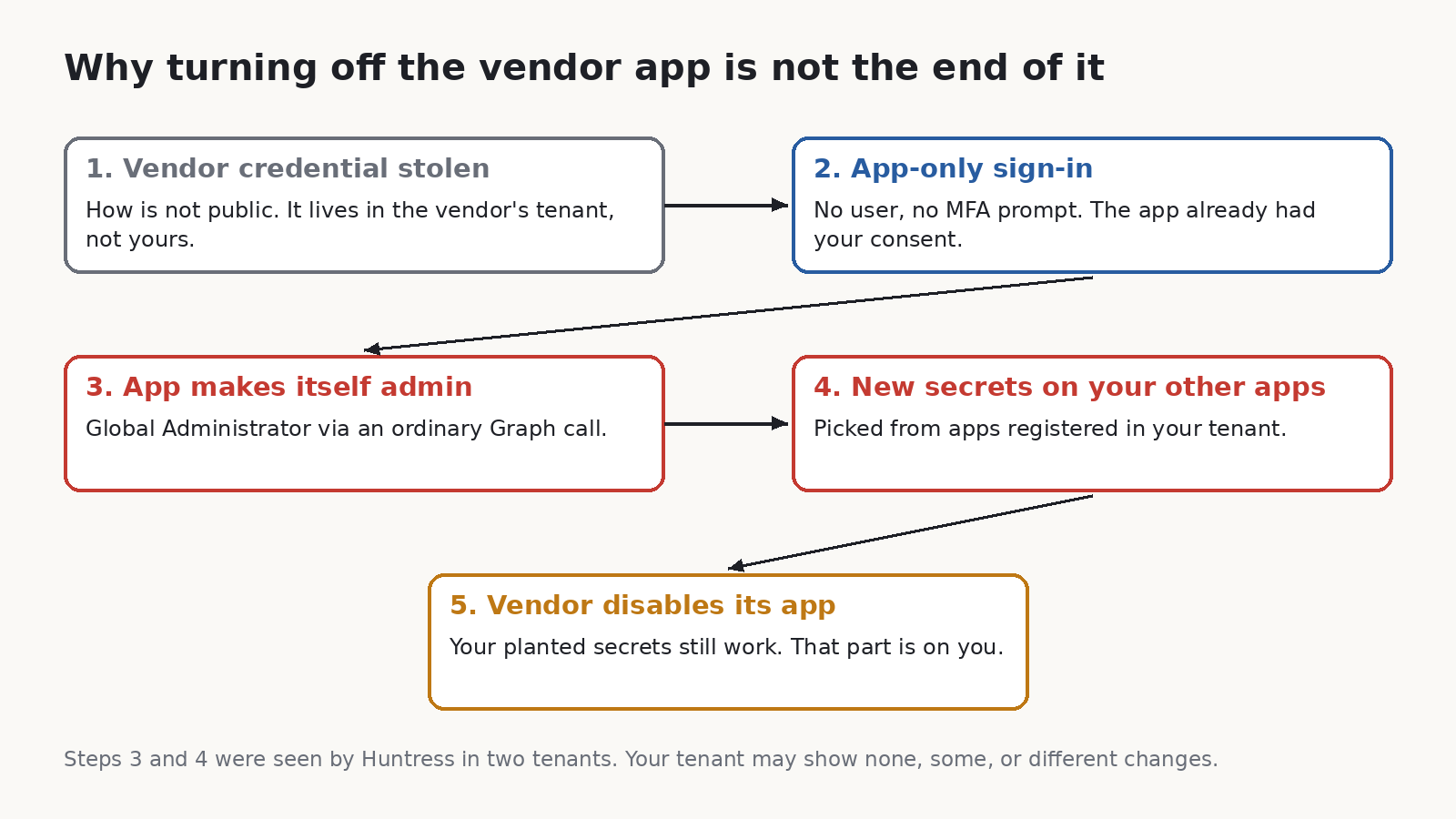
<h2 id="why-switching-off-the-vendor-app-isnt-the-end">Why switching off the vendor app isn’t the end</h2>

<p>This is the bit I’d explain to a manager. When the vendor revokes its credential, the front door closes. But if the attacker already used admin rights to add a secret to one of your other apps, that secret is a separate key. It signs in as that other app, from anywhere, with no user and no MFA prompt. Disabling ConnectWise does nothing to it.</p>

<p><img src="/assets/posts/vendor-app-global-admin/2026-11-02-vendor-app-global-admin-chain.png" alt="Diagram: vendor credential stolen, app-only sign-in, app makes itself admin, new secrets planted on other apps, vendor disables its app but the planted secrets still work" /></p>

<p>That’s why this matters even if you never bought ConnectWise. Any multi-tenant app you’ve consented to with high permissions is the same shape of risk. Backup, migration, compliance, email security, the MSP’s management tool. If you can’t list them right now, that’s the first finding.</p>

<h2 id="check-your-tenant">Check your tenant</h2>

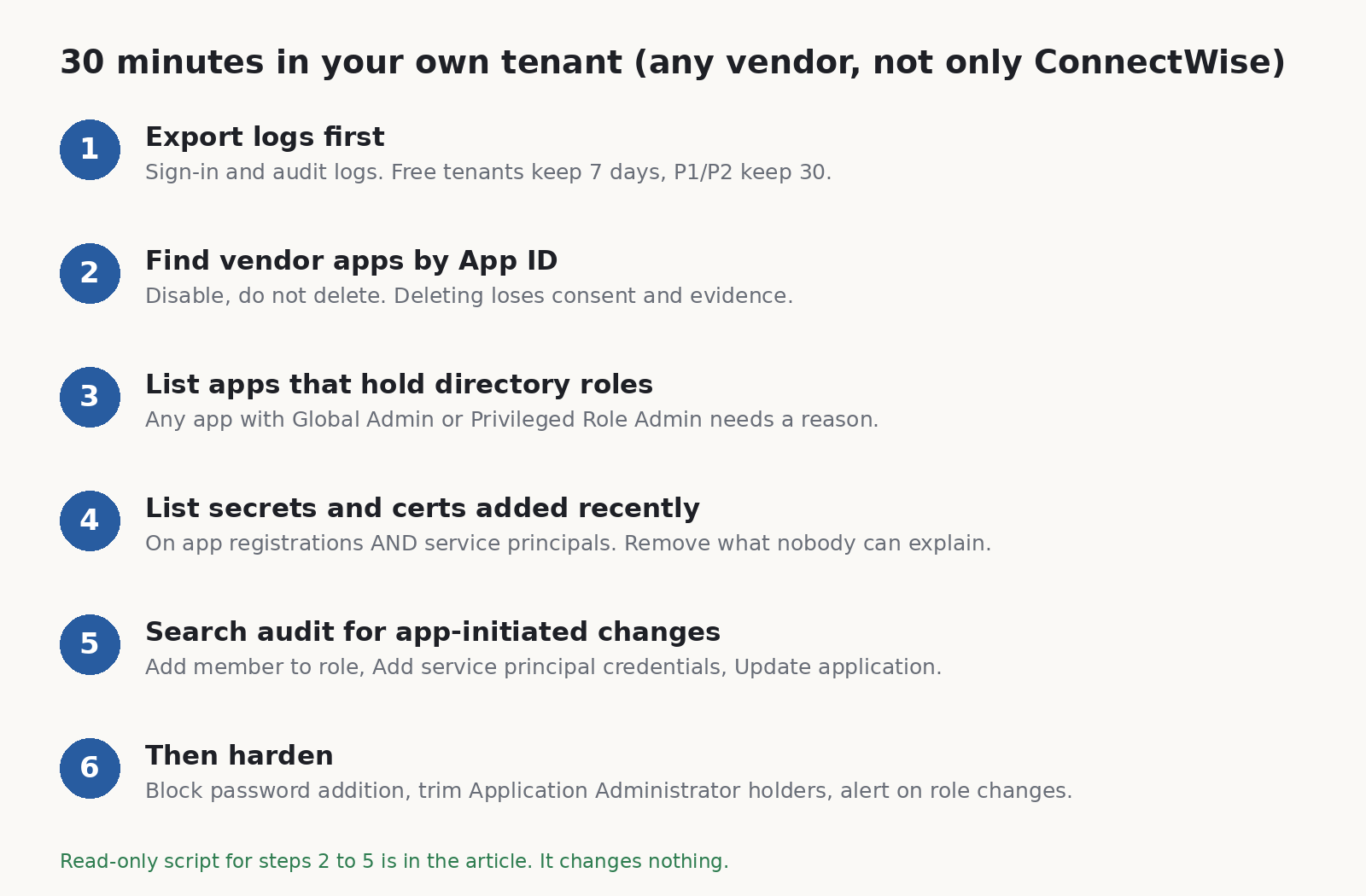
<p>Here’s what I’d do, in this order. I’ve kept it to things a small team can do with the licences they already have.</p>

<p><img src="/assets/posts/vendor-app-global-admin/2026-11-02-vendor-app-global-admin-steps.png" alt="Six steps: export logs, find vendor apps by App ID, list apps holding directory roles, list recent secrets and certificates, search audit for app-initiated changes, then harden" /></p>

<ol>
  <li>
    <p>Save the logs before you touch anything. Entra keeps sign-in and audit logs for 7 days on the free tier and 30 days with P1 or P2 (<a href="https://learn.microsoft.com/en-us/entra/identity/monitoring-health/reference-reports-data-retention">Microsoft Learn</a>). October 15 was 21 days ago. If you’re on the free tier, the key day has already rolled off and nothing will bring it back. If you’re on P1/P2, export now from Monitoring &gt; Audit logs and the Service principal sign-ins tab. That window closes around November 14.</p>
  </li>
  <li>
    <p>Look for the ConnectWise apps by App ID, not by name. Older tenants may show them as “SkyKick Cloud Manager”. The IDs Huntress and ConnectWise published:</p>
  </li>
</ol>

<div class="language-plaintext highlighter-rouge"><div class="highlight"><pre class="highlight"><code>506e08f9-6e9a-4da4-942b-a099a03644ae  ConnectWise Cloud Backup
2399d300-6fca-4e6a-a686-399fefe75b83  ConnectWise Cloud Management
24205314-2b89-4e07-a2a4-579e898a5640  Cloud Management - MS Teams
b78f6a77-d4e5-46fb-87e5-d1648bd02519  Cloud Management - Exchange Online
0de14c77-b9b0-4137-9360-34878a929827  Cloud Management - MS Graph
412dcf96-176d-4b3a-a1b0-4981ad66971e  Cloud Management - Partner Center
b2b55f5b-7758-4719-8d8f-88ae172e6bdb  Cloud Management - SharePoint Online
</code></pre></div></div>

<p>If you find one, set “Enabled for users to sign-in” to No under the enterprise app’s Properties. Don’t delete it. Microsoft and Huntress both say the same thing here: deleting throws away the consent and evidence you may need. And don’t turn the old apps back on. ConnectWise’s restore goes through a new app.</p>

<ol>
  <li>
    <p>List every app that holds a directory role. In most small tenants this list should be short and boring. An app sitting in Global Administrator, Privileged Role Administrator, Application Administrator or Cloud Application Administrator needs a written reason. If it was put there recently and nobody on your team did it, treat that as an incident.</p>
  </li>
  <li>
    <p>List every secret and certificate added recently. Check both app registrations and service principals. Secrets can live on either, and one added straight to a service principal won’t appear on the app registration’s Certificates and secrets page, so clicking around the portal can miss it. For each one added since about October 13, ask who made it. If nobody can say, remove it and rotate whatever that app could reach.</p>
  </li>
  <li>
    <p>Search the audit log for changes started by an app, not a person. The events to look for are “Add member to role”, “Add service principal credentials” and the “Update application” entries for certificates and secrets. In a normal tenant, an app adding itself to a role or editing other apps is rare enough that every hit is worth reading. Huntress noted the vendor’s normal traffic used a .NET SDK user agent (kiota-dotnet), while the changes they saw came from Python-urllib/3.12. A mismatch like that is a good lead, though not proof on its own.</p>
  </li>
</ol>

<p>I wrote a read-only PowerShell script that does steps 2 to 5 in one go. It uses the Microsoft Graph PowerShell SDK, asks for read scopes only, and prints four tables. It changes nothing. Here is the core of it (the full file is linked at the end, and it’s worth trying in a test tenant first):</p>

<div class="language-powershell highlighter-rouge"><div class="highlight"><pre class="highlight"><code><span class="n">Connect-MgGraph</span><span class="w"> </span><span class="nt">-NoWelcome</span><span class="w"> </span><span class="nt">-Scopes</span><span class="w"> </span><span class="s1">'Application.Read.All'</span><span class="p">,</span><span class="s1">'RoleManagement.Read.Directory'</span><span class="p">,</span><span class="s1">'AuditLog.Read.All'</span><span class="w">

</span><span class="c"># Apps that hold a directory role</span><span class="w">
</span><span class="nv">$roleNames</span><span class="w"> </span><span class="o">=</span><span class="w"> </span><span class="p">@{}</span><span class="w">
</span><span class="n">Get-MgRoleManagementDirectoryRoleDefinition</span><span class="w"> </span><span class="nt">-All</span><span class="w"> </span><span class="nt">-Property</span><span class="w"> </span><span class="s1">'id,displayName'</span><span class="w"> </span><span class="o">|</span><span class="w">
    </span><span class="n">ForEach-Object</span><span class="w"> </span><span class="p">{</span><span class="w"> </span><span class="nv">$roleNames</span><span class="p">[</span><span class="bp">$_</span><span class="o">.</span><span class="nf">Id</span><span class="p">]</span><span class="w"> </span><span class="o">=</span><span class="w"> </span><span class="bp">$_</span><span class="o">.</span><span class="nf">DisplayName</span><span class="w"> </span><span class="p">}</span><span class="w">
</span><span class="n">Get-MgRoleManagementDirectoryRoleAssignment</span><span class="w"> </span><span class="nt">-All</span><span class="w"> </span><span class="nt">-ExpandProperty</span><span class="w"> </span><span class="s1">'principal'</span><span class="w"> </span><span class="o">|</span><span class="w">
    </span><span class="n">Where-Object</span><span class="w"> </span><span class="p">{</span><span class="w"> </span><span class="bp">$_</span><span class="o">.</span><span class="nf">Principal</span><span class="o">.</span><span class="n">AdditionalProperties</span><span class="p">[</span><span class="s1">'@odata.type'</span><span class="p">]</span><span class="w"> </span><span class="o">-eq</span><span class="w"> </span><span class="s1">'#microsoft.graph.servicePrincipal'</span><span class="w"> </span><span class="p">}</span><span class="w"> </span><span class="o">|</span><span class="w">
    </span><span class="n">ForEach-Object</span><span class="w"> </span><span class="p">{</span><span class="w"> </span><span class="s1">'{0,-35} {1}'</span><span class="w"> </span><span class="nt">-f</span><span class="w"> </span><span class="nv">$roleNames</span><span class="p">[</span><span class="bp">$_</span><span class="o">.</span><span class="nf">RoleDefinitionId</span><span class="p">],</span><span class="w"> </span><span class="bp">$_</span><span class="o">.</span><span class="nf">Principal</span><span class="o">.</span><span class="n">AdditionalProperties</span><span class="p">[</span><span class="s1">'displayName'</span><span class="p">]</span><span class="w"> </span><span class="p">}</span><span class="w">

</span><span class="c"># Secrets and certificates added since a date, on service principals</span><span class="w">
</span><span class="nv">$since</span><span class="w"> </span><span class="o">=</span><span class="w"> </span><span class="p">[</span><span class="n">datetime</span><span class="p">]</span><span class="s1">'2026-10-13'</span><span class="w">
</span><span class="n">Get-MgServicePrincipal</span><span class="w"> </span><span class="nt">-All</span><span class="w"> </span><span class="nt">-Property</span><span class="w"> </span><span class="s1">'id,appId,displayName,passwordCredentials,keyCredentials'</span><span class="w"> </span><span class="o">|</span><span class="w">
    </span><span class="n">ForEach-Object</span><span class="w"> </span><span class="p">{</span><span class="w">
        </span><span class="nv">$sp</span><span class="w"> </span><span class="o">=</span><span class="w"> </span><span class="bp">$_</span><span class="w">
        </span><span class="p">@(</span><span class="nv">$sp</span><span class="err">.PasswordCredentials</span><span class="p">)</span><span class="w"> </span><span class="o">+</span><span class="w"> </span><span class="p">@(</span><span class="nv">$sp</span><span class="err">.KeyCredentials</span><span class="p">)</span><span class="w"> </span><span class="o">|</span><span class="w">
            </span><span class="n">Where-Object</span><span class="w"> </span><span class="p">{</span><span class="w"> </span><span class="bp">$_</span><span class="w"> </span><span class="o">-and</span><span class="w"> </span><span class="bp">$_</span><span class="o">.</span><span class="nf">StartDateTime</span><span class="w"> </span><span class="o">-ge</span><span class="w"> </span><span class="nv">$since</span><span class="w"> </span><span class="p">}</span><span class="w"> </span><span class="o">|</span><span class="w">
            </span><span class="n">ForEach-Object</span><span class="w"> </span><span class="p">{</span><span class="w"> </span><span class="s1">'{0:u}  {1}'</span><span class="w"> </span><span class="nt">-f</span><span class="w"> </span><span class="bp">$_</span><span class="o">.</span><span class="nf">StartDateTime</span><span class="p">,</span><span class="w"> </span><span class="nv">$sp</span><span class="o">.</span><span class="nf">DisplayName</span><span class="w"> </span><span class="p">}</span><span class="w">
    </span><span class="p">}</span><span class="w">

</span><span class="c"># Audit events where an app (not a user) added someone to a role</span><span class="w">
</span><span class="n">Get-MgAuditLogDirectoryAudit</span><span class="w"> </span><span class="nt">-All</span><span class="w"> </span><span class="nt">-Filter</span><span class="w"> </span><span class="s2">"activityDateTime ge 2026-10-13T00:00:00Z and activityDisplayName eq 'Add member to role'"</span><span class="w"> </span><span class="o">|</span><span class="w">
    </span><span class="n">Where-Object</span><span class="w"> </span><span class="p">{</span><span class="w"> </span><span class="bp">$_</span><span class="o">.</span><span class="nf">InitiatedBy</span><span class="o">.</span><span class="nf">App</span><span class="o">.</span><span class="nf">AppId</span><span class="w"> </span><span class="p">}</span><span class="w"> </span><span class="o">|</span><span class="w">
    </span><span class="n">Select-Object</span><span class="w"> </span><span class="nx">ActivityDateTime</span><span class="p">,</span><span class="w"> </span><span class="p">@{</span><span class="nx">n</span><span class="o">=</span><span class="s1">'ByApp'</span><span class="p">;</span><span class="nx">e</span><span class="o">=</span><span class="p">{</span><span class="bp">$_</span><span class="o">.</span><span class="nf">InitiatedBy</span><span class="o">.</span><span class="nf">App</span><span class="o">.</span><span class="nf">DisplayName</span><span class="p">}},</span><span class="w"> </span><span class="nx">Result</span><span class="w">
</span></code></pre></div></div>

<p>Honest limits. I checked that it parses and that the cmdlets and parameters exist in the current Graph modules, but I haven’t run it against a tenant hit by this incident, because I don’t have one. Credential start dates can be set by whoever creates the credential, so don’t treat “nothing recent” as a clean bill. The audit log is the better witness, if you still have it. And role assignments that are only PIM-eligible won’t show in the role list. In a small tenant that’s usually fine. In a bigger one, check PIM too.</p>

<p>If you hold the Defender XDR or Sentinel licences, Microsoft’s post has ready-made hunting queries that join service principal sign-ins with Graph activity. Use those. My script is for the tenants that don’t have them, which in my experience is most small ones.</p>

<h2 id="then-make-the-next-one-slower">Then make the next one slower</h2>

<p>None of this stops a vendor from losing its own credential. It just makes what an attacker can do with it smaller and noisier.</p>

<ul>
  <li>Block new client secrets. In the Entra admin center, go to Enterprise apps &gt; Application policies &gt; Block password addition and switch it on for all applications (<a href="https://learn.microsoft.com/en-us/entra/identity/enterprise-apps/configure-app-management-policies">Microsoft Learn</a>). Test it first. Some of your own automation may still create secrets, and you can exempt specific apps. It won’t stop certificates, and a Global Admin can switch it off, but it removes the cheapest way to plant a key.</li>
  <li>Shrink who can edit apps. Count the people and apps holding Application Administrator and Cloud Application Administrator. Each one can add credentials to apps. Most small tenants need one or two at most.</li>
  <li>Get an alert, not a report. If you have P1 or P2 but no Sentinel, you can still send audit logs to a Log Analytics workspace and alert on “Add member to role” where the initiator is an app. The point is that someone’s phone buzzes within minutes, because that’s the timescale now.</li>
  <li>Turn on Graph activity logs if you can. It’s the one log that would have shown what was read, and Huntress said nobody they knew had it on.</li>
  <li>Ask your vendors one question. “Which permissions does your app hold in our tenant, and which of them do you actually use?” A backup app needs to read mail. It almost certainly doesn’t need to grant directory roles. If the answer is vague, that tells you something.</li>
</ul>

<p>On Linux boxes I keep a baseline of who has sudo and which SSH keys exist, and I diff it, which is why I built <a href="https://github.com/sudodrift/sudodrift">sudodrift</a>. It doesn’t touch Entra and won’t help with this incident directly. But the habit carries over: write down which apps hold roles and secrets today, save it, and compare next week. You can’t spot a new key if you never knew the old list.</p>

<h2 id="sources">Sources</h2>

<ul>
  <li>Huntress, “ConnectWise (SkyKick) Vendor Credentials Abused in M365 Attacks” (Oct 16, updated through Oct 27): https://www.huntress.com/blog/vendor-credential-enables-unauthorized-access</li>
  <li>Huntress, “AI, Scripts, Operator: Inside the ConnectWise Attack” (Oct 26): https://www.huntress.com/blog/connectwise-attack-ai</li>
  <li>Microsoft Security, “AI-driven, large-scale nation-state campaign using ARTEX enables supply chain compromise” (Oct 21): https://www.microsoft.com/en-us/security/blog/2026/10/21/storm-0940-uses-artex-agentic-ai-connectwise-supply-chain-compromise/</li>
  <li>ConnectWise Trust Center advisory, Cloud Backup (Oct 16, updated through Nov 4): https://www.connectwise.com/company/trust/advisories</li>
  <li>ConnectWise, Cloud Backup technical investigation and remediation guide (Oct 18): https://www.connectwise.com/contentassets/10777cd3364d440c86ed5270a94a5f24/connectwise-cloud-backup-technical-investigation-and-remediation-guide-1.pdf</li>
  <li>Cybersecurity Dive coverage: https://www.cybersecuritydive.com/news/china-nexus-actor-attack-connectwise-cloud-backup/833727/</li>
  <li>Microsoft Learn, Entra data retention: https://learn.microsoft.com/en-us/entra/identity/monitoring-health/reference-reports-data-retention</li>
  <li>Microsoft Learn, app management policies: https://learn.microsoft.com/en-us/entra/identity/enterprise-apps/configure-app-management-policies</li>
</ul>

<p>Full script (read-only, it changes nothing): <a href="https://github.com/sudodrift/sudodrift.github.io/blob/main/assets/posts/vendor-app-global-admin/vendor-app-check.ps1">vendor-app-check.ps1 on GitHub</a>. Read it before you run it, and try it in a test tenant first.</p>

<p><em>All images are original drawings by sudodrift.</em></p>]]></content><author><name>sudodrift</name></author><category term="microsoft-365" /><category term="entra-id" /><category term="supply-chain" /><category term="ai-security" /><category term="incident-response" /><summary type="html"><![CDATA[The ConnectWise Cloud Backup credential theft, the AI agent Microsoft says was steering it, and a read-only check you can run on any Microsoft 365 tenant today.]]></summary><media:thumbnail xmlns:media="http://search.yahoo.com/mrss/" url="https://sudodrift.github.io/assets/posts/vendor-app-global-admin/2026-11-02-vendor-app-global-admin-timeline.png" /><media:content medium="image" url="https://sudodrift.github.io/assets/posts/vendor-app-global-admin/2026-11-02-vendor-app-global-admin-timeline.png" xmlns:media="http://search.yahoo.com/mrss/" /></entry><entry><title type="html">Thousands of AI-Built Apps Left Their Database Open. Here’s How to Test Yours Like a Stranger Would.</title><link href="https://sudodrift.github.io/posts/ai-built-apps-open-database/" rel="alternate" type="text/html" title="Thousands of AI-Built Apps Left Their Database Open. Here’s How to Test Yours Like a Stranger Would." /><published>2026-11-04T00:00:00-05:00</published><updated>2026-11-04T00:00:00-05:00</updated><id>https://sudodrift.github.io/posts/ai-built-apps-open-database</id><content type="html" xml:base="https://sudodrift.github.io/posts/ai-built-apps-open-database/"><![CDATA[<p>A security firm in Hamburg looked at apps people built with Lovable, the AI tool that turns a chat prompt into a working web app. In thousands of them, anyone who opened the site could read the database behind it. No password, no hacking tool. Just the same key the page already hands to every visitor.</p>

<p>I’ve done enough access reviews to know this one isn’t really about AI. It’s about a database rule nobody checked. But AI made it very easy to ship an app with real users before anyone asked who can read what.</p>

<p>If you built something with Lovable, or any app that talks to Supabase straight from the browser, this post shows you how to check it from the outside in about ten minutes.</p>

<h2 id="what-happened">What happened</h2>

<p>Crissy Field GmbH, an application security firm, did the research with the German business paper Handelsblatt, which published its story on November 2, 2026. Crissy Field put its own write-up online in English, and Cybernews and others picked it up on November 4 (<a href="https://www.crissyfield.de/research/lovable-en/">Crissy Field</a>, <a href="https://cybernews.com/security/lovable-ai-apps-expose-personal-information/">Cybernews</a>).</p>

<p>Here are their numbers, as they report them:</p>

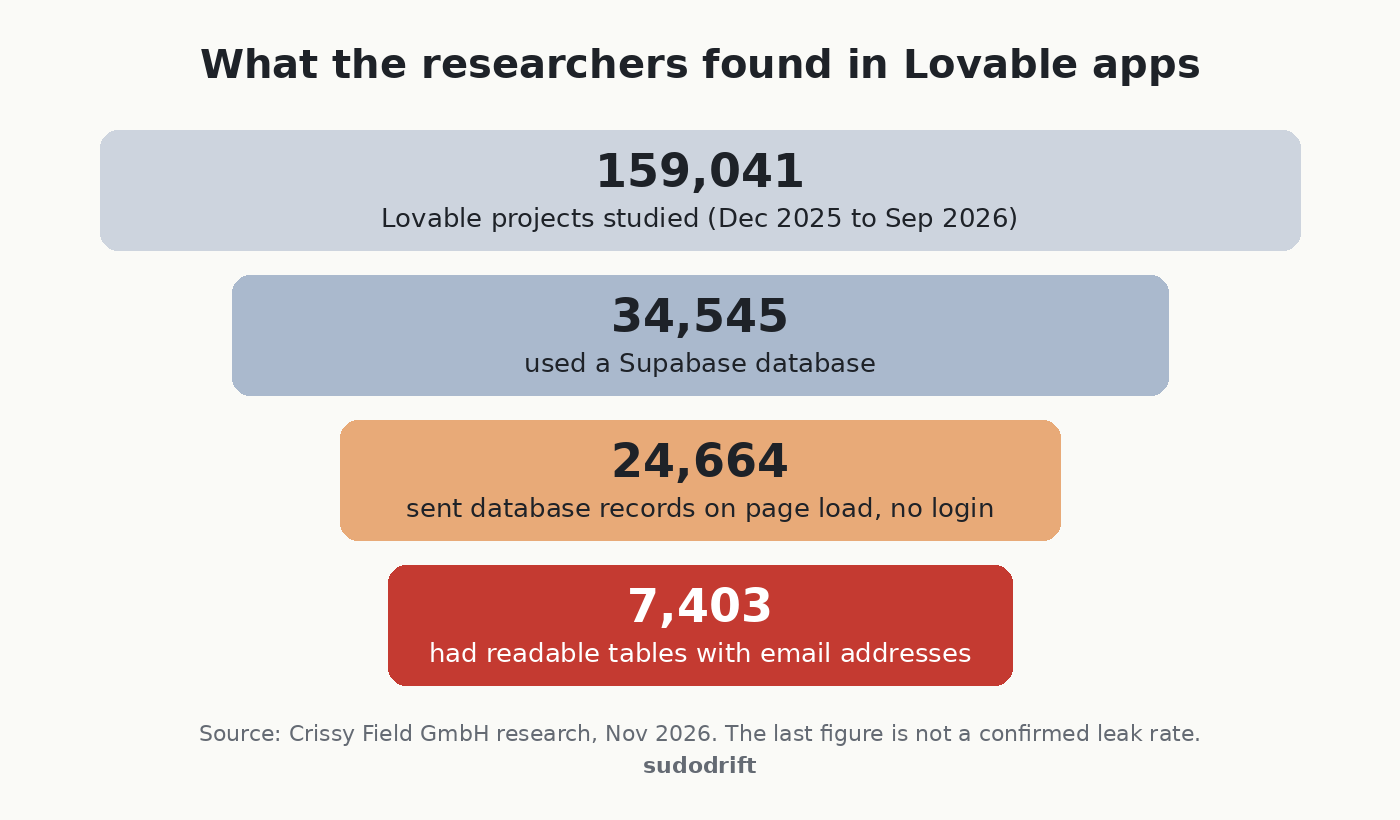
<p><img src="/assets/posts/ai-built-apps-open-database/2026-11-04-lovable-apps-open-database-funnel.png" alt="Funnel chart: 159,041 Lovable projects studied, 34,545 using Supabase, 24,664 sending database records on page load with no login, 7,403 with readable tables containing email addresses" /></p>

<p>They found the projects in Common Crawl, a public archive of the web, covering December 2025 to September 2026. 24,664 sites sent database records as soon as the page loaded. That part can be fine, since some data is meant to be public. The problem came when they made a few more read-only requests with the same key. On 7,403 of those sites they could read tables holding email addresses.</p>

<p>The examples they give are the bad part. A German lifestyle forum with more than 80,000 profiles and over 200,000 chat messages. Event organizers and restaurants with ticket and food orders, including phone numbers, home addresses, payment information and ticket codes. A service provider with more than 1,000 passport records. And one I keep thinking about: a property management company that stored AI-written summaries of its internal emails about tenants and owners, readable by anyone.</p>

<h2 id="whats-confirmed-and-what-isnt">What’s confirmed and what isn’t</h2>

<p>Confirmed, by the researchers: the data was reachable without logging in, and they only used read-only requests.</p>

<p>Not confirmed: whether anyone else found this data first and used it. Crissy Field says plainly it could not tell. It also warns that the 30% figure is not a leak rate. Some of those email addresses could be public contact addresses or test data, and their sample is not every Lovable app.</p>

<p>Not public: which apps were affected. The researchers have not named them, and they kept their exact method to themselves. Good. I won’t guess at it either.</p>

<p>Lovable’s side: according to the coverage, Lovable said this is a known problem across the industry with how people set up Supabase, not a hack of Lovable. That’s partly fair. UpGuard separately reported readable tables on 16,326 Supabase databases, per Cybernews. But “it’s everyone’s problem” doesn’t help the person whose passport number is sitting in a table.</p>

<h2 id="why-the-key-in-your-page-isnt-the-problem">Why the key in your page isn’t the problem</h2>

<p>This trips people up, so here’s how it works.</p>

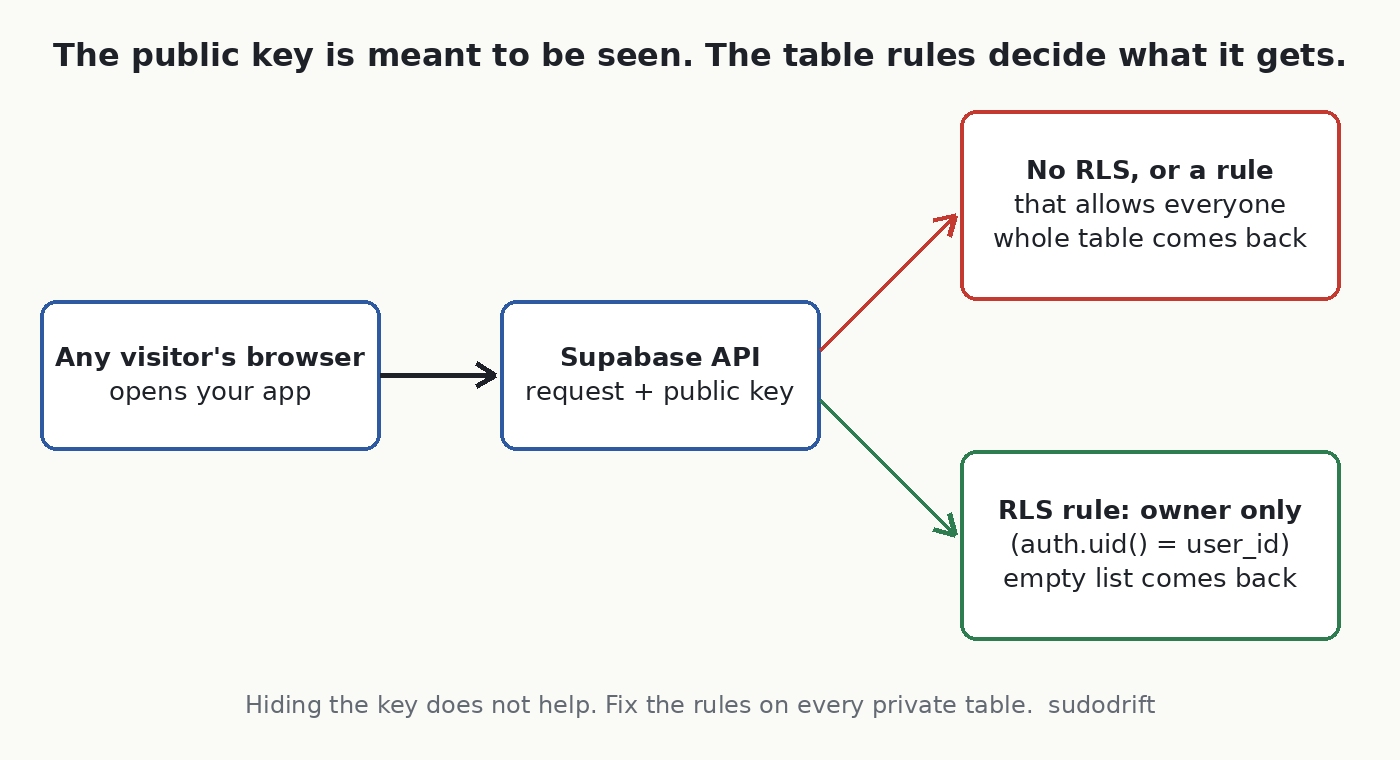
<p>A Supabase app running in the browser carries a public key, often called the anon key or publishable key. It is supposed to be visible. Anyone can open developer tools and see it.</p>

<p>What protects your data is Row Level Security, or RLS. It’s a set of rules inside the database that says which rows each visitor may read or change. With RLS on and good rules, the public key gets a stranger almost nothing. With RLS off, or with a rule that says “allow everyone”, that same key reads the whole table.</p>

<p><img src="/assets/posts/ai-built-apps-open-database/2026-11-04-lovable-apps-open-database-flow.png" alt="Flow diagram: a visitor's browser sends the public key to the Supabase API; if a table has no row-level rules or a rule that allows everyone, the full table comes back; if a rule limits rows to the signed-in owner, an empty result comes back" /></p>

<p>So the fix is never “hide the key”. The fix is the rules.</p>

<h2 id="how-to-check-your-own-app">How to check your own app</h2>

<p>You need to own the app or have permission to test it. Only test your own project.</p>

<p><img src="/assets/posts/ai-built-apps-open-database/2026-11-04-lovable-apps-open-database-steps.png" alt="Three check steps: run the scan in Lovable's Security view, list tables and rules in the database, then request each table with only the public key and expect nothing back" /></p>

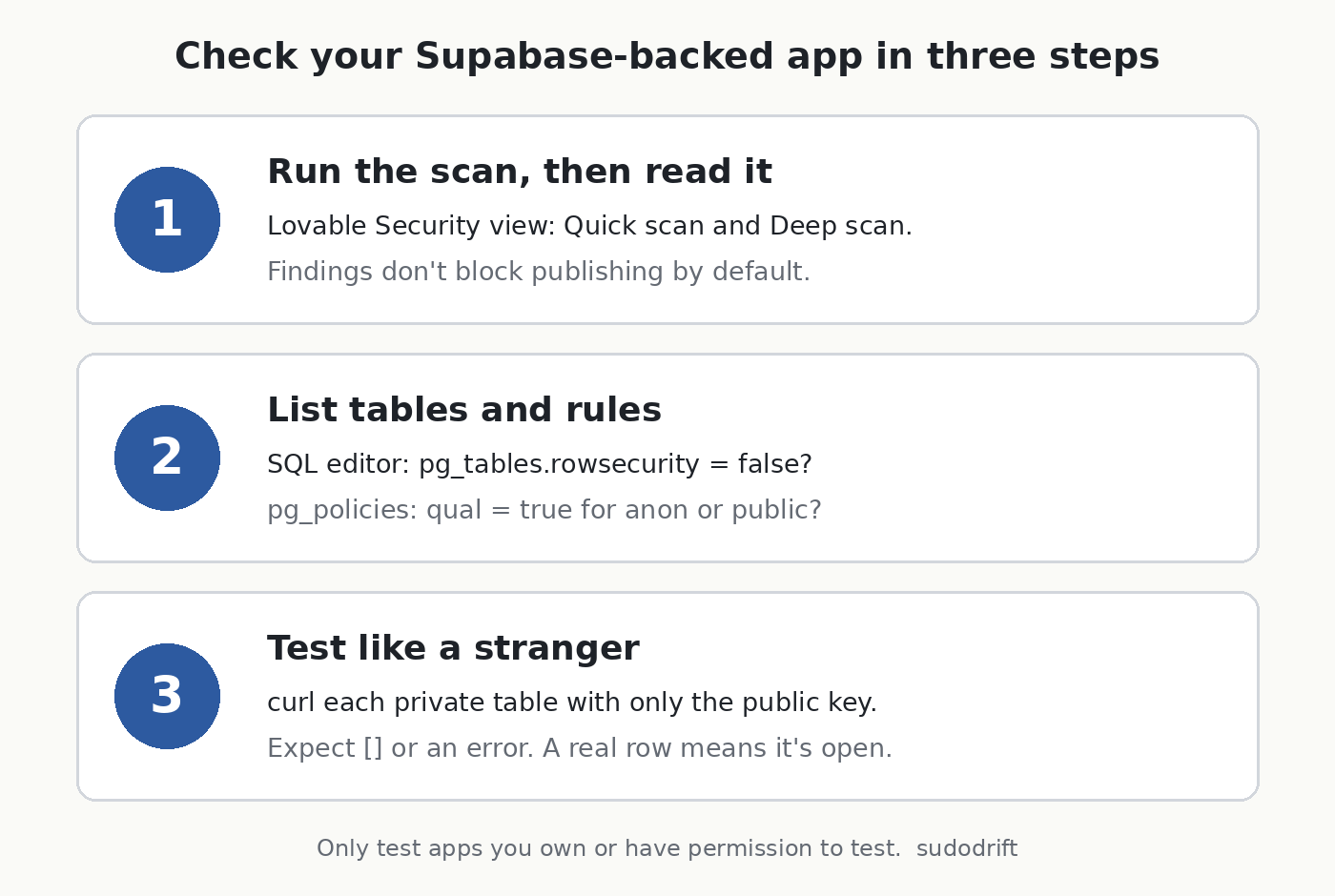
<h3 id="1-run-lovables-own-scan-and-read-it">1. Run Lovable’s own scan, and read it</h3>

<p>Lovable’s docs say a Quick scan runs when you open the Publish dialog and checks for things like tables without RLS and access rules that let everyone through. There’s also a Deep scan you start yourself from the project’s Security view, and your policies are under More, then Database, then Manage, then Policies (<a href="https://docs.lovable.dev/features/security">Lovable docs</a>).</p>

<p>One detail matters. The same docs say findings do not block publishing by default. So a scan that warned you and got clicked past is exactly how a table ends up open. If you’re a workspace admin, Lovable has a setting to block publishing on critical findings (<a href="https://docs.lovable.dev/features/publish">Lovable publish docs</a>). I’d turn it on.</p>

<h3 id="2-look-at-the-rules-yourself">2. Look at the rules yourself</h3>

<p>Open the SQL editor in your Supabase dashboard and run this. It’s read-only.</p>

<div class="language-sql highlighter-rouge"><div class="highlight"><pre class="highlight"><code><span class="c1">-- Which tables in the public schema have RLS switched off?</span>
<span class="k">select</span> <span class="n">tablename</span><span class="p">,</span> <span class="n">rowsecurity</span>
<span class="k">from</span> <span class="n">pg_tables</span>
<span class="k">where</span> <span class="n">schemaname</span> <span class="o">=</span> <span class="s1">'public'</span>
<span class="k">order</span> <span class="k">by</span> <span class="n">rowsecurity</span><span class="p">,</span> <span class="n">tablename</span><span class="p">;</span>

<span class="c1">-- What rules exist, and what do they allow?</span>
<span class="k">select</span> <span class="n">tablename</span><span class="p">,</span> <span class="n">policyname</span><span class="p">,</span> <span class="n">cmd</span><span class="p">,</span> <span class="n">roles</span><span class="p">,</span> <span class="n">qual</span>
<span class="k">from</span> <span class="n">pg_policies</span>
<span class="k">where</span> <span class="n">schemaname</span> <span class="o">=</span> <span class="s1">'public'</span>
<span class="k">order</span> <span class="k">by</span> <span class="n">tablename</span><span class="p">;</span>
</code></pre></div></div>

<p>In the first result, any table with <code class="language-plaintext highlighter-rouge">rowsecurity</code> set to <code class="language-plaintext highlighter-rouge">false</code> is readable through the public key, as long as that table is exposed through the API. In the second, look for rules where <code class="language-plaintext highlighter-rouge">qual</code> is just <code class="language-plaintext highlighter-rouge">true</code> and <code class="language-plaintext highlighter-rouge">roles</code> includes <code class="language-plaintext highlighter-rouge">anon</code> or <code class="language-plaintext highlighter-rouge">public</code>. That means “anyone can read every row”. It’s fine for a menu or a blog post. It’s not fine for orders, profiles, messages or anything with an email in it.</p>

<p>Supabase’s dashboard also has a Security Advisor that flags tables with RLS off. Worth a look, but read the rules yourself too.</p>

<h3 id="3-test-from-outside-the-way-a-stranger-would">3. Test from outside, the way a stranger would</h3>

<p>This is the step most checklists skip, and it’s the one that tells you the truth. Open your live site in a private window, open developer tools, and look in the Network tab for requests to <code class="language-plaintext highlighter-rouge">supabase.co</code>. You’ll see your project address and the public key in the request headers.</p>

<p>Then, from a terminal, ask for one row of each table that holds anything private:</p>

<div class="language-bash highlighter-rouge"><div class="highlight"><pre class="highlight"><code><span class="nv">PROJECT</span><span class="o">=</span><span class="s2">"https://YOUR-PROJECT.supabase.co"</span>
<span class="nv">KEY</span><span class="o">=</span><span class="s2">"the public key your page sends"</span>

<span class="k">for </span>t <span class="k">in </span>profiles orders messages bookings<span class="p">;</span> <span class="k">do
  </span><span class="nb">echo</span> <span class="s2">"== </span><span class="nv">$t</span><span class="s2">"</span>
  curl <span class="nt">-s</span> <span class="s2">"</span><span class="nv">$PROJECT</span><span class="s2">/rest/v1/</span><span class="nv">$t</span><span class="s2">?select=*&amp;limit=1"</span> <span class="se">\</span>
    <span class="nt">-H</span> <span class="s2">"apikey: </span><span class="nv">$KEY</span><span class="s2">"</span> <span class="se">\</span>
    <span class="nt">-H</span> <span class="s2">"Authorization: Bearer </span><span class="nv">$KEY</span><span class="s2">"</span>
  <span class="nb">echo
</span><span class="k">done</span>
</code></pre></div></div>

<p>Change the table names to yours. If your key is one of the newer <code class="language-plaintext highlighter-rouge">sb_publishable_</code> keys and the request complains about the Authorization header, drop that line and keep <code class="language-plaintext highlighter-rouge">apikey</code>.</p>

<p>What you want back for private tables is an empty list <code class="language-plaintext highlighter-rouge">[]</code> or a permission error. If you get a real row with a real person’s data, that table is open to the world right now.</p>

<h3 id="4-if-something-is-open">4. If something is open</h3>

<p>Turn RLS on for that table and write a rule that limits rows to their owner. For a table with a <code class="language-plaintext highlighter-rouge">user_id</code> column, the common pattern looks like this:</p>

<div class="language-sql highlighter-rouge"><div class="highlight"><pre class="highlight"><code><span class="k">alter</span> <span class="k">table</span> <span class="k">public</span><span class="p">.</span><span class="n">orders</span> <span class="n">enable</span> <span class="k">row</span> <span class="k">level</span> <span class="k">security</span><span class="p">;</span>

<span class="k">create</span> <span class="n">policy</span> <span class="nv">"owners read their own orders"</span>
<span class="k">on</span> <span class="k">public</span><span class="p">.</span><span class="n">orders</span> <span class="k">for</span> <span class="k">select</span>
<span class="k">to</span> <span class="n">authenticated</span>
<span class="k">using</span> <span class="p">(</span> <span class="p">(</span><span class="k">select</span> <span class="n">auth</span><span class="p">.</span><span class="n">uid</span><span class="p">())</span> <span class="o">=</span> <span class="n">user_id</span> <span class="p">);</span>
</code></pre></div></div>

<p>Test the app afterwards, because turning RLS on with no rules blocks everyone, including your own users. Then run the curl test again and make sure you get nothing back.</p>

<p>If personal data was readable, treat it as possibly seen. You can’t prove it wasn’t. Depending on where you and your users are, that may mean you have to notify people or a regulator. In Canada that’s PIPEDA’s breach rules, in Europe it’s GDPR. I’m not a lawyer, so if you’re unsure, ask one.</p>

<p>One more habit: don’t store what you don’t need. Nobody can leak a passport number you never collected.</p>

<h2 id="if-youre-a-user-of-a-small-app">If you’re a user of a small app</h2>

<p>Honestly, you can’t check this from your side, and the researchers didn’t name the apps. What you can do is expect the follow-up. Exposed order and ticket records are perfect material for scam emails and texts that quote a real booking or a real ticket code. If a message knows your recent order and asks you to “confirm payment” or “reissue your ticket”, go to the site yourself instead of clicking.</p>

<h2 id="my-take">My take</h2>

<p>I don’t think the lesson is “don’t build with AI”. People have shipped open databases by hand for years. The difference is speed. An app can go from idea to taking payments in an afternoon, and the one thing the tool can’t know is which of your tables is private. You have to tell it, and then you have to check.</p>

<p>If you only do one thing from this post, do the curl test. It takes five minutes and it shows you what a stranger sees.</p>

<h2 id="sources">Sources</h2>

<ul>
  <li>Crissy Field GmbH, “Lovable: Many Apps Expose Sensitive Data”: https://www.crissyfield.de/research/lovable-en/</li>
  <li>Cybernews, “Apps built on Lovable AI expose passport details and 200,000 chat messages” (Nov 4, 2026): https://cybernews.com/security/lovable-ai-apps-expose-personal-information/</li>
  <li>Lovable docs, Security overview: https://docs.lovable.dev/features/security</li>
  <li>Lovable docs, Publish your Lovable project: https://docs.lovable.dev/features/publish</li>
  <li>Lovable docs, Security best practices: https://docs.lovable.dev/tips-tricks/security-best-practices</li>
</ul>

<p>If you want one short, practical security note like this each week, subscribe to <a href="https://weeklybreachnotes.substack.com">Weekly Breach Notes</a>.</p>]]></content><author><name>sudodrift</name></author><category term="lovable" /><category term="supabase" /><category term="data-breach" /><category term="ai" /><category term="security" /><summary type="html"><![CDATA[The key in your page is public on purpose. The rules behind it are the only thing between a visitor and your users' data.]]></summary><media:thumbnail xmlns:media="http://search.yahoo.com/mrss/" url="https://sudodrift.github.io/assets/posts/ai-built-apps-open-database/2026-11-04-lovable-apps-open-database-steps.png" /><media:content medium="image" url="https://sudodrift.github.io/assets/posts/ai-built-apps-open-database/2026-11-04-lovable-apps-open-database-steps.png" xmlns:media="http://search.yahoo.com/mrss/" /></entry><entry><title type="html">You Connected Gmail to Google’s AI Mode. Here’s What It Can See, and Who Else Might.</title><link href="https://sudodrift.github.io/posts/google-connected-apps-what-search-sees/" rel="alternate" type="text/html" title="You Connected Gmail to Google’s AI Mode. Here’s What It Can See, and Who Else Might." /><published>2026-11-04T00:00:00-05:00</published><updated>2026-11-04T00:00:00-05:00</updated><id>https://sudodrift.github.io/posts/google-connected-apps-what-search-sees</id><content type="html" xml:base="https://sudodrift.github.io/posts/google-connected-apps-what-search-sees/"><![CDATA[<p><em>By sudodrift</em></p>

<p>On October 16, 2026, Google changed one sentence in its privacy policy. It used to say Google does not show you personalized ads based on your content from Drive, Gmail or Photos. Now that sentence ends with an exception: “unless you choose to make data from these services available to other Google services that support personalized ads” (<a href="https://policies.google.com/privacy">Google Privacy Policy</a>).</p>

<p>Most of the coverage stopped at the ads part. That is fair, it is the news. But I went and read Google’s own help page for the feature behind it, and the ads are the smallest part of what you agree to when you click Connect.</p>

<p>This post is about what that switch actually lets Google’s AI see, where it goes after that, and how to check your own account in a few minutes.</p>

<p><img src="/assets/posts/google-connected-apps-what-search-sees/2026-11-04-google-connected-apps-what-search-sees-flow.png" alt="Diagram: Gmail, Calendar and Photos connect to all Google Search services, and from there data can feed answers, ads, AI training and human review" /></p>

<h2 id="what-changed-in-plain-words">What changed, in plain words</h2>

<p>Google has a feature called Personal Intelligence. In Search, it lets AI Mode and Ask Maps use your past searches, and, if you connect them, your Gmail, Google Calendar and Google Photos, to give answers that fit you. Google’s example is using an old restaurant booking in your email to suggest new places to eat (<a href="https://support.google.com/websearch/answer/16859283?co=GENIE.Platform%3DDesktop&amp;hl=en">Google Search Help</a>).</p>

<p>The October policy change says that if you make that data available to a Google service that shows personalized ads, it can shape those ads too. The Verge and Ars Technica both reported this after Android Authority spotted it (<a href="https://www.theverge.com/tech/1017600/google-personal-intelligence-privacy-policy-ads-update">The Verge</a>, <a href="https://arstechnica.com/gadgets/2026/10/updated-google-privacy-policy-says-your-gmail-might-be-used-for-advertising/">Ars Technica</a>).</p>

<p>Google told Ars that connecting is fully optional, and that ads won’t be built straight from your inbox or photo library.</p>

<p>So if you never clicked Connect, this does not apply to you. If you did, or you are not sure, keep reading.</p>

<h2 id="what-the-connection-reaches">What the connection reaches</h2>

<p>This is the part I did not expect. Google’s help page says that connecting your apps means all Search services are allowed to access them, not only AI Mode. It lists those services as Google Search (including AI Mode and Discover), Maps (including Ask Maps), Shopping, Flights, Hotels, Translate and News.</p>

<p>Right now the Workspace side means Gmail and Google Calendar, and Google says more Workspace apps will follow. Calendar is only offered in the US in English. Photos is not offered everywhere.</p>

<p>Canada, the US, India and Australia are all on the list of places where this is available. Google’s help page says it is for users 18 and over with a personal Google account.</p>

<h2 id="what-happens-to-what-it-reads">What happens to what it reads</h2>

<p>Here is what Google’s help page says, in my own words.</p>

<p>It uses summaries, not your whole inbox. Mostly. Google says Search works from summaries, short excerpts and guesses it draws from the emails and photos that matter to your question. But the same page also says that when an email or file is short, or very relevant, the summary “may just be the email or file.” So for a short booking email or a one line message, the summary can be the message itself.</p>

<p>It can train Google’s AI models. If you connect, Google says it may use that data to improve its services for all users, and that includes training its generative AI models on those summaries and excerpts. It also trains on your questions and its answers. Google says it takes steps to reduce personal information before training.</p>

<p>People may read some of it. Google says a subset of the data that AI Mode and Ask Maps process is reviewed by human reviewers, including outside service providers. That subset can include summaries and excerpts from your emails, and again, sometimes the summary is the email. Google says it disconnects these from your account and reduces personal details first. For Photos, it says humans do not view your actual media except for abuse cases or when you send feedback.</p>

<p>Google’s own advice on that page is blunt. Do not connect your apps if they hold personal or confidential information you would not want a reviewer to see. I think that sentence should be on the Connect button, not halfway down a help page.</p>

<p>It feeds ads. Google says the same summaries and excerpts Search uses to answer you can also pick the ads you see. Advertisers do not get your inbox or photos, and Google says it does not target ads on sensitive categories like race, religion, sexual orientation or health.</p>

<p>Disconnecting does not clean up. Google says that disconnecting an app, or deleting the email or photo, does not delete anything already saved in your Search Services History. Google can keep using that saved copy to improve its products, AI training included. You have to delete the history yourself.</p>

<h2 id="what-we-do-not-know">What we do not know</h2>

<p>I want to be honest about the gaps.</p>

<p>Google does not say how big the “subset” sent to human reviewers is. It does not say how long reviewed data is kept. It does not explain what an “inference” looks like in practice, for example whether “this person is planning a trip to Lisbon” counts.</p>

<p>I also could not click through these settings on a real account for this post. The menu names below come from Google’s help page and from Android Authority’s walkthrough. Google also says the Search services settings are being updated right now, so your screen may look a bit different.</p>

<h2 id="who-this-affects">Who this affects</h2>

<ul>
  <li>Anyone who tried AI Mode or Ask Maps and clicked Connect when it asked to use Gmail or Photos.</li>
  <li>Families that share one Google account on a tablet or laptop. One person connecting it connects it for everyone’s mail on that account.</li>
  <li>People whose inbox holds medical, legal, money or work email they would never paste into a chatbot.</li>
</ul>

<h2 id="how-to-check-your-account-in-about-5-minutes">How to check your account in about 5 minutes</h2>

<p><img src="/assets/posts/google-connected-apps-what-search-sees/2026-11-04-google-connected-apps-what-search-sees-checklist.png" alt="Checklist: five checks for Google connected apps" /></p>

<ol>
  <li>
    <p>See what Search is connected to. Go to your Google Account, then Data &amp; privacy, then Personalization settings, then Manage Personalized Recommendations in Search Services. Under Additional Personal Intelligence, open Connected Content Apps. If Google Workspace or Google Photos says Connected, click it to disconnect. Android Authority says you will see a warning that data already collected can still be used.</p>
  </li>
  <li>
    <p>Decide on the bigger switch. On that same Search Services page you can turn off Personalized Recommendations entirely. That is the stronger option. You will get less tailored results.</p>
  </li>
  <li>
    <p>Delete what is already saved. Disconnecting is not deleting. Go to <a href="https://activity.google.com">activity.google.com</a>, find your Search Services History, and delete it, or set auto delete to the shortest period you are comfortable with.</p>
  </li>
  <li>
    <p>Check Gmail’s own switch. In Gmail on a computer, open Settings, then See all settings. On the General tab, find Google Workspace smart features and select Manage Workspace smart feature settings. Google’s help page says “Smart features in other Google products” needs to be on for Search to personalize from Gmail. Turning it off is a second lock. Be aware it can turn off other helpful features too, so read what it lists before you save.</p>
  </li>
  <li>
    <p>Check Gemini separately. The Gemini app has its own Personal Intelligence and connected apps settings. Android Authority says disconnecting in Search does not stop the Gemini app from reading Gmail or Photos if you allowed it there. Open Gemini’s settings and look at its connected apps list too.</p>
  </li>
</ol>

<p>If you use a work or school Google account, your admin controls most of this, and Google says the feature needs a personal account.</p>

<h2 id="my-take">My take</h2>

<p>I do not think connecting is always wrong. Asking Maps for directions to the hotel in your booking email is useful. But the trade is bigger than “better answers, maybe some ads.” It is answers, ads, AI training and a chance that a person reads a short email of yours. If your inbox is the place where your whole life lives, I would leave it disconnected and paste in the one booking email when you need it.</p>

<p>Want one short email a week on breaches and what to do about them? Subscribe to Weekly Breach Notes.</p>

<h2 id="sources">Sources</h2>

<ul>
  <li>Google Privacy Policy, effective October 16, 2026: https://policies.google.com/privacy</li>
  <li>Google Search Help, “Connect your Google content apps to get a Search services experience that’s tailored to you”: https://support.google.com/websearch/answer/16859283?co=GENIE.Platform%3DDesktop&amp;hl=en</li>
  <li>The Verge, “Now Google says it might use your Gmail and Google Photos data to target ads,” Oct 23, 2026: https://www.theverge.com/tech/1017600/google-personal-intelligence-privacy-policy-ads-update</li>
  <li>Ars Technica, “Updated Google privacy policy says your Gmail might be used for advertising,” Oct 2026: https://arstechnica.com/gadgets/2026/10/updated-google-privacy-policy-says-your-gmail-might-be-used-for-advertising/</li>
  <li>Android Authority, “How to stop Google from using your Gmail or Photos info for ads”: https://www.androidauthority.com/google-personal-intelligence-ads-opt-out-3729942/</li>
</ul>]]></content><author><name>sudodrift</name></author><category term="google" /><category term="privacy" /><category term="ai" /><category term="gmail" /><category term="personal-intelligence" /><summary type="html"><![CDATA[The ads change got the headlines. Google's own help page says a lot more.]]></summary><media:thumbnail xmlns:media="http://search.yahoo.com/mrss/" url="https://sudodrift.github.io/assets/posts/google-connected-apps-what-search-sees/2026-11-04-google-connected-apps-what-search-sees-flow.png" /><media:content medium="image" url="https://sudodrift.github.io/assets/posts/google-connected-apps-what-search-sees/2026-11-04-google-connected-apps-what-search-sees-flow.png" xmlns:media="http://search.yahoo.com/mrss/" /></entry><entry><title type="html">That Google alert is real. The phone number inside it isn’t.</title><link href="https://sudodrift.github.io/posts/real-google-alert-fake-number/" rel="alternate" type="text/html" title="That Google alert is real. The phone number inside it isn’t." /><published>2026-11-04T00:00:00-05:00</published><updated>2026-11-04T00:00:00-05:00</updated><id>https://sudodrift.github.io/posts/real-google-alert-fake-number</id><content type="html" xml:base="https://sudodrift.github.io/posts/real-google-alert-fake-number/"><![CDATA[<p><em>By sudodrift</em></p>

<p>Most phishing advice comes down to one check. Look at who really sent the email.</p>

<p>This scam passes that check. The email really does come from Google. It’s signed by Google, it lands in the same thread as your other Google alerts, and the buttons in it go to real Google pages. The only fake part is a single line of text in the middle. A scammer typed it.</p>

<p>I think this one is worth ten minutes, mostly because the usual tips make it more convincing, not less.</p>

<h2 id="what-happened">What happened</h2>

<p>Two security teams wrote up the same trick from different sides.</p>

<p>In September, Switzerland’s federal cybersecurity office (BACS, the former NCSC) described a case that started with a genuine Google security warning (<a href="https://www.bacs.admin.ch/en/26w38-en">NCSC Switzerland, Week 38</a>). The scammers had made their own new Google account and put the victim’s email address in as that account’s recovery address. Then they created an app password in their own account. An app password is an old style passcode for apps that can’t do a normal Google sign-in, and Google lets you give it any name you like.</p>

<p>They named it something like “Kevin W. Case ID: 834333 To view your case”. Google sent its normal alert about the new app password to the recovery address, which was the victim. Google’s email repeated the name. So the victim saw what looked like Google opening a support case, with a case handler and a case number.</p>

<p>A phone call followed from someone claiming to be Google security support, showing a Swiss number. The caller pushed the victim to a login page built on Google Sites, so the web address still said google. The form sent the password to the scammers.</p>

<p>On October 6, the University of Michigan’s IT security team posted a second version (<a href="https://safecomputing.umich.edu/phishing-alerts/app-password-created-sign-your-account-tue-10062026-1200">U-M Safe Computing</a>). This time the app password was named after a fake McAfee invoice for $399 with a support phone number. The genuine Google alert was then forwarded on to people at the university, and because it carried valid signatures it passed all of their mail checks.</p>

<h2 id="the-clever-part">The clever part</h2>

<p>U-M points out something I hadn’t thought about. If you do the careful thing and click the real “check activity” button, you land on your own Google account. Nothing is wrong there, because the app password was made on someone else’s account.</p>

<p>That’s on purpose. You’re worried, you checked, and you found nothing. The only thing left in the email that looks like it might explain the charge is the phone number.</p>

<h2 id="whats-confirmed-and-what-isnt">What’s confirmed and what isn’t</h2>

<p>Confirmed by the two official write-ups:</p>

<ul>
  <li>The alert emails are genuine Google messages. The scam text rides inside the app password name.</li>
  <li>One version pushes you to call about a fake invoice. The other is followed by a call from fake Google support.</li>
  <li>In the Swiss case, after getting the password, the scammers set up their own app password inside the victim’s real account within minutes. BACS says that let them keep access even after the victim changed the password, and email and contacts kept syncing to a device abroad for some time.</li>
</ul>

<p>Not known: how many people got these emails, how many called, or how much money was lost. Neither source gives numbers, so I won’t guess.</p>

<p>One honest wrinkle. Google’s own help page says it revokes your app passwords when you change your Google password (<a href="https://support.google.com/accounts/answer/185833?hl=en">Google Account Help</a>). The Swiss report says the scammers kept access after a change anyway. I can’t tell from the outside why those two don’t match, maybe the timing or how the change was done. So I’d do both: change the password and also delete app passwords by hand. It costs you thirty seconds.</p>

<h2 id="how-to-read-one-of-these-emails">How to read one of these emails</h2>

<p><img src="/assets/posts/real-google-alert-fake-number/2026-11-02-real-google-alert-fake-number-anatomy.png" alt="Mock security alert with the attacker's text highlighted: the account line, the fake invoice inside the app name, and the phone number" /></p>

<ol>
  <li><strong>Read the account line first.</strong> A Google alert names the account it’s about. If that address isn’t your account, the alert isn’t about you. It’s about the scammer’s account, with you listed as their backup.</li>
  <li><strong>Treat any invoice, case number or phone number as the scammer’s words.</strong> In this trick, that’s the only part they control.</li>
  <li><strong>Never call a number from an email about a charge.</strong> If you think you were billed, open your bank or card app yourself and look.</li>
  <li><strong>Check your account by typing the address.</strong> Google’s advice is to go to myaccount.google.com/notifications yourself to see recent security activity (<a href="https://support.google.com/mail/answer/8253?hl=en">Gmail Help</a>). If nothing is there, good. That matches this scam.</li>
  <li><strong>Google won’t phone you about this.</strong> BACS’s advice is to hang up on any unexpected call about a security incident. Never read out a code or type a password while someone on the phone is telling you to.</li>
  <li><strong>Real Google sign-in pages are on accounts.google.com.</strong> Not sites.google.com, even though that one also says google.</li>
</ol>

<h2 id="if-you-think-you-already-gave-out-your-password">If you think you already gave out your password</h2>

<p>Do this from a device you trust, not one the caller asked you to install anything on.</p>

<ol>
  <li>Change your Google password at myaccount.google.com, then Security.</li>
  <li>On the same Security page, open “Your devices” and sign out anything you don’t know.</li>
  <li>Go to myaccount.google.com/apppasswords. Delete every entry. BACS says all of them, without exception. If you have an old printer or mail app that needs one, make a fresh one later.</li>
  <li>In Security, check your recovery email and recovery phone. Remove anything that isn’t yours.</li>
  <li>In Gmail on a computer, open Settings, See all settings, then Forwarding and POP/IMAP, and Filters and Blocked Addresses. Delete any forwarding or filter you didn’t set up.</li>
  <li>If you paid or let anyone onto your computer, call your bank now, then report it. In Canada that’s the <a href="https://antifraudcentre-centreantifraude.ca/">Canadian Anti-Fraud Centre</a>. In the US, the FTC at <a href="https://reportfraud.ftc.gov">reportfraud.ftc.gov</a>.</li>
</ol>

<p><img src="/assets/posts/real-google-alert-fake-number/2026-11-02-real-google-alert-fake-number-card.png" alt="Printable card: a real security email can still carry a scammer's phone number" /></p>

<h2 id="what-i-didnt-test">What I didn’t test</h2>

<p>I haven’t recreated this. I didn’t make an app password with a scam name to see what Google sends, because I’m not going to try a scammer’s recipe on Google’s mail system. Everything above about the email itself comes from the two security teams’ write-ups. The steps for cleaning up your own account use Google’s own help pages.</p>

<h2 id="my-honest-take">My honest take</h2>

<p>For years we told people to check the sender. That’s still good advice. But this scam shows the sender check isn’t enough on its own anymore, because the sender is real.</p>

<p>The better habit is simpler. A security email can tell you something happened. It should never be the place you get a phone number from. If a number is in there, someone put it there for you to call, and that someone isn’t Google.</p>

<p>If your parents use Gmail, this is the one I’d mention at dinner. Older relatives are exactly the people who’ve learned “check it’s really from Google” and will feel safe when it is.</p>

<hr />

<p><em>Weekly Breach Notes is my free newsletter. Subscribe if you want one short email a week on what leaked and what to do about it.</em></p>

<p><strong>Sources</strong></p>

<ul>
  <li>NCSC Switzerland (BACS), “Week 38: Genuine Google emails, fake support and a dangerous back door,” Sep 22, 2026: https://www.bacs.admin.ch/en/26w38-en</li>
  <li>University of Michigan Safe Computing, “App password created to sign in to your account,” Oct 6, 2026: https://safecomputing.umich.edu/phishing-alerts/app-password-created-sign-your-account-tue-10062026-1200</li>
  <li>Google Account Help, “Sign in with app passwords”: https://support.google.com/accounts/answer/185833?hl=en</li>
  <li>Gmail Help, “Avoid and report phishing emails”: https://support.google.com/mail/answer/8253?hl=en</li>
  <li>Canadian Anti-Fraud Centre: https://antifraudcentre-centreantifraude.ca/</li>
  <li>FTC, ReportFraud: https://reportfraud.ftc.gov</li>
</ul>

<p><em>All images are original drawings by sudodrift. The email is a mock-up with made-up addresses and a fake number, not a copy of a real message.</em></p>]]></content><author><name>sudodrift</name></author><category term="scams" /><category term="phishing" /><category term="google-account" /><category term="gmail" /><category term="account-security" /><summary type="html"><![CDATA[Scammers are typing fake invoices and fake support case numbers into a Google settings field, and Google's own security email delivers the text for them. Here's how to read one of these without getting pulled into a call.]]></summary><media:thumbnail xmlns:media="http://search.yahoo.com/mrss/" url="https://sudodrift.github.io/assets/posts/real-google-alert-fake-number/2026-11-02-real-google-alert-fake-number-anatomy.png" /><media:content medium="image" url="https://sudodrift.github.io/assets/posts/real-google-alert-fake-number/2026-11-02-real-google-alert-fake-number-anatomy.png" xmlns:media="http://search.yahoo.com/mrss/" /></entry><entry><title type="html">Your registrar login is a production admin account</title><link href="https://sudodrift.github.io/posts/registrar-login-production-admin/" rel="alternate" type="text/html" title="Your registrar login is a production admin account" /><published>2026-11-01T00:00:00-04:00</published><updated>2026-11-01T00:00:00-04:00</updated><id>https://sudodrift.github.io/posts/registrar-login-production-admin</id><content type="html" xml:base="https://sudodrift.github.io/posts/registrar-login-production-admin/"><![CDATA[<p><em>By sudodrift</em></p>

<p>Most teams I talk to have a careful process for production. Named people, MFA, change tickets, logs someone actually reads. Then there’s the domain. It was bought years ago on someone’s personal card, the login lives in a shared password manager entry, and the recovery email points at a mailbox nobody has opened since the founder left.</p>

<p>That login can send every visitor to any server on the internet. Over the weekend of Oct 30, a group of crypto projects found out what that looks like.</p>

<h2 id="what-happened">What happened</h2>

<p>Late on Friday, Oct 30, the websites of several DeFi projects started serving a wallet drainer. Security firm Blockaid flagged Flap and Kintsu first, then ten more sites, including Pickle Finance and Origami Finance. The pages ran Step Drainer, a kit that gets visitors to sign wallet approvals that move their funds out (<a href="https://www.theblock.co/news/defi/2026-10-31-hackers-hijack-a-dozen-defi-websites-all-registered-with-name-com-and-steal-about-138000-432251">The Block</a>).</p>

<p>The common thread was the registrar. Registry records showed all twelve sites Blockaid named were registered through Name.com, even though their DNS was hosted in different places: some on Cloudflare, some on Vercel, some with Name.com itself. Name.com later told The Block that 15 customer domains were affected, that all of them had been restored, and that it had “taken steps to secure the accounts involved” (<a href="https://www.theblock.co/news/defi/2026-10-31-hackers-hijack-a-dozen-defi-websites-all-registered-with-name-com-and-steal-about-138000-432251">The Block</a>, <a href="https://cryptobriefing.com/name-com-restores-hijacked-defi-domains/">Crypto Briefing</a>). Vercel posted a bulletin saying 10 affected domains were associated with its platform (<a href="https://vercel.com/kb/bulletin/name-com-domain-takeover-notice">Vercel</a>).</p>

<p>The Block traced about $138,000 to three attacker wallets on EVM chains. That number leaves out anything taken on Solana or Aptos, where some of the affected projects run, so treat it as a floor. The projects that commented said their smart contracts were untouched. The money went out through signatures on a page that looked right, at the right address.</p>

<h2 id="what-nobody-knows-yet">What nobody knows yet</h2>

<p>How the attackers got in. As of Sunday morning, no one has published a root cause. Some projects blamed Vercel. FluxBeam’s developer said Name.com’s representative was pointing at third parties. Name.com told customers to check their DNS records and turn on two-factor authentication, which tells you what it thinks matters, but not what happened.</p>

<p>So I’m not going to tell you this was a stolen password. It may have been an internal system, a reseller path, or something else. The useful point holds either way: whoever can edit the delegation of your domain controls your users. Your job is to make that set of people and systems as small and as noisy as you can.</p>

<h2 id="why-i-call-it-a-production-admin-account">Why I call it a production admin account</h2>

<p>Think about what the registrar login can do without touching a single one of your servers:</p>

<ul>
  <li>change the nameservers, so a different company answers every DNS question about you</li>
  <li>point your login page, your API and your mail at someone else</li>
  <li>let an attacker pass the domain check a certificate authority runs, so their copy of your site gets a real padlock</li>
  <li>in the worst case, start a transfer to another registrar</li>
</ul>

<p>That’s more reach than SSH on any one box. Yet most of us would never let ten people share a root password, and plenty of us share the registrar login without blinking.</p>

<p><img src="/assets/posts/registrar-login-production-admin/2026-11-01-registrar-login-production-admin-layers.png" alt="Four layers between a visitor and your site: the registrar account, the registry, the DNS host, and your own outside monitoring, each with the control that protects it" /></p>

<h2 id="the-access-review">The access review</h2>

<p>This is the checklist I’d walk through for every domain that carries logins, payments or a wallet connection. It takes about an hour for a small team.</p>

<p><strong>1. Find out who really holds the account.</strong> If you bought the domain through a hosting or app platform, the registrar account may belong to that platform, not to you. Ten of these domains sat behind Vercel. Write down the registrar, the account owner, and any reseller in between. If you don’t control the account, you can’t harden it, and you should decide whether that’s acceptable for this domain.</p>

<p><strong>2. Count the humans.</strong> List everyone who can log in, including old shared logins and sub-accounts. For most small companies the right number is two named people. Not one (you get locked out when they leave) and not everyone in engineering.</p>

<p><strong>3. Strong second factor, with no SMS fallback.</strong> Turn on 2FA for every person and every account in the chain: registrar, DNS host, reseller. Use a security key or passkey if the provider supports one, because a code from an app can be phished in real time. If only app codes are on offer, use them, store the backup codes offline, and remove SMS as a fallback where you can.</p>

<p><strong>4. Give the recovery email its own home.</strong> Whoever controls the recovery mailbox can usually reset the account. If that mailbox is <code class="language-plaintext highlighter-rouge">admin@yourdomain.com</code>, you have a loop: lose the domain, lose the email that would get it back. Use an address on a different domain, protected with the same strong 2FA, and readable by at least two people.</p>

<p><strong>5. Kill the API keys you don’t use.</strong> Registrar APIs are great for automation and terrible as forgotten credentials. List every token. Delete the ones nobody can explain. Scope the rest to the domains they need, if the registrar allows it.</p>

<p><strong>6. Turn on the registrar’s change lock.</strong> A plain transfer lock (<code class="language-plaintext highlighter-rouge">clientTransferProhibited</code>) stops transfers out. It does nothing against a nameserver change. Look for the lock that also blocks updates. On Name.com that’s PrivacyLock, which needs 2FA to turn on and a 2FA code to turn off, and blocks DNS, nameserver and contact changes (<a href="https://docs.name.com/guides/domain-locks">Name.com docs</a>).</p>

<p><strong>7. Ask for registry lock on the domains that carry money.</strong> Registrar locks live in the account you’re trying to protect. Registry lock is set at the registry itself, using the <code class="language-plaintext highlighter-rouge">serverUpdateProhibited</code>, <code class="language-plaintext highlighter-rouge">serverDeleteProhibited</code> and <code class="language-plaintext highlighter-rouge">serverTransferProhibited</code> statuses (<a href="https://www.icann.org/resources/pages/epp-status-codes-2014-06-16-en">ICANN EPP status codes</a>). Undoing it needs an out-of-band step between the registrar and the registry, so a stolen login alone isn’t enough. Not every registrar or TLD offers it, and it usually costs extra. For a domain that fronts a wallet, I’d pay for it or move the domain to a registrar that offers it.</p>

<p><strong>8. Turn on DNSSEC, and know what it doesn’t do.</strong> DNSSEC lets resolvers check that answers really came from the nameservers you delegated to. That protects you from spoofed answers and some attacks on the DNS host. It does not stop someone who controls your registrar account from changing the nameservers and the DS record together. It’s worth having. It isn’t a substitute for steps 3, 6 and 7.</p>

<p><strong>9. Alert on changes from outside.</strong> Don’t rely on the registrar to tell you. Check from the internet every few minutes and alert on any difference in:</p>

<ul>
  <li>the NS records at the parent zone (<code class="language-plaintext highlighter-rouge">dig +short NS example.com @a.gtld-servers.net</code> for a .com)</li>
  <li>the EPP status codes (an RDAP lookup shows them; a new <code class="language-plaintext highlighter-rouge">clientHold</code>, or a lock that vanished, is a red flag)</li>
  <li>new certificates for your names in Certificate Transparency logs, especially from a CA you don’t use</li>
</ul>

<p>Free tools already do this well, so I won’t write another one. Pick one and make sure the alert lands somewhere a person sees at 11 PM on a Friday.</p>

<p><strong>10. Write the bad-night runbook now.</strong> Who calls the registrar’s abuse line? Who has the account number and the security phrase? Who posts the warning to users? Some of the affected teams limited the damage by moving their nameservers quickly. That only works if someone already knows how, and has the access, before it happens.</p>

<h2 id="the-short-version">The short version</h2>

<table>
  <thead>
    <tr>
      <th>Control</th>
      <th>What it stops</th>
      <th>What it doesn’t</th>
    </tr>
  </thead>
  <tbody>
    <tr>
      <td>Phishing-resistant 2FA on every account in the chain</td>
      <td>Password reuse and phishing</td>
      <td>A compromise inside the registrar</td>
    </tr>
    <tr>
      <td>Recovery email on another domain</td>
      <td>Reset loops and hijacked mailboxes</td>
      <td>A weak second factor</td>
    </tr>
    <tr>
      <td>Registrar update lock</td>
      <td>Quick nameserver changes from a stolen session</td>
      <td>An attacker who can also pass 2FA</td>
    </tr>
    <tr>
      <td>Registry lock</td>
      <td>Changes pushed through the registrar account</td>
      <td>Changes inside your own DNS host</td>
    </tr>
    <tr>
      <td>DNSSEC</td>
      <td>Forged DNS answers</td>
      <td>A changed delegation</td>
    </tr>
    <tr>
      <td>Outside monitoring</td>
      <td>Silent changes going unnoticed</td>
      <td>Anything. It only tells you, fast</td>
    </tr>
  </tbody>
</table>

<p>No single row is enough. Together they turn “one login moves everything” into “several people and an offline step move everything, and we hear about it in minutes.”</p>

<h2 id="my-honest-take">My honest take</h2>

<p>DeFi teams spend a lot on smart contract audits, and that’s fine. This weekend the contracts were fine and users still lost money, because the weak part was a web account most of us set up once and forget. You don’t need to run DeFi for this to apply. If your domain hosts a login page, it’s production. Give its keys the same respect.</p>

<hr />

<p><em>Weekly Breach Notes is my free newsletter. Subscribe if you want one short email a week on what leaked and what to do about it.</em></p>

<p><strong>Sources</strong></p>

<ul>
  <li>The Block, “Hackers hijack a dozen DeFi websites, all registered with Name.com, and steal about $138,000,” Oct 31, 2026, updated 3:37 PM ET: https://www.theblock.co/news/defi/2026-10-31-hackers-hijack-a-dozen-defi-websites-all-registered-with-name-com-and-steal-about-138000-432251</li>
  <li>Crypto Briefing, “Name.com restores hijacked domains after attack hit at least 12 DeFi front ends,” Oct 31, 2026: https://cryptobriefing.com/name-com-restores-hijacked-defi-domains/</li>
  <li>Vercel, “Name.com domain takeover notice,” Oct 31, 2026: https://vercel.com/kb/bulletin/name-com-domain-takeover-notice</li>
  <li>Name.com Core API docs, “Understanding Domain Locks”: https://docs.name.com/guides/domain-locks</li>
  <li>ICANN, “EPP Status Codes: What do they mean, and why should I know?”: https://www.icann.org/resources/pages/epp-status-codes-2014-06-16-en</li>
</ul>

<p><em>The image is original by sudodrift.</em></p>]]></content><author><name>sudodrift</name></author><category term="dns" /><category term="domains" /><category term="registrar" /><category term="account-security" /><category term="least-privilege" /><summary type="html"><![CDATA[Name.com domains were pointed at wallet drainers over one weekend. Here is the access review I'd run on every domain that matters.]]></summary><media:thumbnail xmlns:media="http://search.yahoo.com/mrss/" url="https://sudodrift.github.io/assets/posts/registrar-login-production-admin/2026-11-01-registrar-login-production-admin-layers.png" /><media:content medium="image" url="https://sudodrift.github.io/assets/posts/registrar-login-production-admin/2026-11-01-registrar-login-production-admin-layers.png" xmlns:media="http://search.yahoo.com/mrss/" /></entry><entry><title type="html">Checking the hash is not enough. Check who built the download.</title><link href="https://sudodrift.github.io/posts/verify-who-built-it/" rel="alternate" type="text/html" title="Checking the hash is not enough. Check who built the download." /><published>2026-11-01T00:00:00-04:00</published><updated>2026-11-01T00:00:00-04:00</updated><id>https://sudodrift.github.io/posts/verify-who-built-it</id><content type="html" xml:base="https://sudodrift.github.io/posts/verify-who-built-it/"><![CDATA[<p><em>By sudodrift</em></p>

<p>On October 19 a stolen developer account was used to replace the release files of ovhcloud-cli v0.11.0 through v0.15.0. The tags stayed the same. On the newest releases the attacker replaced <code class="language-plaintext highlighter-rouge">checksums.txt</code> too, last, so the published hashes matched the new files. Anyone who checked the binary against that file saw a clean result and ran a credential stealer.</p>

<p>OVHcloud’s advisory says a customer reported the problem through a GitHub issue. StepSecurity’s write-up of the swap shows how that customer noticed: their CI pinned the SHA-256 of the Linux arm64 tarball in their own repository, and the build failed. Nobody who trusted the release’s own checksums file caught anything. (I covered the incident itself in <a href="/posts/ovhcloud-cli-swap/">an earlier post</a>.)</p>

<p>So “verify the download” has to mean something stronger than “the hash matches a file next to it.”</p>

<p><img src="/assets/posts/verify-who-built-it/2026-10-29-verify-who-built-it-timeline.png" alt="From a same-release checksums file to pinning who built the artifact" /></p>

<h2 id="three-checks-that-ask-who-built-it">Three checks that ask who built it</h2>

<p><strong>1. GitHub artifact attestations, with the workflow pinned.</strong></p>

<div class="language-sh highlighter-rouge"><div class="highlight"><pre class="highlight"><code>gh attestation verify ./tool <span class="se">\</span>
  <span class="nt">--repo</span> OWNER/REPO <span class="se">\</span>
  <span class="nt">--signer-workflow</span> OWNER/REPO/.github/workflows/release.yml
</code></pre></div></div>

<p>That fetches the signed attestation for this exact digest and checks that it was produced by that workflow in that repository. Use <code class="language-plaintext highlighter-rouge">--signer-workflow</code> or <code class="language-plaintext highlighter-rouge">--cert-identity</code> (exact SAN), not both; <code class="language-plaintext highlighter-rouge">gh</code> rejects the combination. Add <code class="language-plaintext highlighter-rouge">--deny-self-hosted-runners</code> if you do not want attestations from runners you do not control. <code class="language-plaintext highlighter-rouge">--repo</code> alone is the floor. Pinning the workflow is the useful part.</p>

<p><strong>2. Immutable releases, then the local file.</strong></p>

<div class="language-sh highlighter-rouge"><div class="highlight"><pre class="highlight"><code>gh release verify v1.2.3 <span class="nt">-R</span> OWNER/REPO
gh release verify-asset v1.2.3 ./tool <span class="nt">-R</span> OWNER/REPO
</code></pre></div></div>

<p><code class="language-plaintext highlighter-rouge">gh release verify</code> checks that the release exists and is immutable. <code class="language-plaintext highlighter-rouge">gh release verify-asset</code> checks that your file on disk is an exact match for the attested asset of that tag. It cannot verify the auto-generated source zip or tarball, because those are built at download time.</p>

<p>OVHcloud’s clean v0.16.0 is an immutable release, so the fixed CLI is a real example: <code class="language-plaintext highlighter-rouge">gh release verify-asset v0.16.0 ovhcloud-cli_Linux_x86_64.tar.gz -R ovh/ovhcloud-cli</code>.</p>

<p><strong>3. Cosign on a container digest, with identity constraints.</strong></p>

<div class="language-sh highlighter-rouge"><div class="highlight"><pre class="highlight"><code>cosign verify ghcr.io/OWNER/REPO@sha256:DIGEST <span class="se">\</span>
  <span class="nt">--certificate-identity</span><span class="o">=</span>https://github.com/OWNER/REPO/.github/workflows/release.yml@refs/tags/v1.2.3 <span class="se">\</span>
  <span class="nt">--certificate-oidc-issuer</span><span class="o">=</span>https://token.actions.githubusercontent.com
</code></pre></div></div>

<p>Verify the digest, never a floating tag. Since Cosign 2.0, keyless verification refuses to run without an identity and an issuer, which is good. The trap now is a regex so loose it matches anyone, such as <code class="language-plaintext highlighter-rouge">--certificate-identity-regexp '.*'</code>. That only proves <em>someone</em> in the Sigstore ecosystem signed it. Pin the digest in the Dockerfile or the deploy script so a later run fails if the image moves.</p>

<h2 id="what-still-proves-almost-nothing">What still proves almost nothing</h2>

<ul>
  <li>A <code class="language-plaintext highlighter-rouge">SHA256SUMS</code> or <code class="language-plaintext highlighter-rouge">checksums.txt</code> downloaded from the same release or the same server as the binary. The ovhcloud-cli swap replaced both.</li>
  <li>Fetching the GPG key from the same site as the package.</li>
  <li><code class="language-plaintext highlighter-rouge">cosign verify</code> with an identity regex of <code class="language-plaintext highlighter-rouge">.*</code>.</li>
  <li><code class="language-plaintext highlighter-rouge">curl | sh</code>. The ovhcloud-cli install script did no checksum check at all.</li>
</ul>

<p>Store the expected SHA-256 in your own repository, next to the download instruction. Then the release can be swapped and your CI still fails.</p>

<h2 id="where-releasedrift-fits">Where releasedrift fits</h2>

<p>Most teams never get as far as attestations because the download is not pinned at all. <a href="https://github.com/sudodrift/releasedrift">releasedrift</a> walks a source tree, finds every GitHub release download in Dockerfiles, shell scripts, Makefiles, Actions workflows and Ansible playbooks, and tells you which ones have no SHA-256 nearby and which ones only check against a checksums file from the same release. Without <code class="language-plaintext highlighter-rouge">--offline</code> it also asks the GitHub API for the digest GitHub reports for each asset and keeps it in a state file, so a later run notices when a file was replaced, and it warns when a release is not immutable. It only reads, and works without a token.</p>

<div class="language-sh highlighter-rouge"><div class="highlight"><pre class="highlight"><code>go <span class="nb">install </span>github.com/sudodrift/releasedrift/cmd/releasedrift@latest
releasedrift <span class="nt">--offline</span> /path/to/your/repo
</code></pre></div></div>

<p>Here it is on the sample tree that ships in the repository:</p>

<p><img src="/assets/posts/verify-who-built-it/2026-10-29-verify-who-built-it-terminal.png" alt="releasedrift v0.1.0 flagging unpinned downloads and a same-release checksums check" /></p>

<p>The finding that matches the ovhcloud-cli failure mode is tagged <code class="language-plaintext highlighter-rouge">same-release-checksums</code>. The fix line is the whole point of this post: store the expected SHA-256 in this repository instead of fetching it from the release.</p>

<p>Once every download is pinned, add the attestation or cosign check for the ones that publish one. Pinning without provenance still beats a checksums file that travels with the binary. Provenance without a pin still lets a later tag move under you.</p>

<p><img src="/assets/posts/verify-who-built-it/2026-10-29-verify-who-built-it-steps.png" alt="Four layers of download verification, weakest to strongest" /></p>

<h2 id="sources">Sources</h2>

<ul>
  <li>GitHub Docs, <a href="https://docs.github.com/en/code-security/how-tos/secure-your-supply-chain/secure-your-dependencies/verify-release-integrity">Verifying the integrity of a release</a> (<code class="language-plaintext highlighter-rouge">gh release verify</code>, <code class="language-plaintext highlighter-rouge">gh release verify-asset</code>)</li>
  <li>GitHub CLI manual, <a href="https://cli.github.com/manual/gh_attestation_verify"><code class="language-plaintext highlighter-rouge">gh attestation verify</code></a> (use <code class="language-plaintext highlighter-rouge">--signer-workflow</code> or <code class="language-plaintext highlighter-rouge">--cert-identity</code>, not both)</li>
  <li>Sigstore, <a href="https://docs.sigstore.dev/cosign/verifying/verify/">Verifying signatures with Cosign</a> and <a href="https://blog.sigstore.dev/cosign-2-0-released/">Cosign 2.0 released</a> (identity flags required)</li>
  <li>OVHcloud CLI advisory <a href="https://github.com/ovh/ovhcloud-cli/security/advisories/GHSA-862f-55f5-vmvw">GHSA-862f-55f5-vmvw</a>, the reporter’s <a href="https://github.com/ovh/ovhcloud-cli/issues/300">issue #300</a>, and StepSecurity’s <a href="https://www.stepsecurity.io/blog/ovhcloud-cli-github-release-swap-glassworm">write-up of the swap</a></li>
  <li>Free tool: <a href="https://github.com/sudodrift/releasedrift">sudodrift/releasedrift</a> (<a href="https://github.com/sudodrift/releasedrift/releases/tag/v0.1.0">v0.1.0</a>)</li>
</ul>]]></content><author><name>sudodrift</name></author><category term="supply-chain" /><category term="github" /><category term="releases" /><category term="sigstore" /><category term="releasedrift" /><summary type="html"><![CDATA[A SHA256SUMS file from the same release as the binary proves the two agree with each other. It does not prove who produced either one. Here is what I run instead, and how releasedrift finds the downloads that never get that far.]]></summary><media:thumbnail xmlns:media="http://search.yahoo.com/mrss/" url="https://sudodrift.github.io/assets/posts/verify-who-built-it/2026-10-29-verify-who-built-it-timeline.png" /><media:content medium="image" url="https://sudodrift.github.io/assets/posts/verify-who-built-it/2026-10-29-verify-who-built-it-timeline.png" xmlns:media="http://search.yahoo.com/mrss/" /></entry><entry><title type="html">The Claude Code extension backdoor: check every profile, not just yours</title><link href="https://sudodrift.github.io/posts/claude-code-extension-every-profile/" rel="alternate" type="text/html" title="The Claude Code extension backdoor: check every profile, not just yours" /><published>2026-10-31T00:00:00-04:00</published><updated>2026-10-31T00:00:00-04:00</updated><id>https://sudodrift.github.io/posts/claude-code-extension-every-profile</id><content type="html" xml:base="https://sudodrift.github.io/posts/claude-code-extension-every-profile/"><![CDATA[<p><em>By sudodrift</em></p>

<p>On Thursday, the AI coding assistant a lot of developers trust with their whole repo turned into an SSH backdoor for part of a day. Nobody’s model went rogue. Someone got a poisoned copy of the extension into the store, and auto-update did the rest.</p>

<p>Most write-ups already give you the one-line check. It’s a good check. But it only looks at the account you’re logged in as. I look after endpoints for a living, and that’s not how shared Macs, lab machines or build boxes work. So this post is about checking the whole machine, and then the whole fleet, with two small read-only scripts.</p>

<h2 id="what-happened">What happened</h2>

<p>Cursor posted a security notice on Oct 29. Between about 2:27 AM and 1:35 PM Pacific time (5:27 AM to 4:35 PM in Toronto), a maliciously modified <code class="language-plaintext highlighter-rouge">Anthropic.claude-code</code> extension was served from the Cursor VS Code Extension Marketplace. Cursor’s notice, updated Oct 30, names versions 2.1.312 and 2.1.313 for Windows and macOS (<a href="https://cursor.com/blog/claude-code-extension-security-notice">Cursor notice</a>).</p>

<p>Cursor says the code:</p>

<ul>
  <li>collected host details (hostname, username, OS, home folder, the names of environment variables, Git email, public IP) and sent them to a server at 134.209.82.225</li>
  <li>added an attacker SSH key, labelled <code class="language-plaintext highlighter-rouge">svc-telemetry</code>, to <code class="language-plaintext highlighter-rouge">authorized_keys</code></li>
  <li>tried to switch on SSH on the machine and dial a reverse tunnel out to that server</li>
  <li>set up persistence that keeps retrying the tunnel about every 60 seconds: a LaunchAgent on macOS, a scheduled task called <code class="language-plaintext highlighter-rouge">SysMon</code> on Windows</li>
</ul>

<p>Microsoft Threat Intelligence published its own analysis the next day. It says the packages were never on the Visual Studio Marketplace or the npm CLI package, and that Anthropic told Microsoft its systems were not compromised and it did not build the bad package (<a href="https://www.microsoft.com/en-us/security/blog/2026/10/30/inside-malicious-claude-code-branded-cursor-extension-persistent-ssh-backdoor/">Microsoft Security blog</a>). Ars Technica reports Cursor put the reach at “at most 5,000 users” (<a href="https://arstechnica.com/security/2026/10/anthropic-vs-code-extension-on-cursor-backdoored-for-nearly-12-hours/">Ars Technica</a>).</p>

<h2 id="whats-confirmed-and-what-isnt">What’s confirmed and what isn’t</h2>

<p>Confirmed by Cursor: the time window, the behaviour above, that the attacker server is now offline, and that switching SSH on requires admin rights, which most installs of the extension never had. On most Macs and Windows PCs that part broke, so the attacker had no way to log in through the tunnel. The planted key, the startup items and the host report went through anyway.</p>

<p>Not known yet: how the package got into the marketplace. Ars says neither Cursor nor Anthropic has explained it. Sources also disagree on whether only 2.1.313 was bad or 2.1.312 too, and on whether Linux builds were served. Cursor’s own indicators only list macOS and Windows packages, but researchers describe a Linux branch in the loader (<a href="https://hol.org/blog/claude-code-2-1-313-cursor-marketplace-ssh-backdoor">HOL Guard write-up</a>). I’d check Linux dev boxes anyway. It takes a minute.</p>

<p>There’s one case where “the tunnel probably failed” doesn’t help you: a machine where SSH was already on. Think Macs with Remote Login enabled, Linux workstations and dev VMs running <code class="language-plaintext highlighter-rouge">sshd</code>, or anyone who launched Cursor as admin. On those, the key plus the tunnel is a working way in.</p>

<h2 id="why-id-check-every-profile">Why I’d check every profile</h2>

<p>The public check is <code class="language-plaintext highlighter-rouge">grep svc-telemetry ~/.ssh/authorized_keys</code>. That’s the right first move on your own laptop.</p>

<p>On a shared Mac, a classroom PC or a build server, the person who used Cursor on Thursday may not be the person sitting there today. Every piece of this lives in a user’s home folder: the key, the <code class="language-plaintext highlighter-rouge">.config/.smt</code> files, the LaunchAgent, the temp key file. Uninstalling or updating the extension removes none of it, because none of it is inside the extension folder. So a check that only reads <code class="language-plaintext highlighter-rouge">~</code> can come back clean on a machine that isn’t.</p>

<p>Two more small things I’d watch for:</p>

<ul>
  <li>The <code class="language-plaintext highlighter-rouge">svc-telemetry</code> label is only a comment at the end of the key line. Anyone can rename it. I match on the key itself too.</li>
  <li>Phorion, as summarised by HOL Guard, found that the Linux persistence step can wipe your existing cron jobs if it ran more than once. Save <code class="language-plaintext highlighter-rouge">crontab -l</code> before you touch anything.</li>
</ul>

<p><img src="/assets/posts/claude-code-extension-every-profile/2026-10-31-claude-code-extension-every-profile-steps.png" alt="Five steps in order: find the machines, check every profile, update if nothing is found, isolate and clean if something is, then rotate keys and tokens from a machine you trust" /></p>

<h2 id="how-to-check-one-whole-machine">How to check one whole machine</h2>

<p>These two scripts only read. They don’t delete, change or send anything. Each one prints what it found and exits with 1 if anything turned up, so you can drop them straight into an MDM or remote management tool.</p>

<h3 id="macos-and-linux">macOS and Linux</h3>

<p>Run it with <code class="language-plaintext highlighter-rouge">sudo</code> so it can read every user’s folder. Save it as <code class="language-plaintext highlighter-rouge">cc-sweep.sh</code> and run <code class="language-plaintext highlighter-rouge">sudo sh cc-sweep.sh</code>.</p>

<div class="language-sh highlighter-rouge"><div class="highlight"><pre class="highlight"><code><span class="c">#!/bin/sh</span>
<span class="c"># cc-sweep.sh: read-only check for the Oct 29, 2026 Claude Code extension backdoor.</span>
<span class="c"># Looks at every user profile on a macOS or Linux machine. Changes nothing.</span>
<span class="c"># Run with sudo so it can read other users' folders. Exit code 1 means something was found.</span>
<span class="nv">KEYBODY</span><span class="o">=</span><span class="s1">'AAAAIDdvylCEJ/k2TpezcTfedrkHyFSK9IZ3vmP6vhY4Ss0P'</span>
<span class="nv">HOMES</span><span class="o">=</span><span class="s2">"</span><span class="k">${</span><span class="nv">HOMES</span><span class="k">:-</span><span class="p">/Users/* /home/* /root</span><span class="k">}</span><span class="s2">"</span>
<span class="nv">hits</span><span class="o">=</span>0
hit<span class="o">()</span> <span class="o">{</span> <span class="nb">echo</span> <span class="s2">"FOUND  </span><span class="nv">$1</span><span class="s2">"</span><span class="p">;</span> <span class="nv">hits</span><span class="o">=</span><span class="k">$((</span>hits+1<span class="k">))</span><span class="p">;</span> <span class="o">}</span>
<span class="k">for </span>h <span class="k">in</span> <span class="nv">$HOMES</span><span class="p">;</span> <span class="k">do</span>
  <span class="o">[</span> <span class="nt">-d</span> <span class="s2">"</span><span class="nv">$h</span><span class="s2">"</span> <span class="o">]</span> <span class="o">||</span> <span class="k">continue
  </span><span class="nv">ak</span><span class="o">=</span><span class="s2">"</span><span class="nv">$h</span><span class="s2">/.ssh/authorized_keys"</span>
  <span class="k">if</span> <span class="o">[</span> <span class="nt">-f</span> <span class="s2">"</span><span class="nv">$ak</span><span class="s2">"</span> <span class="o">]</span><span class="p">;</span> <span class="k">then
    if </span><span class="nb">grep</span> <span class="nt">-q</span> <span class="nt">-e</span> svc-telemetry <span class="nt">-e</span> <span class="s2">"</span><span class="nv">$KEYBODY</span><span class="s2">"</span> <span class="s2">"</span><span class="nv">$ak</span><span class="s2">"</span><span class="p">;</span> <span class="k">then
      </span>hit <span class="s2">"attacker key in </span><span class="nv">$ak</span><span class="s2">"</span>
    <span class="k">fi
  fi
  for </span>f <span class="k">in</span> <span class="s2">"</span><span class="nv">$h</span><span class="s2">/.config/.smt"</span> <span class="s2">"</span><span class="nv">$h</span><span class="s2">/.config/.smtk"</span> <span class="s2">"</span><span class="nv">$h</span><span class="s2">/Library/LaunchAgents/com.apple.sysmond.plist"</span><span class="p">;</span> <span class="k">do</span>
    <span class="o">[</span> <span class="nt">-e</span> <span class="s2">"</span><span class="nv">$f</span><span class="s2">"</span> <span class="o">]</span> <span class="o">&amp;&amp;</span> hit <span class="s2">"persistence file </span><span class="nv">$f</span><span class="s2">"</span>
  <span class="k">done
  for </span>e <span class="k">in</span> <span class="s2">"</span><span class="nv">$h</span><span class="s2">"</span>/.cursor/extensions/anthropic.claude-code-2.1.312<span class="k">*</span> <span class="s2">"</span><span class="nv">$h</span><span class="s2">"</span>/.cursor/extensions/anthropic.claude-code-2.1.313<span class="k">*</span><span class="p">;</span> <span class="k">do</span>
    <span class="o">[</span> <span class="nt">-e</span> <span class="s2">"</span><span class="nv">$e</span><span class="s2">"</span> <span class="o">]</span> <span class="o">&amp;&amp;</span> hit <span class="s2">"bad extension folder </span><span class="nv">$e</span><span class="s2">"</span>
  <span class="k">done
done
for </span>t <span class="k">in</span> /tmp/.stk_<span class="k">*</span> /var/folders/<span class="k">*</span>/<span class="k">*</span>/T/.stk_<span class="k">*</span><span class="p">;</span> <span class="k">do</span>
  <span class="o">[</span> <span class="nt">-e</span> <span class="s2">"</span><span class="nv">$t</span><span class="s2">"</span> <span class="o">]</span> <span class="o">&amp;&amp;</span> hit <span class="s2">"tunnel key file </span><span class="nv">$t</span><span class="s2">"</span>
<span class="k">done
for </span>c <span class="k">in</span> /var/spool/cron/crontabs/<span class="k">*</span> /var/spool/cron/<span class="k">*</span> /usr/lib/cron/tabs/<span class="k">*</span><span class="p">;</span> <span class="k">do</span>
  <span class="o">[</span> <span class="nt">-f</span> <span class="s2">"</span><span class="nv">$c</span><span class="s2">"</span> <span class="o">]</span> <span class="o">&amp;&amp;</span> <span class="nb">grep</span> <span class="nt">-q</span> <span class="s1">'\.config/\.smt'</span> <span class="s2">"</span><span class="nv">$c</span><span class="s2">"</span> 2&gt;/dev/null <span class="o">&amp;&amp;</span> hit <span class="s2">"cron entry in </span><span class="nv">$c</span><span class="s2">"</span>
<span class="k">done
</span>ps axww | <span class="nb">grep</span> <span class="nt">-q</span> <span class="s1">'[1]34\.209\.82\.225'</span> <span class="o">&amp;&amp;</span> hit <span class="s2">"tunnel process running"</span>
<span class="nb">echo</span> <span class="s2">"findings: </span><span class="nv">$hits</span><span class="s2">"</span>
<span class="o">[</span> <span class="s2">"</span><span class="nv">$hits</span><span class="s2">"</span> <span class="nt">-eq</span> 0 <span class="o">]</span>
</code></pre></div></div>

<h3 id="windows">Windows</h3>

<p>Run it from an admin PowerShell, or as SYSTEM. Save it as <code class="language-plaintext highlighter-rouge">cc-sweep.ps1</code> and run <code class="language-plaintext highlighter-rouge">powershell -ExecutionPolicy Bypass -File .\cc-sweep.ps1</code>.</p>

<div class="language-powershell highlighter-rouge"><div class="highlight"><pre class="highlight"><code><span class="c"># cc-sweep.ps1: read-only check for the Oct 29, 2026 Claude Code extension backdoor.</span><span class="w">
</span><span class="c"># Looks at every user profile on a Windows machine. Changes nothing.</span><span class="w">
</span><span class="c"># Run as admin or SYSTEM (for example as an Intune Remediations detection script).</span><span class="w">
</span><span class="c"># Exit code 1 means something was found.</span><span class="w">
</span><span class="kr">param</span><span class="p">([</span><span class="n">string</span><span class="p">]</span><span class="nv">$UsersRoot</span><span class="w"> </span><span class="o">=</span><span class="w"> </span><span class="s1">'C:\Users'</span><span class="p">,</span><span class="w"> </span><span class="p">[</span><span class="n">string</span><span class="p">]</span><span class="nv">$ProgramData</span><span class="w"> </span><span class="o">=</span><span class="w"> </span><span class="s1">'C:\ProgramData'</span><span class="p">)</span><span class="w">
</span><span class="nv">$KeyBody</span><span class="w"> </span><span class="o">=</span><span class="w"> </span><span class="s1">'AAAAIDdvylCEJ/k2TpezcTfedrkHyFSK9IZ3vmP6vhY4Ss0P'</span><span class="w">
</span><span class="nv">$found</span><span class="w"> </span><span class="o">=</span><span class="w"> </span><span class="p">@()</span><span class="w">
</span><span class="nv">$keyFiles</span><span class="w"> </span><span class="o">=</span><span class="w"> </span><span class="p">@(</span><span class="err">Join-Path</span><span class="w"> </span><span class="err">(Join-Path</span><span class="w"> </span><span class="nv">$ProgramData</span><span class="w"> </span><span class="s1">'ssh'</span><span class="p">)</span><span class="w"> </span><span class="s1">'administrators_authorized_keys'</span><span class="p">)</span><span class="w">
</span><span class="kr">foreach</span><span class="w"> </span><span class="p">(</span><span class="nv">$u</span><span class="w"> </span><span class="kr">in</span><span class="w"> </span><span class="n">Get-ChildItem</span><span class="w"> </span><span class="nt">-Path</span><span class="w"> </span><span class="nv">$UsersRoot</span><span class="w"> </span><span class="nt">-Directory</span><span class="w"> </span><span class="nt">-Force</span><span class="w"> </span><span class="nt">-ErrorAction</span><span class="w"> </span><span class="nx">SilentlyContinue</span><span class="p">)</span><span class="w"> </span><span class="p">{</span><span class="w">
    </span><span class="nv">$p</span><span class="w"> </span><span class="o">=</span><span class="w"> </span><span class="nv">$u</span><span class="o">.</span><span class="nf">FullName</span><span class="w">
    </span><span class="nv">$keyFiles</span><span class="w"> </span><span class="o">+=</span><span class="w"> </span><span class="n">Join-Path</span><span class="w"> </span><span class="p">(</span><span class="n">Join-Path</span><span class="w"> </span><span class="nv">$p</span><span class="w"> </span><span class="s1">'.ssh'</span><span class="p">)</span><span class="w"> </span><span class="s1">'authorized_keys'</span><span class="w">
    </span><span class="nv">$paths</span><span class="w"> </span><span class="o">=</span><span class="w"> </span><span class="p">@(</span><span class="w">
        </span><span class="err">(Join-Path</span><span class="w"> </span><span class="err">(Join-Path</span><span class="w"> </span><span class="nv">$p</span><span class="w"> </span><span class="s1">'.config'</span><span class="p">)</span><span class="w"> </span><span class="s1">'smt.cmd'</span><span class="p">),</span><span class="w">
        </span><span class="p">(</span><span class="n">Join-Path</span><span class="w"> </span><span class="p">(</span><span class="n">Join-Path</span><span class="w"> </span><span class="nv">$p</span><span class="w"> </span><span class="s1">'.config'</span><span class="p">)</span><span class="w"> </span><span class="s1">'smtk'</span><span class="p">),</span><span class="w">
        </span><span class="p">(</span><span class="n">Join-Path</span><span class="w"> </span><span class="nv">$p</span><span class="w"> </span><span class="s1">'AppData\Roaming\Microsoft\Windows\Start Menu\Programs\Startup\sysmon.cmd'</span><span class="p">)</span><span class="w">
    </span><span class="p">)</span><span class="w">
    </span><span class="kr">foreach</span><span class="w"> </span><span class="p">(</span><span class="nv">$f</span><span class="w"> </span><span class="kr">in</span><span class="w"> </span><span class="nv">$paths</span><span class="p">)</span><span class="w"> </span><span class="p">{</span><span class="w"> </span><span class="kr">if</span><span class="w"> </span><span class="p">(</span><span class="n">Test-Path</span><span class="w"> </span><span class="nt">-LiteralPath</span><span class="w"> </span><span class="nv">$f</span><span class="p">)</span><span class="w"> </span><span class="p">{</span><span class="w"> </span><span class="nv">$found</span><span class="w"> </span><span class="o">+=</span><span class="w"> </span><span class="s2">"persistence file </span><span class="nv">$f</span><span class="s2">"</span><span class="w"> </span><span class="p">}</span><span class="w"> </span><span class="p">}</span><span class="w">
    </span><span class="nv">$tmp</span><span class="w"> </span><span class="o">=</span><span class="w"> </span><span class="n">Join-Path</span><span class="w"> </span><span class="nv">$p</span><span class="w"> </span><span class="s1">'AppData\Local\Temp'</span><span class="w">
    </span><span class="n">Get-ChildItem</span><span class="w"> </span><span class="nt">-Path</span><span class="w"> </span><span class="nv">$tmp</span><span class="w"> </span><span class="nt">-Filter</span><span class="w"> </span><span class="s1">'.stk_*'</span><span class="w"> </span><span class="nt">-Force</span><span class="w"> </span><span class="nt">-ErrorAction</span><span class="w"> </span><span class="nx">SilentlyContinue</span><span class="w"> </span><span class="o">|</span><span class="w">
        </span><span class="n">ForEach-Object</span><span class="w"> </span><span class="p">{</span><span class="w"> </span><span class="nv">$found</span><span class="w"> </span><span class="o">+=</span><span class="w"> </span><span class="s2">"tunnel key file </span><span class="si">$(</span><span class="bp">$_</span><span class="o">.</span><span class="nf">FullName</span><span class="si">)</span><span class="s2">"</span><span class="w"> </span><span class="p">}</span><span class="w">
    </span><span class="nv">$ext</span><span class="w"> </span><span class="o">=</span><span class="w"> </span><span class="n">Join-Path</span><span class="w"> </span><span class="p">(</span><span class="n">Join-Path</span><span class="w"> </span><span class="nv">$p</span><span class="w"> </span><span class="s1">'.cursor'</span><span class="p">)</span><span class="w"> </span><span class="s1">'extensions'</span><span class="w">
    </span><span class="n">Get-ChildItem</span><span class="w"> </span><span class="nt">-Path</span><span class="w"> </span><span class="nv">$ext</span><span class="w"> </span><span class="nt">-Directory</span><span class="w"> </span><span class="nt">-Force</span><span class="w"> </span><span class="nt">-ErrorAction</span><span class="w"> </span><span class="nx">SilentlyContinue</span><span class="w"> </span><span class="o">|</span><span class="w">
        </span><span class="n">Where-Object</span><span class="w"> </span><span class="p">{</span><span class="w"> </span><span class="bp">$_</span><span class="o">.</span><span class="nf">Name</span><span class="w"> </span><span class="o">-match</span><span class="w"> </span><span class="s1">'^anthropic\.claude-code-2\.1\.31[23]'</span><span class="w"> </span><span class="p">}</span><span class="w"> </span><span class="o">|</span><span class="w">
        </span><span class="n">ForEach-Object</span><span class="w"> </span><span class="p">{</span><span class="w"> </span><span class="nv">$found</span><span class="w"> </span><span class="o">+=</span><span class="w"> </span><span class="s2">"bad extension folder </span><span class="si">$(</span><span class="bp">$_</span><span class="o">.</span><span class="nf">FullName</span><span class="si">)</span><span class="s2">"</span><span class="w"> </span><span class="p">}</span><span class="w">
</span><span class="p">}</span><span class="w">
</span><span class="kr">foreach</span><span class="w"> </span><span class="p">(</span><span class="nv">$k</span><span class="w"> </span><span class="kr">in</span><span class="w"> </span><span class="nv">$keyFiles</span><span class="p">)</span><span class="w"> </span><span class="p">{</span><span class="w">
    </span><span class="kr">if</span><span class="w"> </span><span class="p">((</span><span class="n">Test-Path</span><span class="w"> </span><span class="nt">-LiteralPath</span><span class="w"> </span><span class="nv">$k</span><span class="p">)</span><span class="w"> </span><span class="o">-and</span><span class="w"> </span><span class="p">(</span><span class="n">Select-String</span><span class="w"> </span><span class="nt">-LiteralPath</span><span class="w"> </span><span class="nv">$k</span><span class="w"> </span><span class="nt">-SimpleMatch</span><span class="w"> </span><span class="nt">-Pattern</span><span class="w"> </span><span class="s1">'svc-telemetry'</span><span class="p">,</span><span class="w"> </span><span class="nv">$KeyBody</span><span class="w"> </span><span class="nt">-Quiet</span><span class="p">))</span><span class="w"> </span><span class="p">{</span><span class="w">
        </span><span class="nv">$found</span><span class="w"> </span><span class="o">+=</span><span class="w"> </span><span class="s2">"attacker key in </span><span class="nv">$k</span><span class="s2">"</span><span class="w">
    </span><span class="p">}</span><span class="w">
</span><span class="p">}</span><span class="w">
</span><span class="kr">if</span><span class="w"> </span><span class="p">(</span><span class="n">Get-Command</span><span class="w"> </span><span class="nx">Get-ScheduledTask</span><span class="w"> </span><span class="nt">-ErrorAction</span><span class="w"> </span><span class="nx">SilentlyContinue</span><span class="p">)</span><span class="w"> </span><span class="p">{</span><span class="w">
    </span><span class="kr">if</span><span class="w"> </span><span class="p">(</span><span class="n">Get-ScheduledTask</span><span class="w"> </span><span class="nt">-TaskName</span><span class="w"> </span><span class="s1">'SysMon'</span><span class="w"> </span><span class="nt">-ErrorAction</span><span class="w"> </span><span class="nx">SilentlyContinue</span><span class="p">)</span><span class="w"> </span><span class="p">{</span><span class="w"> </span><span class="nv">$found</span><span class="w"> </span><span class="o">+=</span><span class="w"> </span><span class="s1">'scheduled task SysMon'</span><span class="w"> </span><span class="p">}</span><span class="w">
</span><span class="p">}</span><span class="w">
</span><span class="kr">if</span><span class="w"> </span><span class="p">(</span><span class="n">Get-Command</span><span class="w"> </span><span class="nx">Get-CimInstance</span><span class="w"> </span><span class="nt">-ErrorAction</span><span class="w"> </span><span class="nx">SilentlyContinue</span><span class="p">)</span><span class="w"> </span><span class="p">{</span><span class="w">
    </span><span class="n">Get-CimInstance</span><span class="w"> </span><span class="nx">Win32_Process</span><span class="w"> </span><span class="nt">-ErrorAction</span><span class="w"> </span><span class="nx">SilentlyContinue</span><span class="w"> </span><span class="o">|</span><span class="w">
        </span><span class="n">Where-Object</span><span class="w"> </span><span class="p">{</span><span class="w"> </span><span class="bp">$_</span><span class="o">.</span><span class="nf">CommandLine</span><span class="w"> </span><span class="o">-like</span><span class="w"> </span><span class="s1">'*134.209.82.225*'</span><span class="w"> </span><span class="p">}</span><span class="w"> </span><span class="o">|</span><span class="w">
        </span><span class="n">ForEach-Object</span><span class="w"> </span><span class="p">{</span><span class="w"> </span><span class="nv">$found</span><span class="w"> </span><span class="o">+=</span><span class="w"> </span><span class="s2">"tunnel process </span><span class="si">$(</span><span class="bp">$_</span><span class="o">.</span><span class="nf">ProcessId</span><span class="si">)</span><span class="s2">"</span><span class="w"> </span><span class="p">}</span><span class="w">
</span><span class="p">}</span><span class="w">
</span><span class="nv">$found</span><span class="w"> </span><span class="o">|</span><span class="w"> </span><span class="n">ForEach-Object</span><span class="w"> </span><span class="p">{</span><span class="w"> </span><span class="s2">"FOUND  </span><span class="bp">$_</span><span class="s2">"</span><span class="w"> </span><span class="p">}</span><span class="w">
</span><span class="s2">"findings: </span><span class="si">$(</span><span class="nv">$found</span><span class="o">.</span><span class="nf">Count</span><span class="si">)</span><span class="s2">"</span><span class="w">
</span><span class="kr">if</span><span class="w"> </span><span class="p">(</span><span class="nv">$found</span><span class="o">.</span><span class="nf">Count</span><span class="w"> </span><span class="o">-gt</span><span class="w"> </span><span class="mi">0</span><span class="p">)</span><span class="w"> </span><span class="p">{</span><span class="w"> </span><span class="kr">exit</span><span class="w"> </span><span class="mi">1</span><span class="w"> </span><span class="p">}</span><span class="w"> </span><span class="kr">else</span><span class="w"> </span><span class="p">{</span><span class="w"> </span><span class="kr">exit</span><span class="w"> </span><span class="mi">0</span><span class="w"> </span><span class="p">}</span><span class="w">
</span></code></pre></div></div>

<p>I tested both against a folder of planted fake files and a clean one. This is what the Mac and Linux version looks like:</p>

<p><img src="/assets/posts/claude-code-extension-every-profile/2026-10-31-claude-code-extension-every-profile-terminal.png" alt="Terminal: the sweep script finds a planted key and two planted persistence files in a test folder and exits with code 1, then reports zero findings on a clean folder" /></p>

<h2 id="running-it-across-a-fleet">Running it across a fleet</h2>

<p>If you manage more than a handful of machines, push the same scripts instead of asking people to run commands.</p>

<ul>
  <li>Intune: Remediations treats a detection script that exits with 1 as “issue found”. Run <code class="language-plaintext highlighter-rouge">cc-sweep.ps1</code> as detection only, as SYSTEM, and read the output column. Don’t attach an automatic fix. You want a person to look before anything is cleaned.</li>
  <li>Jamf or any Mac tool that runs scripts as root: run <code class="language-plaintext highlighter-rouge">cc-sweep.sh</code> once against everything and pull the logs.</li>
  <li>No management tool: <code class="language-plaintext highlighter-rouge">ssh</code> loops for Linux boxes are fine. It’s read-only.</li>
</ul>

<p>Then look at your network logs for 134.209.82.225 on ports 22 and 8099 from Oct 29 onward. Cursor had the server taken down, so a quiet log today doesn’t prove nothing connected on Thursday.</p>

<h2 id="if-something-turns-up">If something turns up</h2>

<ol>
  <li>Take the machine off the network. Copy the files the script named somewhere safe before deleting anything.</li>
  <li>On macOS and Windows, use Cursor’s own cleanup scripts, linked from <a href="https://cursor.com/blog/claude-code-extension-security-notice">its notice</a>. The Mac one runs as the affected user. The Windows one needs an admin PowerShell. Both report failure if something is still there.</li>
  <li>On Linux there’s no official script. Save your crontab first, then remove the <code class="language-plaintext highlighter-rouge">.config/.smt</code> cron line, the key line, and the <code class="language-plaintext highlighter-rouge">.smt</code>, <code class="language-plaintext highlighter-rouge">.smtk</code> and <code class="language-plaintext highlighter-rouge">.stk_</code> files. Reboot once and run the sweep again.</li>
  <li>Check SSH logs for logins you don’t recognise. If the machine already had SSH on and you find one, rebuild it.</li>
  <li>From a different, clean machine, rotate what that user could reach: GitHub and CI tokens, cloud keys, package registry tokens, SSH keys, live sessions. The attacker has the names of their secret variables, which is a handy list of where to look. Start there.</li>
  <li>Then update the extension to 2.1.314 or later. Do this after the cleanup, never before it.</li>
</ol>

<h2 id="what-im-changing">What I’m changing</h2>

<p>I like auto-update for most things. For extensions that can read my whole repo and run code the moment the editor opens, I’m turning it off for a while. In VS Code and its forks that’s <code class="language-plaintext highlighter-rouge">"extensions.autoUpdate": false</code> in settings. A bad release then waits for me instead of landing overnight. I lose silent fixes for a few weeks. That’s a trade I’m fine with.</p>

<p>If you hold keys on your dev machines anyway, <a href="https://github.com/sudodrift/keydrift">keydrift</a> is the small free tool I wrote that lists which keys sit in agent logs, shell history and config files (without printing them) and builds a rotation order. It won’t detect this backdoor. It helps with step 5.</p>

<h2 id="my-honest-take">My honest take</h2>

<p>This wasn’t the AI doing something wrong. It was the trust we give AI tools. We hand them our code, our shell and our tokens, and then let them update themselves from a store we don’t control. The good news is the attacker’s own bugs stopped the worst of it on most machines. I wouldn’t count on that next time.</p>

<hr />

<p><em>Weekly Breach Notes is my free newsletter. Subscribe if you want one short email a week on what leaked and what to do about it.</em></p>

<p><strong>Sources</strong></p>

<ul>
  <li>Cursor, “Security notice: malicious version of Anthropic.claude-code (2.1.312 and 2.1.313) identified in the Cursor VS Code Extension Marketplace,” Oct 29, 2026, updated Oct 30: https://cursor.com/blog/claude-code-extension-security-notice</li>
  <li>Microsoft Security blog, “Inside a malicious Claude Code-branded extension and its persistent SSH backdoor,” Oct 30, 2026: https://www.microsoft.com/en-us/security/blog/2026/10/30/inside-malicious-claude-code-branded-cursor-extension-persistent-ssh-backdoor/</li>
  <li>Ars Technica, “Anthropic VS code extension on Cursor backdoored for nearly 12 hours,” Oct 30, 2026: https://arstechnica.com/security/2026/10/anthropic-vs-code-extension-on-cursor-backdoored-for-nearly-12-hours/</li>
  <li>HOL Guard, “Claude Code 2.1.313 SSH backdoor in Cursor: how to check and fix” (summarises Phorion, OpenSourceMalware and StepSecurity findings), Oct 30, 2026: https://hol.org/blog/claude-code-2-1-313-cursor-marketplace-ssh-backdoor</li>
  <li>Unbound, “Claude Code 2.1.313 Backdoor in Cursor: Checks and Cleanup”: https://getunbound.ai/blog/claude-code-extension-backdoor-cursor-marketplace</li>
</ul>

<p><em>Both images are original by sudodrift. The terminal image is from a test folder with planted fake files, not a real machine.</em></p>]]></content><author><name>sudodrift</name></author><category term="ai" /><category term="supply-chain" /><category term="claude-code" /><category term="cursor" /><category term="endpoint-security" /><summary type="html"><![CDATA[A tampered build sat in Cursor's marketplace for about 11 hours on Oct 29. The public checks look at one user. Here is how I'd sweep a whole machine, or a whole fleet, before Monday.]]></summary><media:thumbnail xmlns:media="http://search.yahoo.com/mrss/" url="https://sudodrift.github.io/assets/posts/claude-code-extension-every-profile/2026-10-31-claude-code-extension-every-profile-steps.png" /><media:content medium="image" url="https://sudodrift.github.io/assets/posts/claude-code-extension-every-profile/2026-10-31-claude-code-extension-every-profile-steps.png" xmlns:media="http://search.yahoo.com/mrss/" /></entry></feed>