The LiteLLM Hack Started With a Key Nobody Revoked in May
How to check your machines for the poisoned 1.107.0 release without setting it off again, and what to fix in your own GitHub org.
On Tuesday, October 21, a malicious build of LiteLLM went out through the project’s normal release channels. LiteLLM is the Python library and proxy a lot of teams put in front of OpenAI, Anthropic, Bedrock and the rest, so a single box running it often holds keys for every model provider the company pays for. According to the project’s incident post, version 1.107.0 sat on PyPI from 11:39 to 13:23 UTC, and the official Docker tags v1.107.0, latest, main-latest and main-stable pointed at the bad build until 14:20 UTC.
I’ve gone through the maintainers’ write-ups and the analyses from JFrog, Datadog, Microsoft and Socket. A lot of the coverage I’ve seen ends at “rotate your secrets.” This is the version I’d hand a colleague: what is confirmed, the commands I’d actually run, and the root cause, which I think every team should take personally.
What the package did
Several independent teams agree on this part. All seven wheels carried three extra files: cook.pth, cook.py and sitecustomize.py. pip places them at the top of site-packages, not inside the litellm folder. Python processes .pth files and tries to import sitecustomize every time the interpreter starts. So nobody had to import LiteLLM. Starting any Python in that environment was enough, and that includes pip.
cook.py is a stealer. Per JFrog’s teardown, it reads SSH and GPG keys, cloud credentials including instance metadata, Kubernetes and Docker config, git and package registry tokens, browser password stores, shell history and the config folders of AI coding tools. On Linux it also reads the environment of every process it has permission to see under /proc. If the proxy has a database configured, it tries to dump the stored provider credentials too. The haul is encrypted and sent to www.litellm.dev. The real project lives at litellm.ai, and JFrog says the fake domain was registered on October 13.
sitecustomize.py forks a background process that checks a file on GitHub once an hour for a server address, then fetches Python from that server and runs it. JFrog found the file empty when they looked, and Datadog says nothing but test values was ever put in it. Nobody has observed a second-stage payload. Good news, but the stealer never needed it.
This is also the second time this year. Versions 1.82.7 and 1.82.8 were poisoned in March. Researchers have not tied the two incidents together.
How they got in
This is the bit I keep coming back to. LiteLLM’s root cause post from October 23 says that on May 27 a config file containing the master key for an internal agent platform landed in a public repo. The team spotted it, force-pushed over the commit and marked the key for revocation. Their own words: “key revocation did not occur for the master key.”
On October 10 the attacker used that key against the platform’s API. One response included a GitHub CLI OAuth token belonging to one of the two org owners. From there they pushed throwaway branches whose workflows sent CI secrets to webhook.site, which gave them tokens for two more maintainers. Socket found those workflows on its own before the root cause was published. On October 21 the owner token was used to override branch protection and point the release workflow at a lookalike fork, Berri-AI/litellm. A second stolen token approved the release. A third deleted the run logs. The two-person release approval had been loosened earlier that same week so engineers could ship bugfix backports faster.
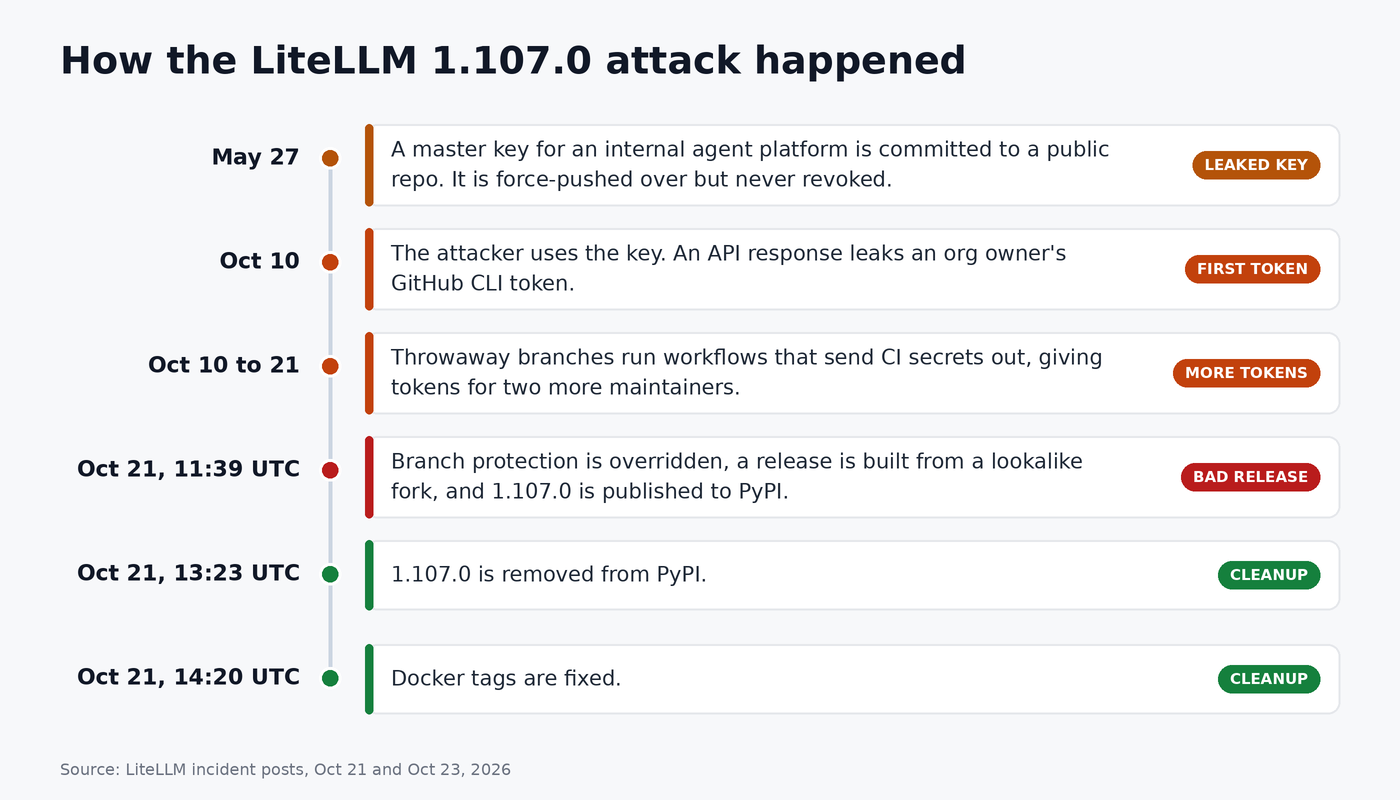
So the result was a signed release whose provenance faithfully recorded the wrong source. None of it is exotic. An old secret leaked and stayed valid. A human owner’s token sat in a service config with no scoping. A control got relaxed for convenience.
What I don’t know, and haven’t seen anyone publish: how many environments pulled 1.107.0 in the window, and whether credentials stolen from users have been abused yet. If someone quotes you a number right now, ask where it came from.
Are you affected?
You are in scope if anything installed litellm without a pinned version between 11:39 and 13:23 UTC on October 21 (7:39 to 9:23 AM Eastern), or ran one of those Docker tags before 14:20 UTC. Don’t stop at the proxy. Check laptops, CI runners, notebooks, internal mirrors, and any agent framework that pulls litellm in as a dependency.
The one rule every write-up agrees on: do not start Python in a suspect environment to check. That rules out pip show litellm. Use the shell.
Look for the files and the dist-info folder:
sudo find / \( -path /proc -o -path /sys \) -prune -o \
  \( -name cook.pth -o -name cook.py -o -name 'litellm-1.107.0*' \) -print 2>/dev/null
A file called sitecustomize.py is not proof of anything. Debian and Ubuntu ship one for the system Python. Compare hashes against the IOCs published by JFrog and Microsoft:
cat > /tmp/litellm-iocs.txt <<'IOC'
7f191632e7320705d154b85204f1ae546b543acbd7e8861229b76f5042b92bdb
84dc8c82c0a4a4a62552ef826b49fcc86d1a5c4a5d0f2c06665723f93d129d7d
9dd0a3926f96a37eb86cf1ee2310d9be93139cc4ebef3ef9e2efe9531390be25
03ac2a8b752605d1d7710979c17ff18b03dd978203ba23ba97fd8ce3d6f897ea
34bef04fe88ac9d0aae0475630b1738681d15b94f233ac8aa46eacf5968305fa
b6122440d0d9cb1eb1ade9933f49214da8c31288de7710c076c2680dfa528465
IOC
sudo find / -path /proc -prune -o -type f \( -name 'cook.p*' -o -name sitecustomize.py \) -print0 2>/dev/null \
  | xargs -0 -r sha256sum | grep -F -f /tmp/litellm-iocs.txt
Then the leftovers and the background loader:
ls -la /tmp/.pc_once_72129118c59f5636c0bb /tmp/remote_code_loader.lock 2>/dev/null
ls -d /tmp/.pc_e_* /tmp/.pc_sq_* 2>/dev/null
sudo lsof /tmp/remote_code_loader.lock
The .pc_once marker is only written after a successful upload. If you see it, your secrets left. If you don’t, that tells you nothing, because containers and tmp cleaners wipe it.
Containers, lock files and caches:
docker images --digests | grep -i litellm
kubectl get pods -A -o jsonpath='{range .items[*]}{.metadata.name}{" "}{.status.containerStatuses[*].imageID}{"\n"}{end}' \
  | grep -E '1bbcb1443bc9|c00f9d92c427|7b00e91cd2fe'
rg -n 'litellm==1\.107\.0' .
rg -U 'name = "litellm"\nversion = "1\.107\.0"' -g '*.lock' .
find ~/.cache/uv ~/.cache/pip -ipath '*litellm*1.107.0*' 2>/dev/null
The three digest prefixes come from LiteLLM’s post and cover the main, database and non_root images. If you run Artifactory, Nexus or devpi, purge 1.107.0 from there as well.
Cleaning up
If you found it, isolate first. If it’s a container, throw it away and redeploy from a pinned image. On a host, remove the files from the shell, kill whatever holds the lock, then rebuild the virtualenv from scratch instead of patching it:
SP=/path/to/venv/lib/python3.12/site-packages   # adjust
sudo rm -f "$SP"/cook.pth "$SP"/cook.py "$SP"/__pycache__/cook*.pyc
# only if its hash matched the IOC list:
sudo rm -f "$SP"/sitecustomize.py "$SP"/__pycache__/sitecustomize*.pyc
sudo kill $(sudo lsof -t /tmp/remote_code_loader.lock)
Pin to 1.106.2 or a later release the project has confirmed clean.
Then, from a different machine, rotate everything that host could read: provider keys, every key stored in the proxy database, the LiteLLM master and virtual keys, DATABASE_URL, cloud and instance role credentials, SSH and GPG keys, GitHub, PyPI and npm tokens, AI coding tool logins and browser sessions. Revoke active sessions too. A new password doesn’t kill an existing token.
Look for use. On AWS, LiteLLM suggests starting with GetCallerIdentity calls from the instance role:
aws cloudtrail lookup-events \
  --lookup-attributes AttributeKey=EventName,AttributeValue=GetCallerIdentity \
  --start-time 2026-10-21T11:00:00Z
After that, check whether the role’s credentials show up from IPs outside your own ranges, and grep DNS or proxy logs for litellm.dev.
The loader could run arbitrary code as the affected user. Nobody has seen it do that. Still, after rotating SSH keys I’d confirm nothing new turned up in authorized_keys or sudoers. I wrote a small free tool for that kind of before and after check, sudodrift. It snapshots Linux users, SSH keys, sudo rules and file permissions and diffs them against a baseline. It won’t detect this malware. It answers the next question, which is whether anything else on the box changed.
What I’d fix this week even if you never ran LiteLLM
Audit startup hooks. Any .pth line that starts with import runs on every interpreter start:
sudo find / -path /proc -prune -o -name '*.pth' -path '*-packages*' -print 2>/dev/null \
  | xargs -r grep -l '^import'
You will get legit hits from setuptools, virtualenv and editable installs. Know what each one is.
Pin by hash and by digest. Generate hashes with pip-compile --generate-hashes or uv pip compile --generate-hashes, install with pip install --require-hashes -r requirements.txt, and reference images as image@sha256:... instead of latest. Floating tags are part of how this one spread. uv also has --exclude-newer, which ignores anything published after a date you choose. It’s a cheap way to sit out the first hours of a bad release.
Treat any pushed secret as burned. A force-push hides the commit from the branch, not from people who already cloned it or scraped the push. Rotate first, clean history second. gitleaks git or trufflehog git file://. will scan your history.
Keep human owner tokens out of automation. Bots should use a GitHub App or a narrowly scoped token. Look under GitHub Settings, Applications, Authorized OAuth Apps for old GitHub CLI grants, and search your org audit log for branch protection overrides and deleted workflow runs.
My honest take: LiteLLM had hardened its release pipeline after March, and it still fell over because of one key from five months earlier that nobody killed. Most of us have one of those somewhere.
If this was useful, subscribe to Weekly Breach Notes for one breach a week and the fix that goes with it.
Sources
- LiteLLM, incident post for v1.107.0: https://docs.litellm.ai/blog/security-incident-oct-21-2026
- LiteLLM, attack chain and root cause (Oct 23): https://docs.litellm.ai/blog/security-incident-oct-21-2026-attack-chain
- JFrog Security Research, “LiteLLM Hijacked Again”: https://research.jfrog.com/post/litellm-hijacked-again/
- Datadog Security Labs, “LiteLLM supply chain compromise: What you need to know”: https://securitylabs.datadoghq.com/articles/litellm-compromised-pypi-docker
- Microsoft Security Blog, “Inside the LiteLLM 1.107.0 supply chain compromise”: https://www.microsoft.com/en-us/security/blog/2026/10/23/inside-the-litellm-1-107-0-supply-chain-compromise-credential-theft-through-python-startup-hooks/
- Socket, “New Evidence Shows LiteLLM Secret-Stealing Workflows Ran 11 Days Before Supply Chain Attack”: https://socket.dev/blog/litellm-attack-timeline
- OSV entry MAL-2026-2144: https://osv.dev/vulnerability/MAL-2026-2144
Subscribe to Weekly Breach Notes for one breach a week and the fix that goes with it.