Polymarket got drained through a page-speed script. Does your site load one?
A monitoring script that Polymarket loaded from its vendor DebugBear was swapped for a wallet drainer for about an hour on October 29. Hundreds of wallets were hit, by one count about 710 deposit addresses, though that is not the same as the number of victims. Here is what is confirmed, what is still open, and how to check your own site for the same weak spot.
By sudodrift
On Thursday afternoon, Polymarket’s international site was serving code that nobody at Polymarket wrote. It came in through a script that was supposed to measure how fast pages load. For a little under an hour it found logged-in traders, sold or moved their positions, and sent the money to one wallet.
Polymarket’s smart contracts were not the problem. The page itself was. That makes this a story about every website that pastes a vendor’s script tag into its HTML, which is most of them.
What happened
Polymarket used DebugBear’s real user monitoring (RUM) product. RUM works by embedding a small JavaScript file from the vendor’s CDN, in this case a per-customer file at cdn.debugbear[.]com/C7xcKKrjUnXK.js. That file runs inside every visitor’s browser with the same access as Polymarket’s own code.
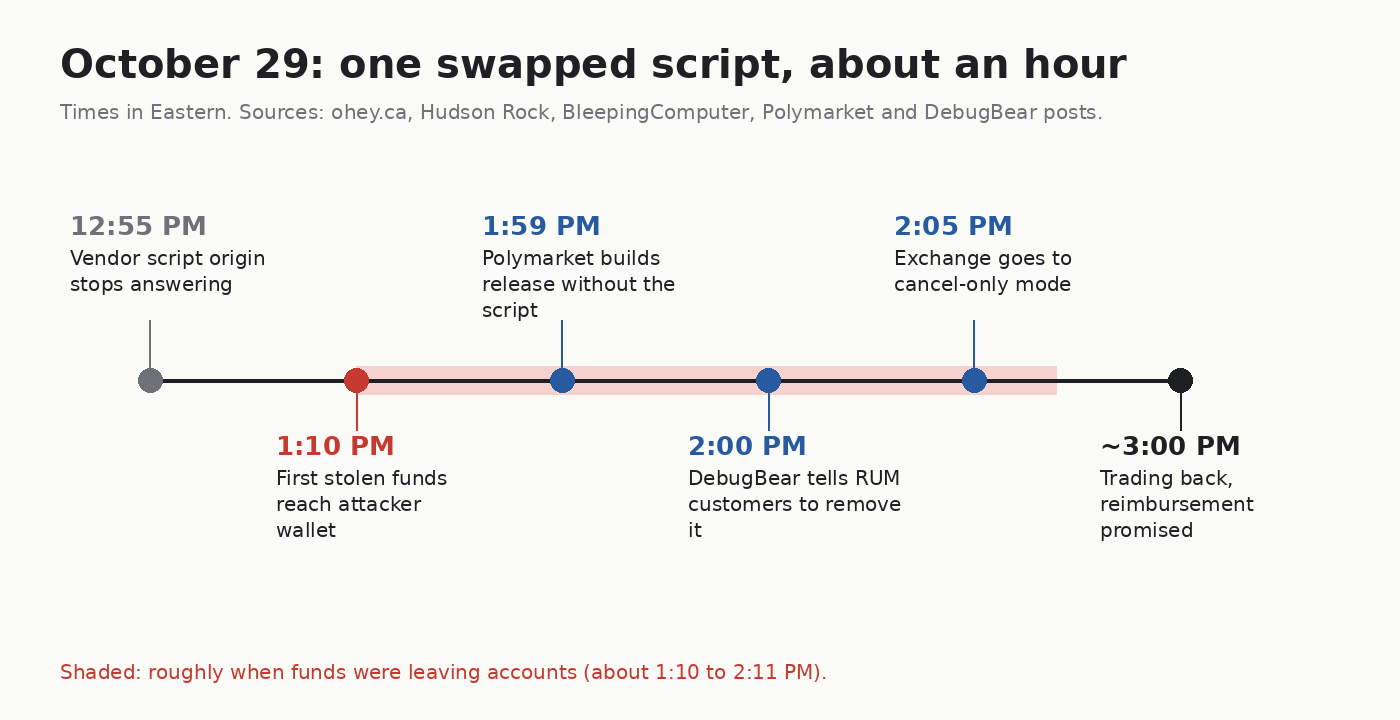
On October 29 the file at that address was replaced. Times below are Eastern.
- About 12:55 PM, the script’s normal origin stopped answering, according to a timeline published by the researcher at ohey.ca using archived copies and response headers.
- 1:10 PM, the first stolen funds reached the attacker’s wallet.
- 1:59 PM, Polymarket built a release with a commit titled “remove debugbear rum script”, which Hudson Rock found in build metadata.
- 2:00 PM, DebugBear posted on X that it was “impacted by an ongoing security incident” and told RUM customers to remove its embed code.
- 2:05 PM, Polymarket put the exchange in cancel-only mode.
- About 3:00 PM, trading was back and Polymarket said it would reimburse affected traders.
The swapped script did not need to steal a password or a seed phrase. Analysis from Hudson Rock, BleepingComputer and a write-up on Security Boulevard all describe the same trick. It read Polymarket’s session data from the browser, found the trading client already sitting in the page, and used the signer the user had already unlocked. Then it pushed sells and transfers through Polymarket’s own relayer. To Polymarket’s backend, those looked like normal requests from a logged-in user.
Confirmed and not confirmed
Confirmed by the companies themselves:
- Polymarket said one of its third-party providers was compromised, that it referred this to law enforcement, and that affected traders will be made whole.
- DebugBear said it was impacted by an ongoing incident and told RUM customers to pull the embed code.
- Polymarket’s US platform was not affected, according to CNBC as cited by The Record and other outlets.
Reported by researchers and on-chain analysis, not by Polymarket:
- Loss estimates land around $2.5 to $2.7 million across hundreds of wallets. GoPlus counted about 710 deposit addresses, but as SecurityWeek notes, that is not the same as the number of victims. Polymarket later put thefts at $2.7 million and said it was paying back $3.9 million in total, including traders hurt by the pause, per a Yahoo Finance report.
- Polymarket has not named DebugBear publicly. The link comes from the build commit, Hudson Rock’s analysis and DebugBear’s own post.
Still unknown:
- How DebugBear was broken into. Neither company has said.
- Whether other DebugBear RUM customers got a malicious file too. Hudson Rock said its evidence did not show a wider compromise. That is not the same as ruling one out.
If you use Polymarket
- Open your activity history on polymarket.com and look for sells or transfers on October 29 between about 1 PM and 2:10 PM Eastern that you did not make.
- If you see them, use Polymarket’s official support channel only. Expect fake “refund” messages and DMs this week. Polymarket is not going to ask for your seed phrase to pay you back.
- Read any release form before you sign it. Some users reported that larger repayments come with an ID check and a release, per the Yahoo report. I can’t tell you whether to sign. I can tell you to read it first.
- If you were logged in during that window, log out everywhere and back in. The analyses say the script did not send your API keys out, but resetting a session costs you a minute.
If you run a website
This is the part I care about most. A page-speed script, a chat widget, an A/B testing tag and an analytics snippet all have the same power as your own code. If one of those vendors is breached, your users are breached.
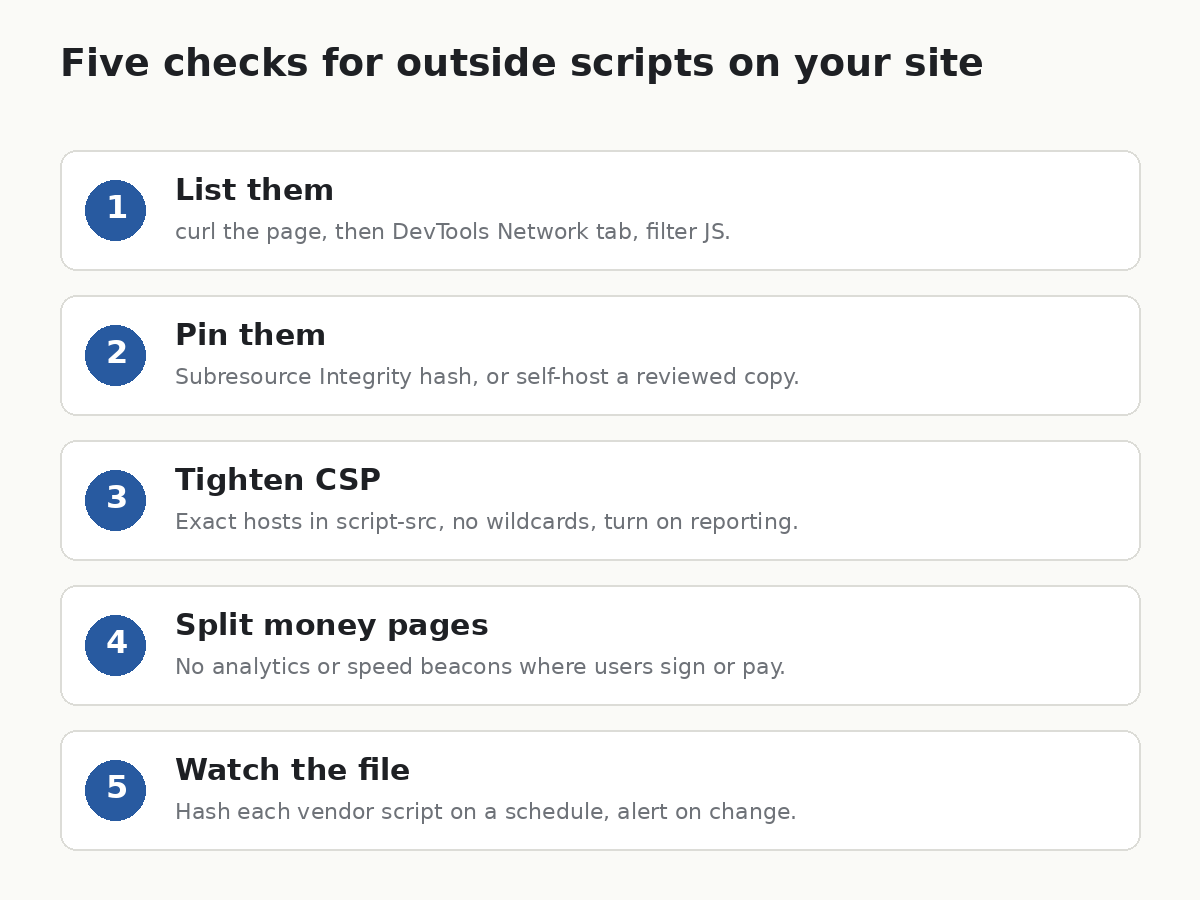
1. Find every script you load from someone else
On the live page:
curl -s https://yoursite.example/ \
  | grep -oE '<script[^>]+src="[^"]+"' \
  | grep -oE 'https?://[^/"]+' | sort | uniq -c
That only sees scripts in the first HTML. Tag managers load more later. For the full list, open DevTools, go to the Network tab, filter by JS, and reload while logged in.
In your code:
git grep -nE 'debugbear|<script[^>]+src=' -- '*.html' '*.tsx' '*.jsx' '*.ts' '*.js' '*.vue'
If debugbear shows up and you use their RUM product, do what DebugBear said and remove the embed until they publish an all-clear.
2. Pin what you can with Subresource Integrity
Subresource Integrity (SRI) tells the browser to refuse a script whose hash does not match. Make the hash like this:
curl -s https://vendor.example/lib.js | openssl dgst -sha384 -binary | openssl base64 -A
Then add it to the tag:
<script src="https://vendor.example/lib.js"
        integrity="sha384-PASTE_HASH_HERE"
        crossorigin="anonymous"></script>
The honest limit: SRI breaks the moment the vendor ships an update, and many monitoring vendors update their files without telling you. Scott Helme of Report URI argued that pinning the file to a known hash would have stopped this one. I agree, and it means you either accept updating the hash yourself or you self-host a copy you have reviewed.
3. Do not let your CSP become a guest list for everyone
Content Security Policy (CSP) is the header that says which hosts your page may load from and talk to. According to the ohey.ca analysis, every host the drainer called, apart from DebugBear’s own, was already allowed by Polymarket’s CSP. That is normal. A drainer that uses your own APIs will pass your own allowlist.
Two things still help. Keep script-src tight and list exact hosts, not wildcards like *.cdn.example. And turn on CSP reporting (report-to) so a new host showing up in production gets noticed in minutes instead of in a news story.
4. Keep money pages separate
If a page can sign transactions, move money or change account settings, it should load as little outside code as possible. Analytics can live on marketing pages. The trading screen does not need a page-speed beacon. That one change would have taken this attack off the table.
5. Watch the file, not just the vendor’s status page
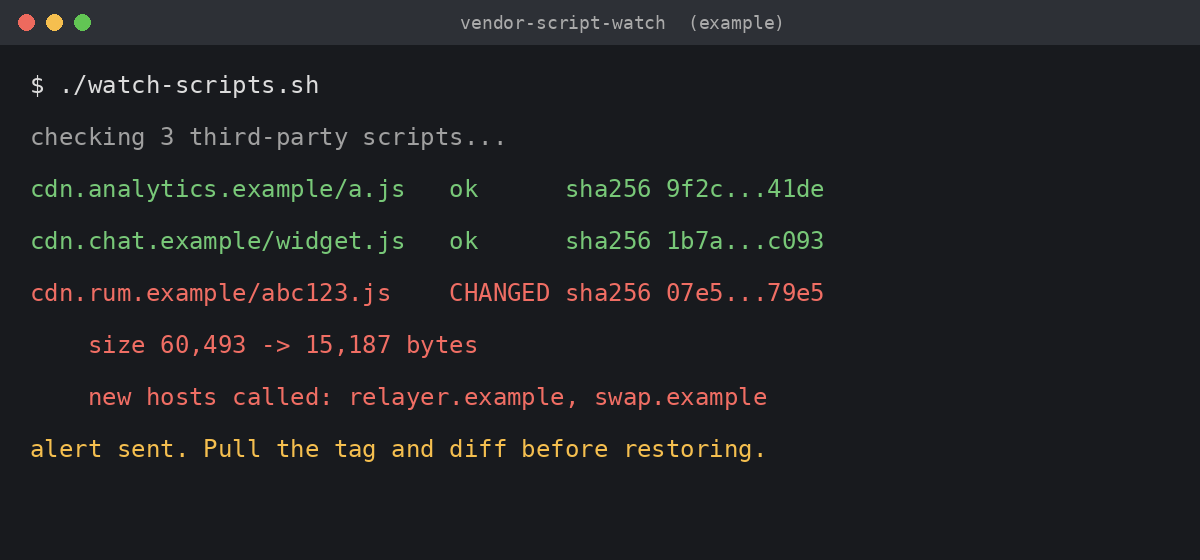
A tiny cron job that fetches each third-party script and compares the hash catches a swap even when the vendor has not noticed yet:
curl -s https://vendor.example/lib.js | sha256sum
Store the result, alert on change, and look at the diff. It is noisy for vendors that update often. It was exactly the signal here: the file went from about 60 KB to about 15 KB, according to the archived copies.
What I take from it
Polymarket reacted fast. Under an hour from first theft to a clean build is better than most companies manage. It still was not fast enough, because a drainer only needs minutes. Yahoo also reports this was the second time since June that a vendor’s code was used against Polymarket’s frontend, which says more about the setup than about one bad vendor day.
The lesson is boring and it applies to almost everyone. Count the outside scripts on your most sensitive page, and ask why each one is there.
Sources
- BleepingComputer, Polymarket halts trading after crypto-draining script breach, $2.5M traced, October 29, 2026
- The Record, Polymarket confirms cyberattack on third-party provider after outages
- ohey.ca, Polymarket wallet drainer served from DebugBear’s script CDN, October 29, 2026
- Security Boulevard, Dissecting the Polymarket malicious JavaScript compromise
- Yahoo Finance, Polymarket sends $3.9M back to traders after vendor script drain
- DebugBear and Polymarket posts on X, October 29, 2026, as quoted in the reports above
If this was useful, Weekly Breach Notes sends one of these with the checks every week. Subscribing is free.
Subscribe to Weekly Breach Notes for one breach a week and the fix that goes with it.