Someone is password-spraying FileMaker Servers. Here is how I'd check mine tonight.
A FileMaker hosting company pulled every server offline on October 25. If you run FileMaker Server yourself, here is what I would check first, and which keys I would change.
By sudodrift
FileMaker doesn’t get much attention in security news. It runs the back office of a lot of small businesses, schools, clinics and nonprofits, often on one box that a contractor set up years ago. That’s why this week caught my eye.
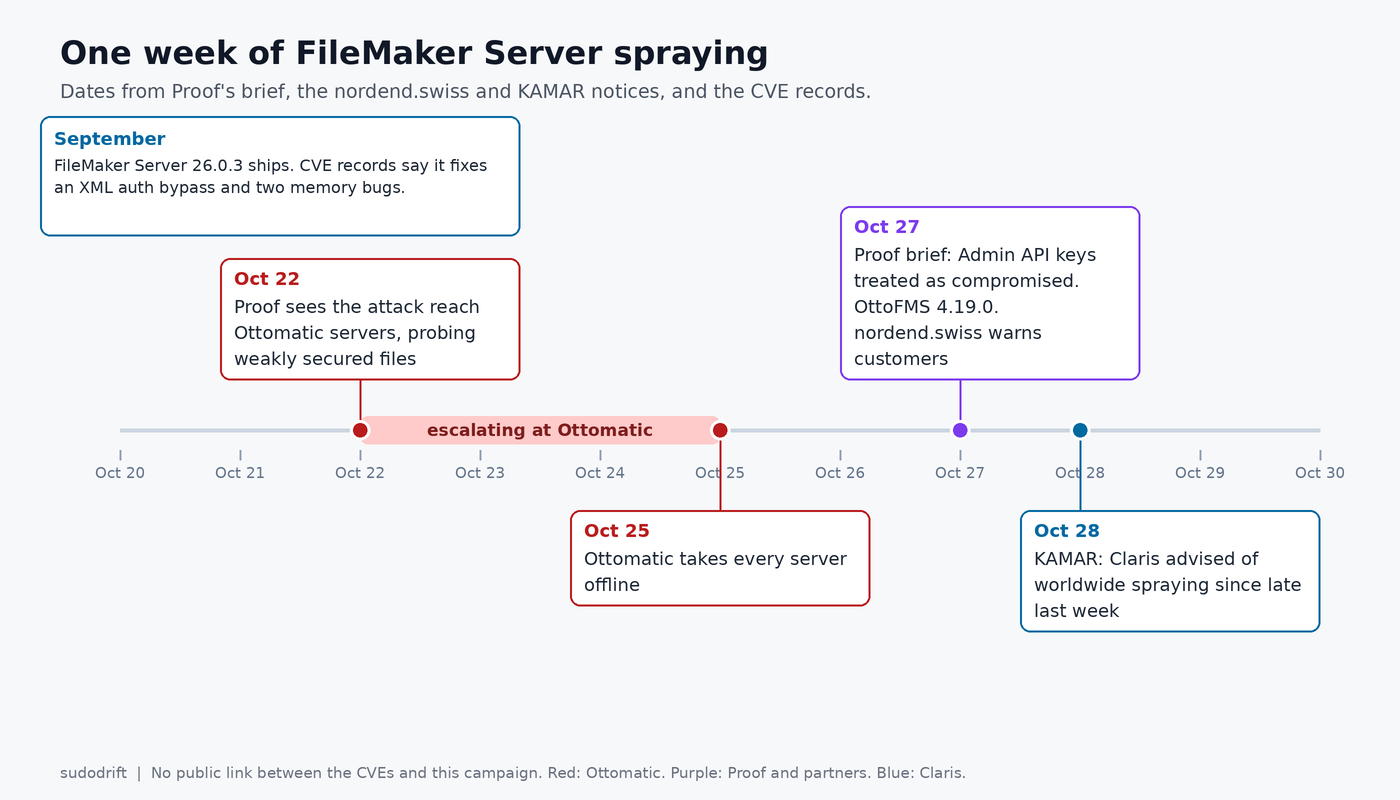
On October 27, Proof, the company behind the Ottomatic hosting service and the OttoFMS tool, put out a brief on a coordinated attack against FileMaker servers. A day later the New Zealand school software vendor KAMAR posted a notice to its schools saying Claris had warned of password spraying against FileMaker Servers worldwide, going on since late last week. A Swiss FileMaker partner, nordend.swiss, sent its customers a similar warning (in German) on October 27.
Password spraying is the boring kind of attack. The attacker takes a short list of likely passwords and tries each one against many account names, slowly, so no single account locks out. It works on servers that still have an admin account with a weak password, or a Guest account that can see more than anyone meant.
What is confirmed so far
From Proof’s brief:
- Its team saw the attack reach Ottomatic’s managed servers on October 22. The first phase hunted for databases with poor security settings. Over the next few days it moved on to the servers and the systems around them.
- Ottomatic shut down all of its servers on October 25.
- Proof is treating every FileMaker Server Admin API key on Ottomatic servers as compromised. On servers that used OttoFMS Webhooks it also considers Data API and OData keys exposed, since the attacker may have got to log files.
- On a few servers, Proof found evidence that someone tried to reach data. Proof says that review isn’t finished and the number could change.
- Proof says OttoFMS did not cause the Admin API key exposure. It shipped OttoFMS 4.19.0 with security changes anyway, and asks on-prem users to install it.
- Proof lists four targets for the spraying: the Admin Console, plus the Data API, OData and XML endpoints. KAMAR adds WebDirect, and notes that all of these sit on port 443.
What I don’t know, and what nobody has said in public as far as I can find:
- Who is behind it, and how many servers have actually been broken into rather than just tried.
- How the Admin API keys at Ottomatic were exposed. Proof says what it isn’t (OttoFMS) but not what it is.
- Whether any software bug is involved. Everything published so far describes password guessing, not an exploit.
- What Claris itself published. KAMAR refers to a Claris advisory, but I couldn’t find a public copy on Claris’s site or community today. If you’re a Claris customer, check your email and the Claris Customer Console. I’ll update this if one turns up.
- I found no coverage of this in the security press yet, and nothing on Medium or Substack. The only write-ups are from vendors and partners telling their own customers what to do.
Proof also says the same attackers are going after any system they can reach, not only FileMaker. I can’t check that claim. I’d take it as a reason to look at your VPN and remote desktop logs too.
Why I’d also patch, even though this is “just” passwords
FileMaker Server 26.0.3 came out in September. Three CVE records say it fixes:
- CVE-2026-86934 (CVSS 9.1): a request carrying an extended privilege header could reach the XML Web Publishing interface even when XML publishing was switched off.
- CVE-2026-86930 (9.1): on Linux, a crafted image uploaded to a container field could leak process memory when WebDirect made a thumbnail.
- CVE-2026-86926 (7.8): a crafted .fmp12 file could corrupt memory in the database engine.
Details for all three are on OpenCVE’s Claris page. Nobody has tied any of them to this campaign, and I’m not claiming a link. But the first one bothers me in this context. XML is one of the endpoints being sprayed, and a lot of admins think of it as off because the setting says off. On older builds that wasn’t the whole story.
Two oddities worth knowing. The 26.0.3 release notes only list one CVE in their security section (an ImageMagick one), so if you read only the release notes you’d miss the three above. And the CVE records only name 26.0.3. I couldn’t find whether FileMaker Server 2025 (version 22) gets the same fixes. If you’re on 22.x, ask Claris before assuming you’re covered.
Step 1: see what the internet sees
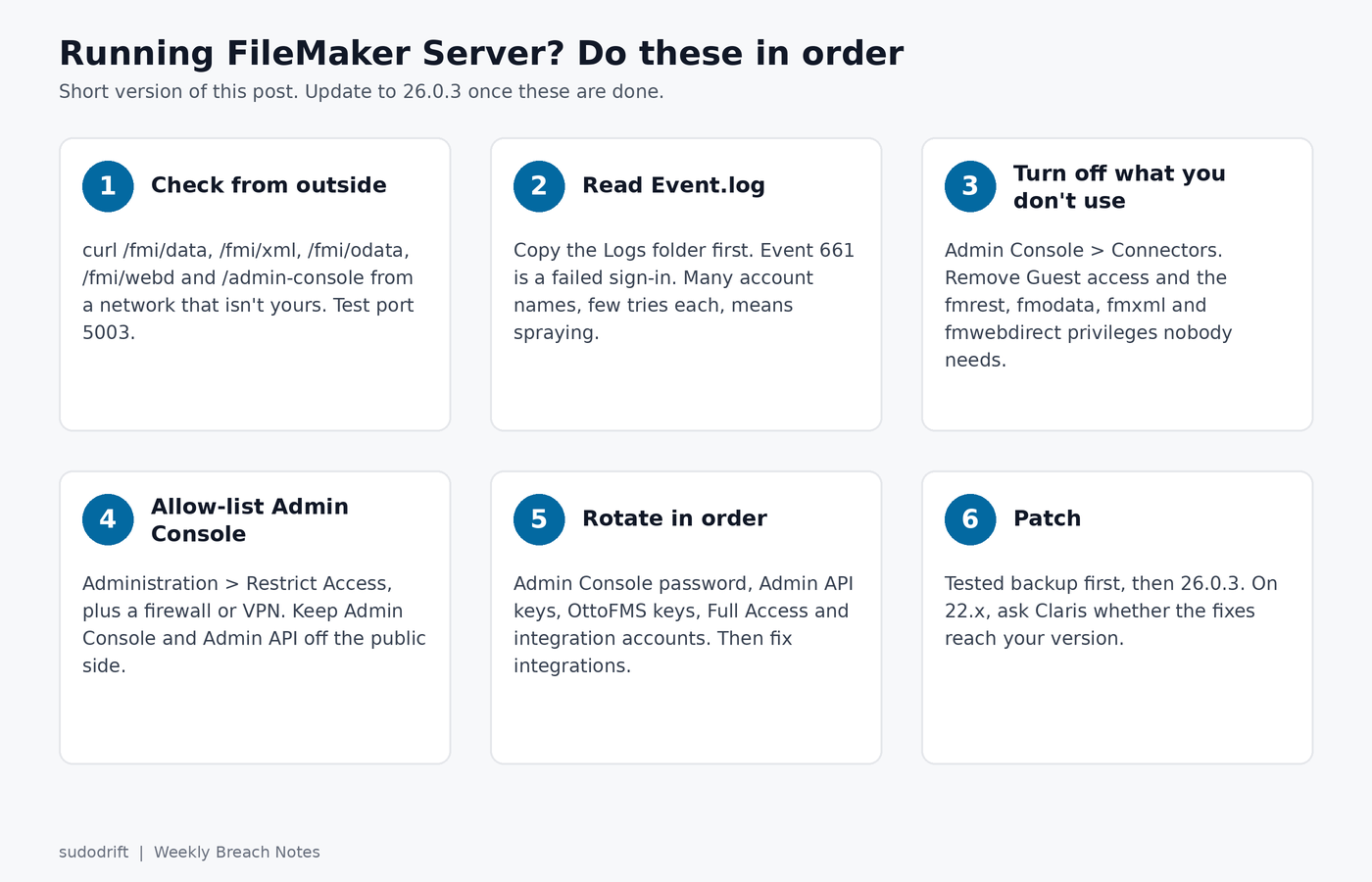
Do this from outside your network. A phone hotspot or a cheap cloud VM works. From inside the office you’ll see everything, which tells you nothing.
These are the doors that matter. Replace the host with yours:
H=https://fms.example.com
curl -s "$H/fmi/data/vLatest/productInfo"            # Data API: no login needed for this one
curl -s "$H/fmi/xml/fmresultset.xml?-dbnames"        # XML publishing
curl -s -o /dev/null -w '%{http_code}\n' "$H/fmi/odata/v4"     # OData
curl -s -o /dev/null -w '%{http_code}\n' "$H/fmi/webd"         # WebDirect
curl -s -o /dev/null -w '%{http_code}\n' "$H/admin-console"    # Admin Console
nc -vz fms.example.com 5003                          # FileMaker Pro and Go
How to read it:
productInfois documented by Claris as needing no auth header. If it returns JSON naming the “FileMaker Data API Engine”, the Data API is on and reachable.-dbnameslists databases that are enabled for XML. If you get back a result with error code 0, XML publishing is on. Claris’s error table lists 959 as “Custom Web Publishing technology is disabled”.- For OData, WebDirect and the Admin Console, anything other than a 404, a 403 or a timeout means something answered. A 401 still means the door is there and someone can knock on it all day.
- Older FileMaker Server versions used port 16000 for remote Admin Console access. Current ones use 443, per Claris’s ports page. If 16000 is open on your box, you’re running something old, or you have a firewall rule nobody cleaned up.
I put these into a small script, filemaker-exposure-check.sh, about 65 lines of bash. It sends a few GETs with no credentials, opens one TCP connection to 5003 and one to 16000, and never tries a password. Point it only at a server you run.
./filemaker-exposure-check.sh https://fms.example.com ~/fms-logs-copy
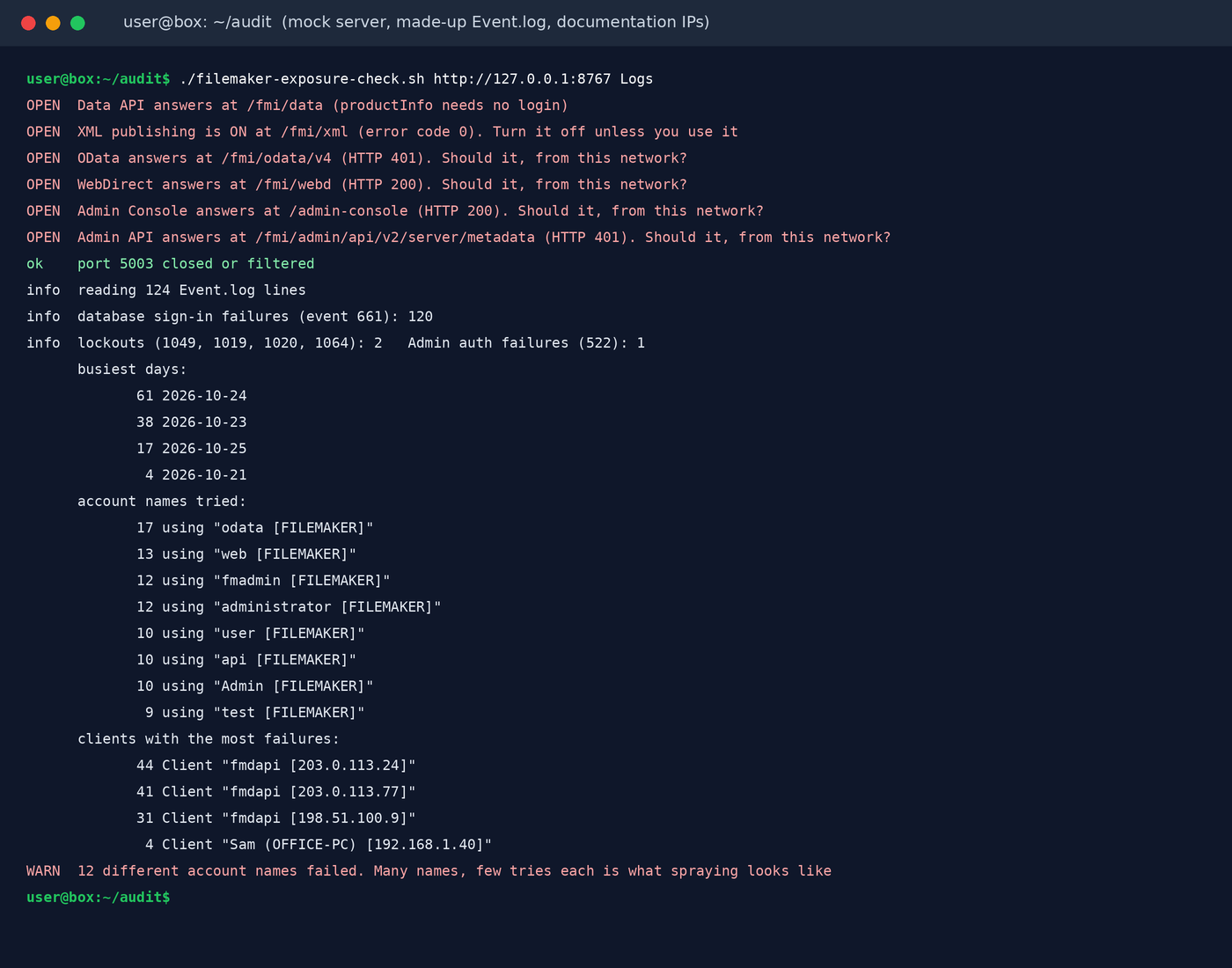
That run is against a fake server on my own box with a made-up log. The IPs come from the ranges reserved for documentation. Real FileMaker answers may differ in small ways from my mock, which is one reason the script reports what it saw instead of guessing.
Step 2: read the logs for the spray
Logs live in one folder. These are the default paths from Claris’s docs:
- Windows:
C:\Program Files\FileMaker\FileMaker Server\Logs - macOS:
/Library/FileMaker Server/Logs - Linux:
/opt/FileMaker/FileMaker Server/Logs
Claris says not to open log files in place while the server is running, because processes may be writing to them. Copy the folder, or download logs from Admin Console under Logs > Log Viewer, and work on the copy.
The file that matters most is Event.log. Per the Access log page, Access.log only holds information-level messages, and warnings and errors go to Event.log. A failed sign-in is a warning. So if you only skim Access.log, you can miss the whole thing.
The event IDs I’d search for, from Claris’s list of Event.log messages (I read it through a mirror on CyberFM because the Claris community page wouldn’t render for me):
- 661: a client failed to authenticate to a database. This is the main one.
- 1049: an account was temporarily locked after too many failed attempts.
- 522: Admin Console authentication failed.
- 1019, 1020 and 1064: Admin Console sign-in blocked or the admin account locked after too many failures.
On Linux or macOS, against your copy:
cd ~/fms-logs-copy
grep 'authentication failed on database' Event*.log | cut -c1-10 | sort | uniq -c       # failures per day
grep 'authentication failed on database' Event*.log | grep -o 'using "[^"]*"' | sort | uniq -c | sort -rn | head
grep -E 'temporarily (locked|disabled)|Administrator authentication failed' Event*.log
On Windows, in PowerShell:
Select-String -Path .\Event*.log -Pattern 'authentication failed on database' |
  Group-Object { $_.Line.Substring(0,10) } | Sort-Object Name
What spraying looks like: lots of different account names (admin, Admin, api, web, odata, test), each tried a few times, from a handful of addresses, often spread over hours. One user who forgot their password looks very different: one name, many tries, one address you recognise.
Then look at the per-service logs in the same folder: fmdapi.log for the Data API, fmodata.log for OData, wpe0.log for WebDirect and XML, and fac.log for the Admin Console and Admin API. The monitoring page lists them all. I haven’t seen enough real samples of these during an attack to give you a reliable pattern, so I’m not going to pretend. Sort by time, look at the days from October 20 on, and look for bursts.
Limits, honestly: Event.log rolls over to Event-old.log when it hits the size limit, and after that the older history is gone. A quiet log on a busy public server can just mean the evidence rolled off. And a failed sign-in log shows you the attempts. It doesn’t show you the one that worked. For that, go to Access.log, which records clients connecting and the account each one used, and look for account names you don’t expect at hours nobody works.
Step 3: switch off what you don’t use
Every connector that’s on and reachable is one more place to spray. In Admin Console, under Connectors, there is a tab each for Web Publishing (WebDirect and XML), FileMaker Data API, OData and ODBC/JDBC. Turn off whatever has no named owner and no current use.
From the command line on the server, Claris documents fmsadmin set cwpconfig enablexml=true to turn XML on. I’d expect enablexml=false to turn it off, but I’m going from the documented form, not from a page that says so. Check fmsadmin help on your version. fmsadmin stop wpe and fmsadmin stop fmdapi stop the web publishing and Data API processes, but I’d use the Admin Console switches as the lasting change, since a stop may not survive a restart.
Then go into the files themselves, in FileMaker Pro:
- Turn off the Guest account, or at least take every extended privilege away from it. If you truly need public data, Proof and nordend both suggest a separate file that holds only that data. I agree.
- Look at which privilege sets have
fmrest(Data API),fmodata,fmxmlandfmwebdirectturned on. nordend recommends that [Full Access] accounts have none of the web ones. That’s my view too. Full Access over the internet is a bad trade for convenience. - Give each integration its own account with the smallest privilege set that works.
Step 4: put the Admin Console behind an allow list
In Admin Console, go to Administration > Restrict Access and set Enable Access Restriction to Enabled. Then add the IP addresses that should reach it, separated by commas. Claris’s page says the change takes effect at once and that 127.0.0.1 is always allowed. KAMAR runs its own cloud servers with Admin Console reachable from localhost only, which is where I’d want to be.
One catch. The FileMaker Server 2024 release notes list a fix for this restriction being bypassed with the X-Forwarded-For header. If you’re still on a build from before 2024, the allow list may not be doing what you think. Use your firewall as well.
Better still, don’t put 443 on the open internet at all. If your users are all staff, a VPN in front of the server removes almost all of this risk. If WebDirect must be public, at least keep the Admin Console and Admin API paths off the public side.
Step 5: rotate in the right order
If your server was reachable and you see sprays, assume a weak password may have been found. Rotate in this order, so the attacker can’t use one thing you missed to see the next one you change:
- The Admin Console password. Administration > Administrator > Password in Admin Console.
fmsadmin resetpwexists if you’re locked out. - FileMaker Admin API public keys. These sit on the same Administration > Administrator tab, per Claris. Delete any you can’t explain, and replace the rest with new key pairs.
- If you use OttoFMS: its Admin API keys (they start with
ak_) and Data API keys (dk_). The OttoFMS docs say an Admin API key can do anything your Admin Console login can. From 4.19.0 you can revoke keys and set expiry dates. Revoking a Data API key also deletes the FileMaker password stored with it, so make the new one first. - Passwords for every [Full Access] account, and for every account that sits behind a Data API key, OData client or other integration.
- Then update every integration that used them.
The last item is where people get stuck, because nobody knows where the credentials ended up. Search your code, CI settings and automation tools (Zapier, Make, n8n and friends) for /fmi/data/, /fmi/odata/, /otto/fmi/, apiKey=, dk_ and ak_. Every hit is something that will break when you rotate, and something that was holding a secret.
Proof makes a point I’d repeat: don’t store passwords in FileMaker fields, and don’t write API keys or personal data into log files. Proof is treating Data API keys on webhook servers as exposed for exactly that reason. The attacker may have reached the logs.
Step 6: update to 26.0.3
Take a backup you’ve actually tested, then install 26.0.3 using the full installer from your Claris download page. On macOS, read the note at the top of Claris’s release notes first. It says running the installer straight from a mounted .dmg can skip setup options and leave you unable to reach Admin Console, and it links to the fix.
If you can’t update this week and you have a proxy or WAF in front of the server that can filter by path, block /fmi/xml there as well as switching XML off, because of CVE-2026-86934.
My take
None of this is clever. The attackers are betting that FileMaker servers have weak passwords and more services switched on than anyone uses, and on a lot of servers that bet pays. Proof’s choice to pull everything offline was painful for its customers, but I’d rather a host do that than discover in a month which servers were in the “small number”.
If you only have twenty minutes tonight: run the curl checks from outside, grep Event.log for 661, and turn on Restrict Access. Rotation can wait until tomorrow morning. It shouldn’t wait until next week.
Sources
- Proof, FileMaker Systems Attack Brief, October 2026, October 27, 2026
- KAMAR, Security: FileMaker Server, October 28, 2026
- nordend.swiss, Sicherheitshinweis: Laufende Angriffe auf FileMaker Server, October 27, 2026
- Claris, FileMaker Server release notes
- OpenCVE, Claris CVE list (CVE-2026-86934, CVE-2026-86930, CVE-2026-86926)
- Rapid7, CVE-2026-86934 entry
- Claris, Viewing and downloading log files, Access log, Event log, Monitoring FileMaker Server
- Claris, FileMaker Server Event Log Messages, read via the CyberFM mirror
- Claris, Restrict access, Administrator settings, Starting or stopping components, Hosting databases for XML queries, Ports used by FileMaker Server
- Claris, Data API: Get product information, FileMaker error codes
- Ottomatic, OttoFMS: Using API Keys
If this was useful, Weekly Breach Notes sends one of these with the checks every week. Subscribing is free.
Subscribe to Weekly Breach Notes for one breach a week and the fix that goes with it.