A Vendor Left a Live Database Key on a Public Website for 14 Months. Check Yours Today.
A health analytics vendor put a working key to a member database on the open web and nobody on its side noticed for over a year. Here is what is known, and how to check your own sites and vendors.
The scary part of this one is not the number. It is the date range.
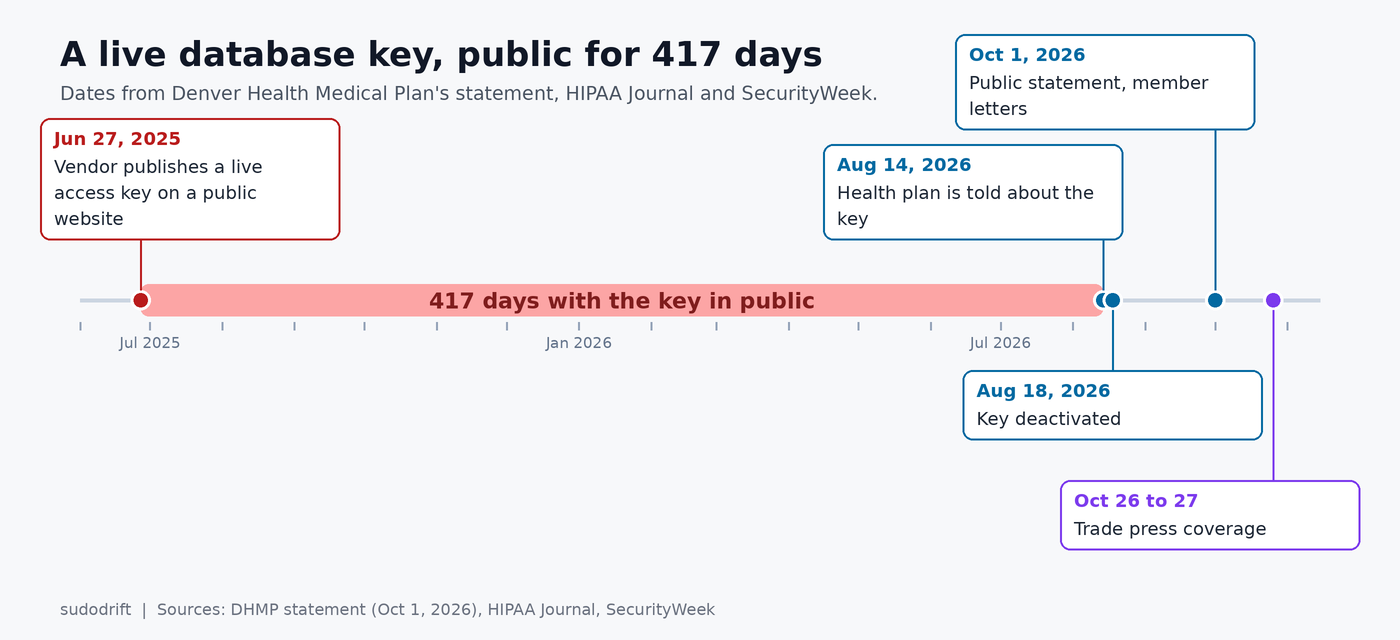
An access key for a database holding health data on 238,083 people went up on a public website on June 27, 2025. It came down on August 18, 2026. That is 417 days where anyone who stumbled on it had a working credential. No exploit, no phishing, no ransomware crew. Just a string in the wrong place.
The database belonged to SquareML, a healthcare analytics vendor. The members belong to Denver Health Medical Plan (DHMP), a nonprofit plan inside the Denver Health and Hospital Authority that runs Medicaid benefits for people in Denver and nearby counties.
I see this class of mistake more than any other in real work. So I want to cover the facts quickly and then spend most of this post on how you find the same thing before someone else does.
What has been confirmed
All of this comes from DHMP’s own statement dated October 1, plus reporting by HIPAA Journal on October 26 and SecurityWeek on October 27.
- SquareML published an active access key on a publicly reachable website on June 27, 2025. DHMP calls it inadvertent.
- DHMP was told about it on August 14, 2026. The key was turned off four days later, on August 18.
- The key could reach a SquareML database with data on 238,083 DHMP members.
- That data included full names, dates of birth, city, state and ZIP code, demographic details, plan eligibility, provider names, hospital admission, discharge and transfer records, and lab style health numbers like BMI, HbA1c and eGFR.
- No Social Security numbers or financial data were in that database, according to DHMP.
- The account behind the key was read-only. DHMP says it could not be used to download, export, delete or change data.
- Passwords were reset for every account with access to the database. Letters have gone out to members, and there is a hotline at 888-766-0023.
What we still don’t know
Quite a lot, and these gaps matter for anyone trying to learn from it.
- Which website. Nobody has said whether it was a marketing site, a docs page, a code repo, a JavaScript bundle or something else.
- What kind of key. It could be a cloud provider key, a database user and password, or a vendor API token. That changes how you would hunt for use of it.
- Who found it. “DHMP was informed” does not say by whom.
- Whether there were logs. The plan says it has “no evidence that member information was viewed or misused, only that it may have been.” That is an honest sentence. It is also what you write when you can’t prove a negative across 14 months.
One thing I’d push back on gently. “Read-only” sounds reassuring, and it does rule out tampering and deletion. But a breach of health data is about reading. If the key let someone run queries and see rows, then copying those rows off a screen or out of a query result is the whole risk. I’d treat “could not download or export” as a statement about one interface, not a guarantee about the data.
If you are a DHMP member
This is the short part, because there is not much you can do about data that may have been read.
Read the letter if you got one and keep it. Call the hotline above if you want to confirm whether you are in the set. Expect phishing that uses your real provider name or a real hospital stay as bait, since those details were in scope. A call or text that knows about your last admission is not proof it is legitimate. Hang up and call the number on your member card.
Because no SSNs or card numbers were involved, a credit freeze is optional here rather than urgent. I’d still do it, since it is free in the US and takes ten minutes per bureau.
If you run websites, or buy from vendors who do
This is where I’d spend the hour.
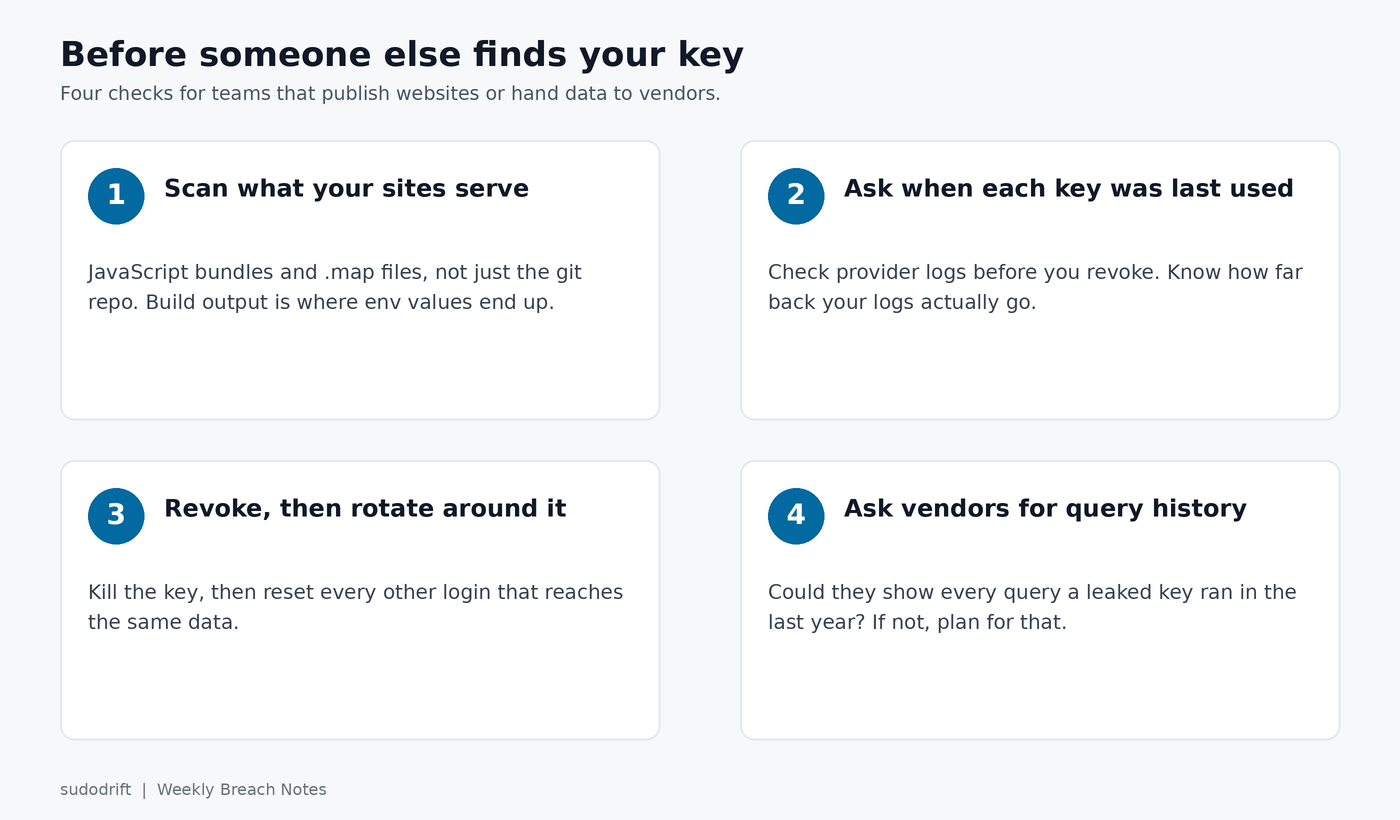
Check 1: Scan what your public sites actually serve
Your repo scanner probably runs on source code. The leak here was on a website. Those are not the same files. Build steps inline environment variables into JavaScript bundles all the time, and source maps ship the original source right next to them.
So scan the thing a visitor’s browser gets, not the thing in git. I wrote a small script that fetches a page, every script it loads, and the matching .map file if one exists, then greps for strings shaped like live credentials (AWS, Google, Azure storage, GitHub, Slack, OpenAI style keys, private key blocks, and database URLs with a password in them).
./public-key-scan.sh https://www.example.com https://docs.example.com
It only downloads what any browser would, waits a second between files, and prints the first 12 characters of anything it finds so the full secret does not end up in your terminal history or CI logs. Here it is against a test site I set up with fake keys:
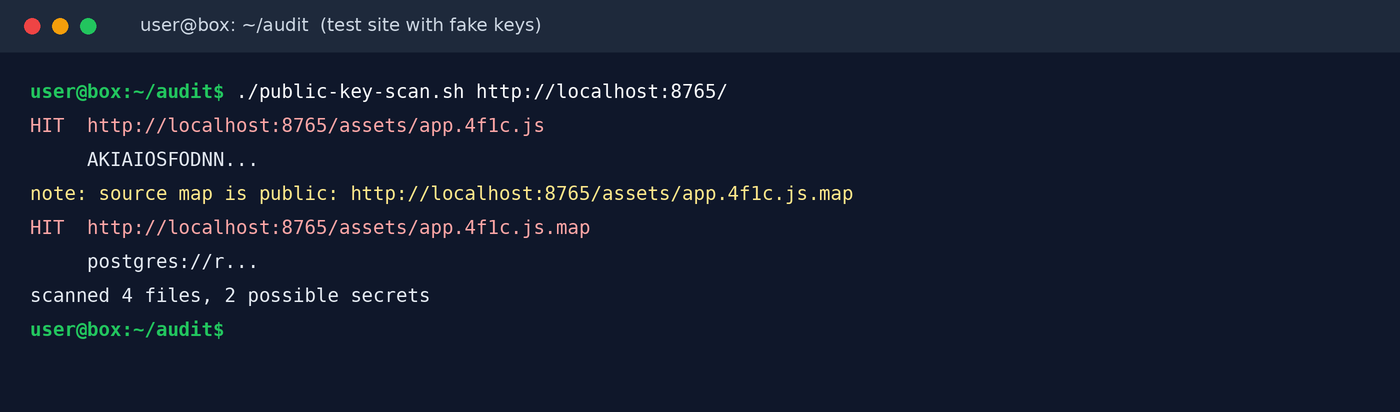
Note the second hit. The bundle had an AWS key, which is bad. The source map had a full database URL with a password, which is worse and much easier to miss, because nobody looks at map files.
The script is a starting point, not a crawler. It looks at the pages you name. For a full pass on a built site, point a proper scanner at your build output before deploy:
trufflehog filesystem ./dist --only-verified
gitleaks dir ./dist
And stop shipping source maps to production unless you have a reason. In most bundlers that is one setting (build.sourcemap: false in Vite, devtool: false for production in webpack).
Check 2: For every key you find, ask when it was last used
Finding a key is half the job. The next question is whether anyone used it. Do this before you revoke, while you still know which key you are asking about.
AWS:
aws iam get-access-key-last-used --access-key-id AKIA...
aws cloudtrail lookup-events \
  --lookup-attributes AttributeKey=AccessKeyId,AttributeValue=AKIA... \
  --max-results 50
The honest limit: CloudTrail event history only covers the last 90 days and only management events. If the key was public for a year, you need a trail that was writing to S3 the whole time. Data reads from S3 or DynamoDB are not in event history at all unless you turned on data events.
Google Cloud service account keys:
gcloud iam service-accounts keys list \
  --iam-account=reporting@PROJECT.iam.gserviceaccount.com --managed-by=user
gcloud logging read \
  'protoPayload.authenticationInfo.serviceAccountKeyName:"KEY_ID"' \
  --freshness=400d --limit=50
Postgres, if it was a database login:
SELECT rolname, rolvaliduntil FROM pg_roles WHERE rolcanlogin;
ALTER ROLE report_ro WITH PASSWORD 'new-long-random-value';
Postgres does not log reads by default. If log_connections was off, you will not know who connected. Turn it on now so the next time you have an answer.
Check 3: Revoke, then rotate everything that key could reach
Kill the key first. Then reset every other credential that touches the same data, because whoever found one key in a public file may have found others nearby. DHMP did this with passwords, which is the right instinct.
For Azure storage keys that is az storage account keys renew --account-name NAME --resource-group RG --key primary, then the same for secondary once apps are moved. For cloud keys, delete rather than disable once you are sure nothing legitimate depends on them.
Check 4: Ask your vendors the boring questions
This is a vendor incident, and the plan that holds the member relationship is the one writing letters. If you send data to an analytics or reporting vendor, a few questions are worth an email this week:
- Do any long-lived keys or database logins reach our data, and who can see them?
- Do you scan your public websites and published files for secrets, or only your repos?
- If a key to our data were found tomorrow, could you show us every query it ran in the last year?
The third one is the real test. If the answer is no, then “no evidence of misuse” is the best they will ever be able to tell you.
My take
Fourteen months is the number I keep coming back to. Secret scanning on repos has become normal. Secret scanning on the websites we actually publish has not, and neither has keeping access logs long enough to answer the question that matters after a leak. A read-only key with good logs is a bad week. A read-only key with no logs is a year you can’t account for.
If you only do one thing from this post, run a scan against your own public site and its source maps today. It takes a few minutes.
Sources
- Denver Health Medical Plan, statement on the SquareML incident, October 1, 2026
- HIPAA Journal, Denver Health Medical Plan Discloses Vendor Breach Affecting 238K Members, October 26, 2026
- SecurityWeek, Vendor Key Leak Puts Data of 238,000 Denver Health Plan Members at Risk, October 27, 2026
- AWS docs, GetAccessKeyLastUsed and CloudTrail event history
If you want one of these in your inbox each week, with the checks that actually matter, subscribe to Weekly Breach Notes.
Subscribe to Weekly Breach Notes for one breach a week and the fix that goes with it.