26,400 working keys were sitting in public Gitee repos. One scanner would have caught about half.
A researcher cloned 7.25 million public repositories on Gitee and found 26,400 credentials that still worked. The number is big, but the detail I keep coming back to is smaller: the two scanners he used mostly found different keys. If you scan your own repos with one tool and call it done, this is a good week to stop.
By sudodrift
What happened
On October 28, independent researcher Ben Zimmermann published his results as a guest post on MongoDB’s blog. Gitee is the biggest code host in China. He collected 7,256,531 public repos, cloned them, and ran TruffleHog and Kingfisher over each one. Both tools try a found key against the service that issued it and throw away anything that fails. MongoDB makes Kingfisher, and the post was written with that team, which is worth keeping in mind when you read the comparison.
The Hacker News wrote it up on October 29. Here is what’s on the record:
- 26,400 unique working credentials, counted once each by value.
- Alibaba Cloud AccessKey pairs were the biggest group, about 9,400 of them. The post puts it at roughly one live Alibaba key per 766 repos.
- Next came YouTube (Google Cloud) API keys, DeepSeek, Zhipu BigModel and OpenAI keys, then a long tail that includes GitHub, AWS, Gemini, Stripe and Slack.
- Nearly half, 12,242, were committed in 2025. So this is not just old abandoned code.
- One was described as “an active organization-admin credential for a major enterprise AI platform.” The platform was not named.
- He reported the keys to the vendors that had the most of them, rather than to each developer.
What is not known: the exact dates of the scan, whether vendors have revoked anything yet (the post says that wasn’t confirmed at publishing), and whether anyone else used these keys first. I have no evidence either way on that last one and I won’t guess.
The part that matters for your own repos
The two tools barely overlapped. From the post’s own table:
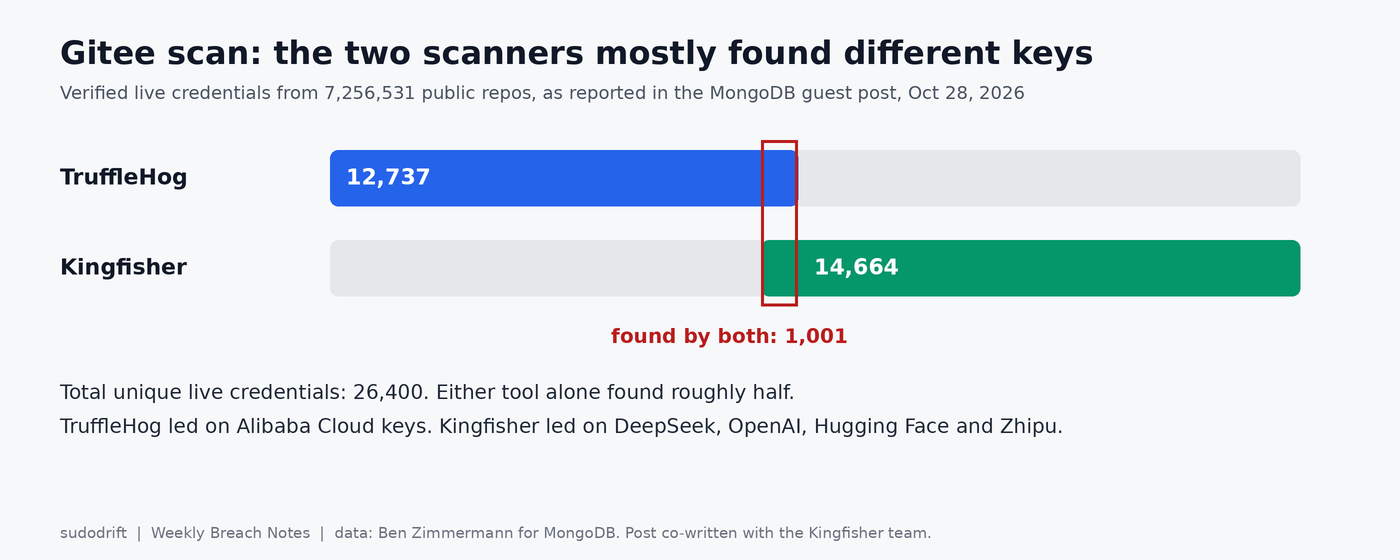
Nearly every Alibaba key in the set came from TruffleHog’s side. Kingfisher found far more DeepSeek, OpenAI and Hugging Face keys, and it was the only one that found Zhipu keys at all, because TruffleHog has no detector for them. Remember the source here is a post co-written with Kingfisher’s maker. I’m not reading it as “tool A beats tool B.” I’m reading it as “each tool has blind spots, and you don’t know yours until you run a second one.”
Also note how both tools worked. They read the full commit history. A key you deleted in a later commit is still in the repo, still in every clone, and was still counted.
Who should do something today
- You have ever pushed a key to a public repo on any host, Gitee or not. Treat it as exposed.
- You mirror code to Gitee, or you have old public Gitee repos from a course, a contract or a side project. Start there.
- You work with Alibaba Cloud, DeepSeek, Zhipu or other Chinese AI services. Those detectors are exactly where single scanner coverage was thin.
Check your own history with both tools
Run this on your own repos, on your machine. Don’t point scanners at other people’s code.
Install both. These are the projects’ own install scripts; read them first if you prefer:
curl -sSfL https://raw.githubusercontent.com/trufflesecurity/trufflehog/main/scripts/install.sh | sh -s -- -b ~/.local/bin
curl -sSfL https://raw.githubusercontent.com/mongodb/kingfisher/main/scripts/install-kingfisher.sh | bash -s -- ~/.local/bin
Then scan one repo’s whole history with each:
cd ~/code/my-repo
trufflehog git file://$PWD --results=verified,unknown
kingfisher scan . --git-history full --only-valid
With validation on, both tools send each found key to its provider to see if it works. That’s the point, but know it happens. If that bothers you for a given repo, use --no-verification (TruffleHog) and --no-validate (Kingfisher) and treat every hit as live.
Reading two outputs side by side gets old fast, so I wrote a small script, two-scanner-check.py (link at the end). It runs both tools on one repo, merges results by secret value, and tells you which tool found each one. It never prints a value, only the first few characters, the length and a short hash. It also tells you when a key sits in a file you already deleted.
python3 two-scanner-check.py ~/code/my-repo
Here it is on a throwaway repo I built with made up keys. I committed an Alibaba pair, then a .env with OpenAI, DeepSeek and GitHub tokens, then “removed the secrets” in a third commit. Validation is off because none of these keys exist.
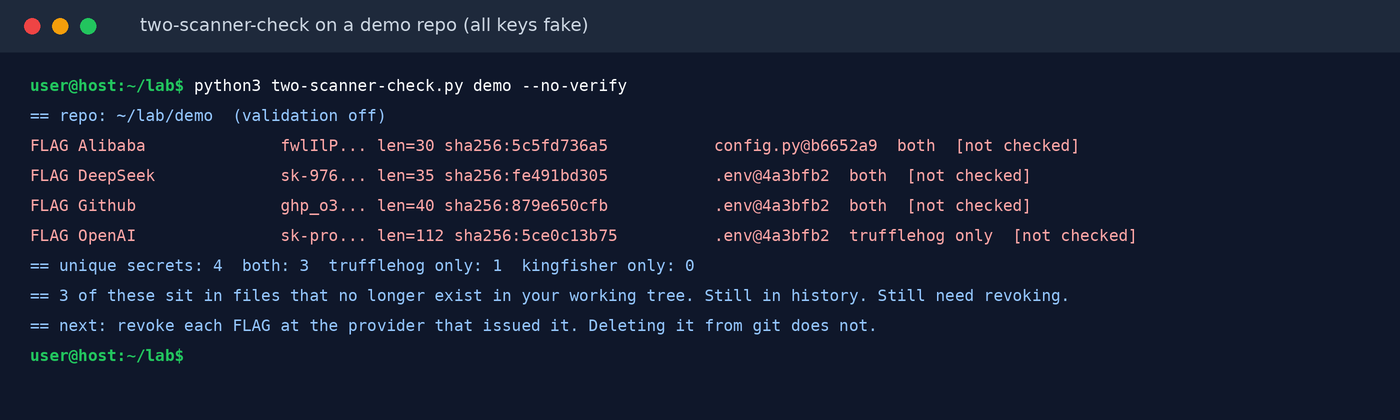
Even on four fake keys the tools disagreed once: Kingfisher skipped my fake OpenAI key. I made that key up, so it may simply not match the real format closely enough. I wouldn’t read anything into it about real keys. It’s just a small reminder of why the merge step is worth having.
What the script does not do. It scans one local repo at a time. It doesn’t see forks, other people’s clones or anything a code host cached. A clean result means neither tool found anything, not that nothing leaked. It only knows what the two tools’ detectors know, so an in house token with no fixed shape can still slip through both.
Fix it: revoke first, clean history second
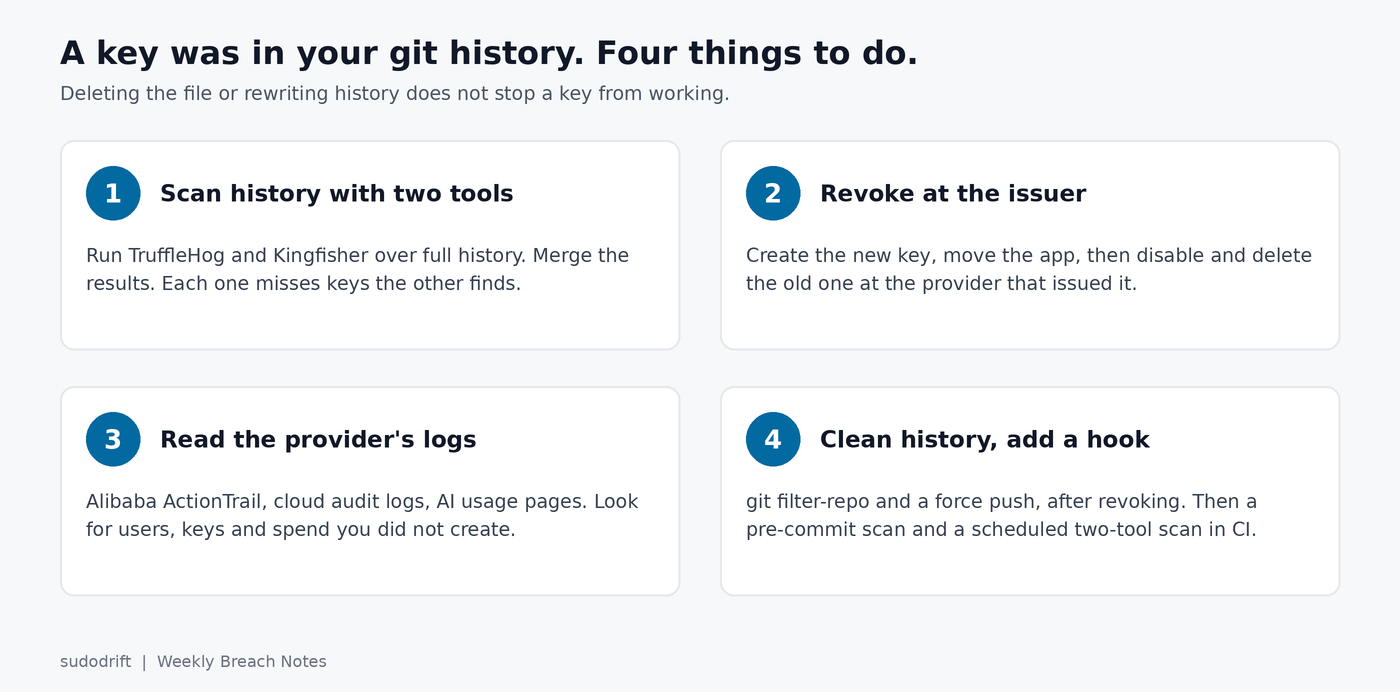
Deleting a key from git does not stop it working. Rewriting history doesn’t either. Revoke at the issuer, then look at what the key did.
Alibaba Cloud
Alibaba’s AccessKey leak response plan says disable first, investigate, then delete. With the aliyun CLI:
aliyun ram ListAccessKeys --UserName app-uploader
aliyun ram UpdateAccessKey --UserName app-uploader --UserAccessKeyId LTAI_OLD_KEY --Status Inactive
aliyun actiontrail LookupEvents --EventAccessKeyId LTAI_OLD_KEY \
  --StartTime 2026-10-01T00:00:00Z --EndTime 2026-10-29T00:00:00Z
Make the new key and switch your app to it before you disable the old one, or you’ll take yourself down. Per the LookupEvents docs, ActionTrail keeps 90 days, one query covers at most 30 days, and times are UTC. So run it in 30 day chunks. I would look hard for new users, new AccessKeys, policy attachments, new instances and security group changes you didn’t make. Data reads in OSS and SLS don’t show up there; check those services’ own logs.
Google and YouTube API keys
Rotate the key in the Cloud console, move your app over, delete the old one. Then add API restrictions so the key only works for the one API it’s meant for. An unrestricted Google API key works with every API that accepts keys.
OpenAI, DeepSeek, Zhipu and the rest
Revoke in each console and read per key usage for the last few weeks. Set a spend limit if the platform has one. For OpenAI and Anthropic, keyburn can watch per key usage and spend through their admin APIs and alert you when a key starts doing work it shouldn’t. It only reads usage. It can’t revoke anything, and it won’t see abuse the provider hasn’t counted yet.
GitHub tokens
Revoke under Settings, Developer settings, Personal access tokens. The list shows when each token was last used, which is a decent quick check.
Then clean the history
Do it mainly so the next scanner, friendly or not, stops finding it. Gitee’s help center documents git filter-repo for removing a file from every commit, and GitHub has the same guide for its side:
git filter-repo --path .env --invert-paths
git push origin --force --all && git push origin --force --tags
This breaks everyone else’s clones and does nothing about forks or copies already taken. That’s why it comes after revoking, never instead of it.
Stop the next one
Both tools can run before a commit lands. kingfisher scan . --staged checks only what you’re about to commit, and TruffleHog documents a pre-commit hook. Pick one for the hook and run both in CI on a schedule. If you use AI coding agents, keys also end up in their local logs, which is a different place to look; keydrift does a masked scan of those.
My take
I don’t think Gitee developers are worse at this than anyone else. The post itself says the comparison with GitLab and Bitbucket isn’t apples to apples, because those older scans used one tool. What this scan really shows is that a “clean” result from a single scanner is weaker than it looks, and that keys from 2025 are still live in public right now. Revoke anything that has ever been public. It takes ten minutes per key, and a leaked cloud key can run up a bill while you sleep.
Sources
- Ben Zimmermann for MongoDB, Scanning 7.25 Million Public Repositories on China’s Largest Git Platform for Secrets, October 28, 2026
- The Hacker News, 26,400 Valid Cloud and AI Credentials Found Exposed in Public Gitee Repositories, October 29, 2026
- Alibaba Cloud, AccessKey leak response plan and ActionTrail LookupEvents
- Gitee Help Center, reducing repository size with git filter-repo
- GitHub Docs, Removing sensitive data from a repository
- Tools: TruffleHog (tested v3.99.7), Kingfisher (tested v2.15.0)
- Script for this post: two-scanner-check.py. Free tools: sudodrift/keyburn, sudodrift/keydrift
If this was useful, Weekly Breach Notes sends one of these with the checks every week. Subscribing is free.
Subscribe to Weekly Breach Notes for one breach a week and the fix that goes with it.