Warp lost some agent traces. Here is how I would find the keys that were in mine.
Warp says someone broke into one of its vendors and got at agent traces and telemetry belonging to as many as 1% of its users. Nobody outside Warp knows yet what those traces held. Your laptop keeps its own copy of a lot of it, and you can read that copy today.
By sudodrift
What happened, and what Warp has actually said
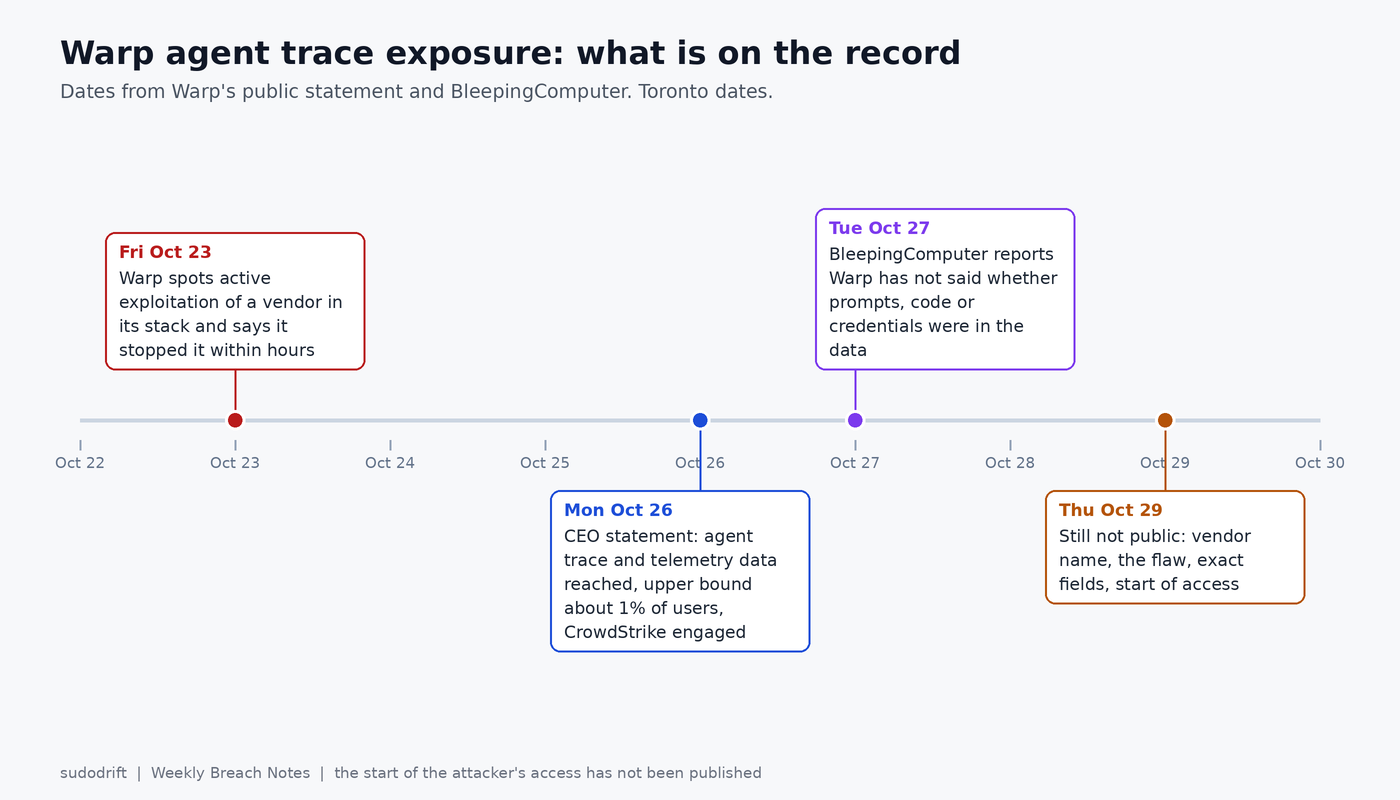
Warp started as a terminal and is now an environment where you hand tasks to AI agents that run commands, edit code and read the output. On Monday, October 26, its CEO Zach Lloyd posted a statement on X and LinkedIn. The short version:
- On Friday, October 23, Warp noticed someone actively exploiting a vendor that sits in its infrastructure. It says it caught this within hours and shut it down.
- Its read is that an automated “agent swarm” did it, probably starting from a hole in a dependency of that vendor.
- The attacker got to “a limited amount of agent trace and telemetry data” (Lloyd’s words).
- Warp’s current ceiling is roughly 1% of its users. People it could positively identify were notified, and they are supposed to get instructions.
- CrowdStrike is helping with the investigation and law enforcement has been told.
BleepingComputer covered it on October 27 and noted that Warp’s site claims at least 800,000 users. So 1% could be several thousand people, though that is my arithmetic on two numbers Warp gave for other reasons, not a count.
What is still not public as of Thursday morning: which vendor, which flaw, what fields were in the traces, when the access started, and whether data was copied out or only reachable. BleepingComputer also says Warp did not clarify whether prompts, source code or credentials were in the exposed data. The “agent swarm” part is Warp’s own assessment. No indicators have been published, so I can’t check it and neither can you.
Why “agent traces” is the part I care about
Telemetry in the old sense is button clicks. Warp’s own telemetry table is mostly that kind of event, and it says those events carry no user content.
Agent traces are different. An agent working in a terminal sees what you see. If it ran env to debug a deploy, the trace has your environment. If you pasted a token into the prompt and asked why it gets a 401, the trace has the token. Both are ordinary things to do in an agent session, which is the problem.
Warp’s privacy page spells out a few things that decide how worried to be:
- With “Help improve Warp” left on, Warp may collect AI interactions and console inputs, not only usage events.
- On the Free plan, telemetry has to stay on if you want the AI features. Paid plans can switch it off and keep AI.
- Teams on Business or Enterprise are covered by Warp’s zero data retention terms, and per the same page Warp keeps none of their AI or console content.
- Secret Redaction, the feature that masks keys before they leave your machine, is off by default.
Separately, the security overview says cloud conversations and cloud agent runs store conversation data on purpose, because the feature needs it, and that this is apart from telemetry. It also says telemetry, once collected, is kept indefinitely.
To be clear, nobody has said which of these stores the vendor touched. But if you were on Free with AI on and redaction off, the documented settings put your agent content on Warp’s side. That is the case where I would stop waiting for the final report.
Who should act
- You got a notice from Warp. Follow it. Then do the rest of this anyway, because a vendor’s instructions tend to be the minimum.
- You used Warp’s agent with real credentials in the session and you have no notice. Warp says no email means you were not identified. Its own number is an estimate, and the investigation is still open. I would treat my keys as possibly exposed and rotate the ones I can find. Rotating a key you didn’t need to costs you ten minutes.
- You used Warp only as a terminal with AI turned off, or you are on Business or Enterprise. Your risk from this incident looks low based on Warp’s docs. Still worth a quick scan, because the local database holds secrets no matter what plan you are on.
One more thing. Breach notices are a gift to phishers. If an email about this asks you to sign in or “verify” anything, go to warp.dev by typing it yourself.
Read the local copy
You can’t see what sits on Warp’s servers. You can see what sits on your disk, and it overlaps a lot with what an agent trace would hold.
Warp keeps a SQLite database for session restore and saved agent conversations. Its own session restoration docs give the paths:
- Linux:
${XDG_STATE_HOME:-$HOME/.local/state}/warp-terminal/warp.sqlite - macOS:
~/Library/Group Containers/2BBY89MBSN.dev.warp/Library/Application Support/dev.warp.Warp-Stable/warp.sqlite - Windows:
%LOCALAPPDATA%\warp\Warp\data\warp.sqlite
Preview builds use the same paths with -preview or Warp-Preview, per the file locations page. MCP server config, with whatever tokens you typed into it, lives in ~/.warp/.mcp.json on every platform.
Warp’s desktop client is open source under AGPL, so I didn’t have to guess at the layout. The schema in the client repo shows where the interesting text lives:
ai_queries.inputholds the prompts you typed, with a timestamp and working directory.agent_tasks.taskholds saved agent conversations as protobuf blobs. Strings inside protobuf are stored as plain UTF-8, so a byte scan finds keys in them.blocks.stylized_commandandblocks.stylized_outputhold commands and their output for session restore.mcp_server_installations.variable_valuesholds values you filled into MCP templates.
Don’t open the live file while Warp is running. Copy it first, including the -wal file if there is one, and work on the copy:
DB="${XDG_STATE_HOME:-$HOME/.local/state}/warp-terminal/warp.sqlite"   # Linux path
T=$(mktemp -d) && chmod 700 "$T" && cp "$DB"* "$T"/
sqlite3 "$T/warp.sqlite" "SELECT count(*), min(start_ts), max(start_ts) FROM ai_queries;"
sqlite3 "$T/warp.sqlite" "SELECT count(*), max(last_modified_at) FROM agent_conversations;"
That tells you how much agent history you have and how far back it goes. To scan it I wrote a small script, warp-trace-check.py (link at the end). It’s plain Python with no dependencies. It copies the database to a private temp folder, reads the four places above plus ~/.warp/.mcp.json, matches known key shapes (mostly Warp’s own recommended redaction patterns, plus OpenAI project keys, npm, Slack and NAME_TOKEN=value style lines), and prints only the kind, a short prefix, the length and where it was found. It never prints a value. It also reads the [privacy] and [agents] keys in settings.toml and tells you when a documented default is in effect.
python3 warp-trace-check.py
Here it is on a demo home folder. I built the database from the real migrations in Warp’s client repo and seeded it with keys I made up, so nothing in this screenshot works anywhere.
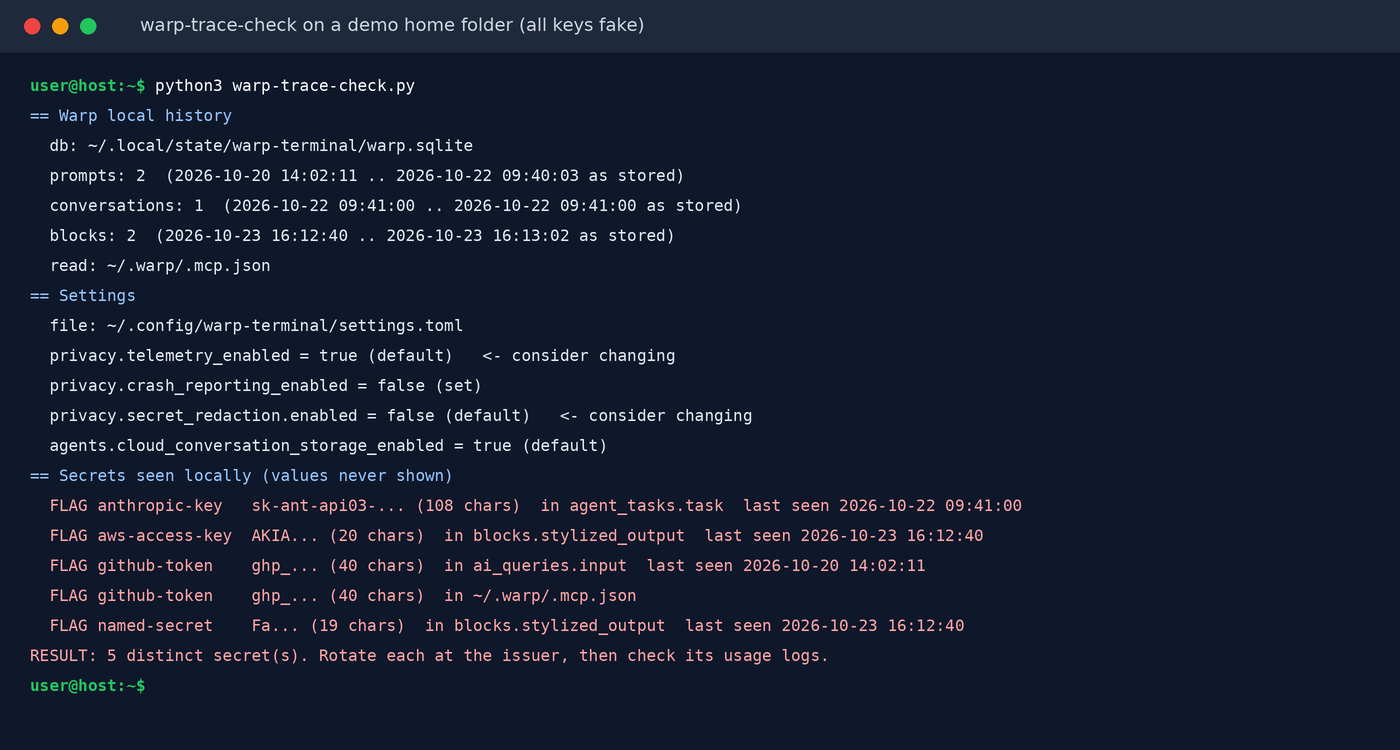
What it does not do, plainly:
- It sees only your machine. Warp’s server copy, conversations you already deleted, and blocks from sessions that were overwritten on a later restore are all invisible to it. Warp’s docs say the block data is replaced each time you quit. A clean result means “nothing found locally,” not “nothing leaked.”
- Pattern matching misses keys with no fixed shape unless the variable name sits next to them. Database passwords in a connection string, for example, are easy to miss.
- It doesn’t parse the protobuf. It just scans bytes, which is enough for keys but won’t give you a nice transcript.
- I tested it against a database built from the current client schema. Older Warp versions may have different tables. The script skips tables it can’t find instead of failing.
If you use other agents on the same machine, keydrift does the same kind of masked scan across Claude Code, Codex, Gemini CLI, Cursor, OpenCode and shell histories, and builds a rotation list. It does not read Warp’s database today, which is why I wrote the script above. Run both.
What I would do this week
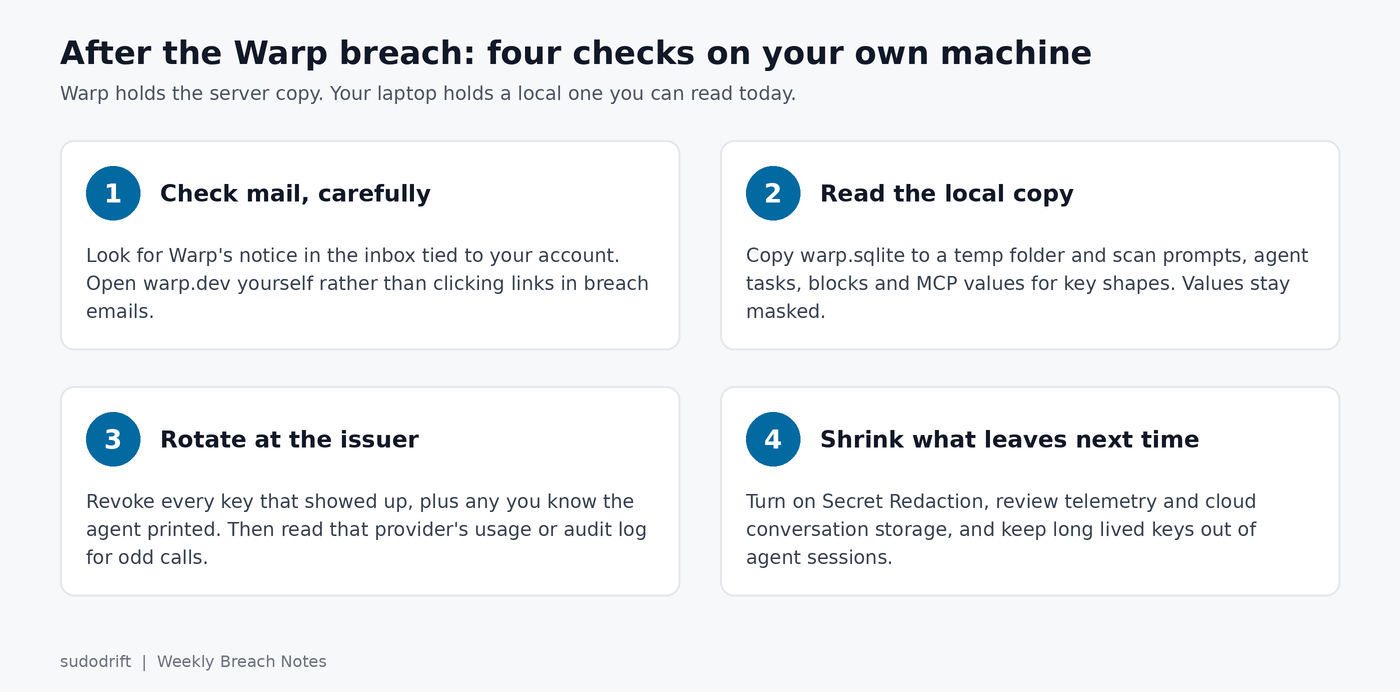
Rotate at the issuer, not in Warp. Deleting the database or the prompt does nothing to a copy that already left. For each key the scan found, and each one you remember the agent printing:
- GitHub tokens: revoke under Settings, Developer settings, Personal access tokens. The token list shows when each was last used, which is a quick sanity check. Re-run
gh auth loginif the CLI token was among them. - AWS keys: make a new key, move your tools to it, then disable and delete the old one. Before you delete it, look up what it did:
aws iam list-access-keys --user-name YOUR_USER
aws cloudtrail lookup-events \
  --lookup-attributes AttributeKey=AccessKeyId,AttributeValue=AKIA_OLD_KEY \
  --start-time 2026-10-01 --max-results 50
aws iam update-access-key --user-name YOUR_USER --access-key-id AKIA_OLD_KEY --status Inactive
- OpenAI and Anthropic keys: revoke in each console and read the per key usage for the last two weeks. If you want an alert next time a key starts doing work it shouldn’t, keyburn watches per key usage through both providers’ admin APIs. It only reads usage and spend. It can’t revoke anything and it won’t see abuse that hasn’t landed in the provider’s usage data yet.
- MCP tokens in
~/.warp/.mcp.json: rotate them at whatever service they belong to, then decide if that server needs a long lived token at all.
CloudTrail lookup-events only covers management events in one region for the last 90 days, so repeat it per region you use. I’d start the log review at October 1, not October 23. Warp has published when it noticed the attack, not when the attacker got in.
Shrink what leaves next time
Turn on Secret Redaction. It is under Settings, Privacy, Secret redaction, or in settings.toml per the settings reference:
[privacy.secret_redaction]
enabled = true

[[privacy.custom_secret_regex_list]]
name = "Internal service token"
pattern = "svc_[A-Za-z0-9]{32}"
The Secret Redaction docs say matching text is masked before it goes to Warp or a model provider. It is regex based, so it only catches what you taught it. Add a pattern for every in house token format you have.
Look at the other two switches with open eyes. privacy.telemetry_enabled controls “Help improve Warp”. On Free, turning it off also turns off AI, so that’s a real tradeoff and only you can make it. agents.cloud_conversation_storage_enabled defaults to true. If you don’t use cloud conversations, I’d switch it off.
And the boring fix that matters most: keep long lived keys out of agent sessions. Use short lived cloud credentials where you can, scoped tokens where you can’t, and stop running env or cat .env in a terminal an agent is watching. That habit is the hard one to drop.
My honest take: Warp’s response so far looks quick, and the 1% ceiling may well be right. But “a limited amount” of agent traces is still a set of working sessions, and this is the second AI coding tool this month to lose user data from its back end, after OpenCode’s Console breach. The local scan takes a few minutes. I would do it before Warp’s final report, not after.
Sources
- Zach Lloyd (Warp CEO), statement on the vendor incident, October 26, 2026 (also posted on X)
- BleepingComputer, Warp discloses breach exposing AI agent logs, user telemetry data, October 27, 2026
- Warp docs, Privacy and data control
- Warp docs, Security overview
- Warp docs, Secret Redaction
- Warp docs, Session Restoration and File and folder locations
- Warp docs, All settings reference
- Warp client source, crates/persistence schema and migrations (read October 29, 2026)
- BleepingComputer, OpenCode hack exposes API keys amid AI distillation attacks
- Script for this post: warp-trace-check.py. Free tools: sudodrift/keydrift, sudodrift/keyburn
If this was useful, Weekly Breach Notes sends one of these with the checks every week. Subscribing is free.
Subscribe to Weekly Breach Notes for one breach a week and the fix that goes with it.