The OVHcloud CLI Was Swapped for a Stealer, and the Checksums Still Matched
How to check your machines without running the binary, what to rotate, and the one GitHub setting that would have stopped this.
Last Monday morning, October 19, someone replaced the downloads on five old releases of OVHcloud’s official command line tool with a build that steals secrets. It was live for about an hour and a half. OVHcloud counts roughly 250 downloads in that window, which sounds small until you look at what the stealer took from each machine.
I almost skipped this one because of that number. Then I read the details and changed my mind. Nothing exotic happened here. No zero-day, no poisoned CI pipeline. A contributor’s account with write access uploaded new files over old ones, and the project’s own checksum file was swapped too, so anyone who checked hashes the usual way got a green light. Plenty of projects on GitHub are set up exactly like this today, maybe including yours.
What happened
Here is what OVHcloud has confirmed in its GitHub security advisory:
- The attacker used a compromised GitHub account belonging to one of its developers.
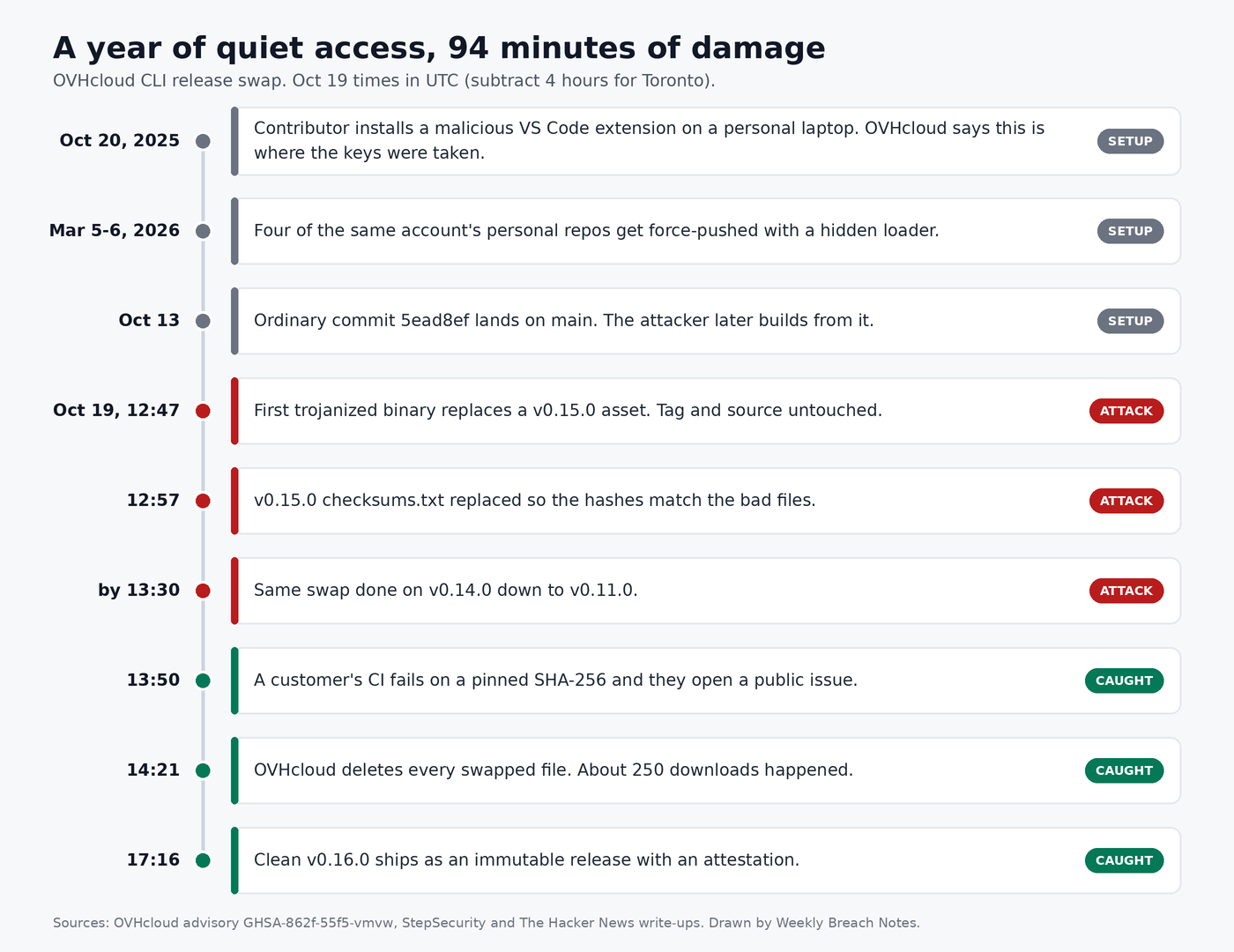
- Release assets for v0.11.0 through v0.15.0 were replaced with malicious binaries between 14:47 and 16:21 Paris time on October 19. That is 12:47 to 14:21 UTC, or 8:47 to 10:21 AM in Toronto.
- You’re affected only if you installed or updated inside that window. A copy from before it is the original.
- The source code and the build pipeline were not touched.
- v0.10.0 and older are clean, and so is v0.16.0, which shipped that evening.
The swapped files were the normal CLI rebuilt with extra Go code bolted on. Each time it ran, it copied credentials into a folder named /tmp/envchecker- followed by nine or ten digits, packed that folder up, and sent it to a server at 45.32.148[.]174. OVHcloud says the folder is never cleaned up, which helps you now.
The target list is worth reading slowly. It’s not only cloud keys. OVHcloud lists AWS, Google Cloud and Azure credentials, Docker and Kubernetes configs, npm and Terraform credentials, ~/.netrc, your global git config, and everything under ~/.ssh. It also goes after AI coding tools: VS Code and Cursor state databases, the Continue and Sourcegraph Cody stores, OpenCode’s local database, Hermes agent sessions and the whole ~/.claude directory. If you use a laptop for both cloud work and AI coding, that’s most of your working life in one archive.
How it happened
Confirmed by OVHcloud: release immutability was not turned on for the repository. In their words, “the GitHub repository was not appropriately configured to ensure release immutability” (advisory). Without that setting, anyone with write access can remove a release’s files and put new ones up with identical names. The download URL stays the same. Nobody gets a notification.
Also confirmed by OVHcloud: the account was compromised much earlier. They trace it to a malicious VS Code extension, color-picker-universal 2.8.91, that the developer installed on a personal MacBook on October 20, 2025. The uploads on October 19 were made with stolen keys, not from that laptop, and OVHcloud says the developer’s work laptop was not compromised as far as it knows.
According to StepSecurity and Corgea, the attacker uploaded a new checksums.txt after the binaries, so the hash list on the release page agreed with the trojanized files. The official install.sh never checked hashes at all.
Less settled: who did it. OVHcloud says a Solana wallet used by the extension belongs to the GlassWorm actor. The researchers at OpenSourceMalware tied the account’s earlier repo tampering to GlassWorm too, but as The Hacker News reported, they call the actor link their own inference. I’d treat the attribution as likely but not proven. It doesn’t change anything you need to do.
What tipped it off is my favourite part. A customer’s CI job had the SHA-256 of one archive pinned in its own config. The new file didn’t match, the job failed, and they opened a public issue. OVHcloud pulled every swapped file about half an hour later.
Were you even exposed?
The install method matters more than the version number here.
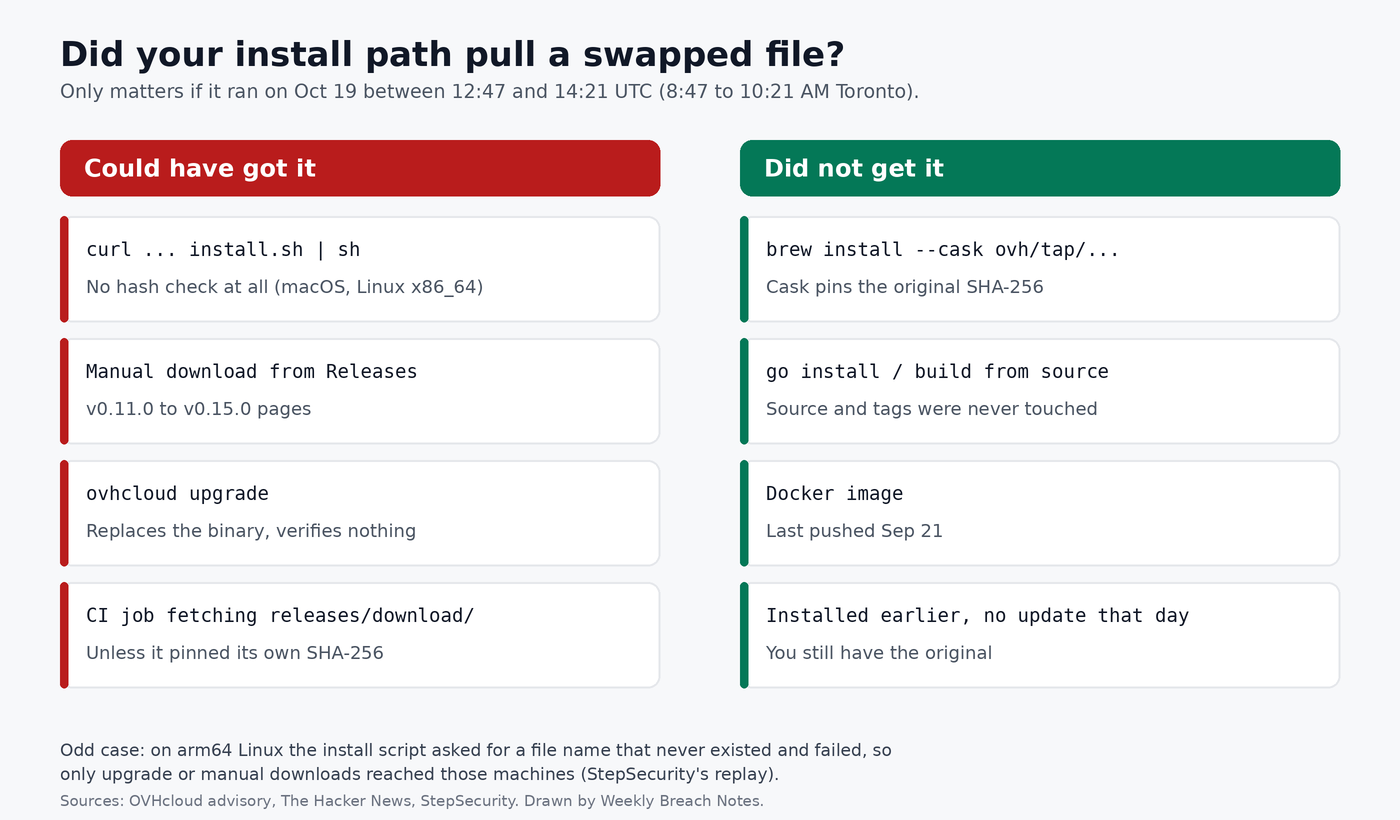
Short version, combining OVHcloud’s advisory with the replay work by StepSecurity and the checks The Hacker News did:
- Exposed if, during the window, you ran the
curl ... install.sh | shone-liner, downloaded an archive from the Releases page, ranovhcloud upgrade, or had a CI job fetch the archive straight from GitHub with no hash of its own to compare. - Not exposed if you used Homebrew (the cask pins the original hashes, so the download would have failed),
go install, a source build, or the Docker image. - One odd case from StepSecurity: on arm64 Linux the install script asks for a file name that doesn’t exist, so it always failed. Those machines could only get the bad file through
upgradeor a manual download.
If you don’t remember how you installed it, check when the file landed on disk. Use the change time, not the modified time. tar keeps the archive’s original timestamp as mtime, so mtime lies to you here. I tested this with the clean v0.16.0 archive: mtime showed the build date, ctime showed when I extracted it.
stat -c 'mtime %y | ctime %z | %n' "$(command -v ovhcloud)"
A ctime on October 19 between 8:47 and 10:21 AM Toronto time (adjust for your zone) means look closer. Anything else, and you can probably relax, unless something has touched the file since.
Check the binary without running it
Don’t run a suspect binary to see what version it reports. Every run steals again.
You have two safe checks. The first is the MD5 list in the advisory, one hash per platform:
Darwin_arm64   6f2f086239f3d88eb2750e871901927d
Darwin_x86_64  347e65eb7f2d78d1c6872690272a6cc3
Linux_arm64    01f57206d37c28cf711677f612052913
Linux_x86_64   301bff0b51980b9e76c93633e7cfd3bd
Windows_x86_64 6a3cf153338c416169cda2fe704c8848
The second is the build info Go embeds in every binary. go version -m reads it from the file without executing anything. The swapped build was made from commit 5ead8ef on main, not from a release tag, so its module line shows a pseudo-version with that commit in it. It was also built with -ldflags="-s -w", while the real release pipeline leaves no ldflags line at all.
One trap: The Hacker News points out that the genuine v0.16.0 also says +dirty and vcs.modified=true. I checked and got the same on my copy. So don’t flag a binary just for “dirty”.
I put both checks in a small shell script. Pass it the path to your binary, or let it look in the usual places:
#!/bin/sh
# Look for the Oct 19, 2026 OVHcloud CLI release swap WITHOUT running the binary.
BAD="6f2f086239f3d88eb2750e871901927d 347e65eb7f2d78d1c6872690272a6cc3
01f57206d37c28cf711677f612052913 301bff0b51980b9e76c93633e7cfd3bd
6a3cf153338c416169cda2fe704c8848"

paths="$*"
[ -z "$paths" ] && paths=$(command -v ovhcloud; ls ~/.local/bin/ovhcloud /usr/local/bin/ovhcloud 2>/dev/null)

for p in $(printf '%s\n' $paths | sort -u); do
  [ -f "$p" ] || continue
  echo "== $p"
  sum=$(md5sum "$p" | cut -d' ' -f1)
  if echo "$BAD" | grep -qw "$sum"; then
    echo "   md5 $sum  MATCHES A KNOWN BAD BUILD"
  else
    echo "   md5 $sum  not on the bad list"
  fi
  if command -v go >/dev/null; then
    go version -m "$p" | awk '$1=="mod"{print "   module: "$3} /vcs.revision/{print "   commit: "substr($2,14,12)}'
    go version -m "$p" | grep -q 'ldflags="-s -w"' && echo "   WARNING: built with -s -w and no version flag (swap signature)"
    go version -m "$p" | grep -q '5ead8ef9b43d' && echo "   WARNING: built from commit 5ead8ef (the swapped build)"
  fi
done

echo "== staging folders in /tmp"
ls -d /tmp/envchecker-* 2>/dev/null || echo "   none found (a reboot may have wiped /tmp, so this alone proves nothing)"
No Go on the machine? strings "$(command -v ovhcloud)" | grep 5ead8ef9b43d does a rougher version of the same check. On my test it found the commit four times in the rebuilt binary and zero times in the real v0.16.0.
I don’t have a copy of the actual malicious file. Almost nobody does, since they were deleted within the hour. So to test the script I did two things on a scratch box. I downloaded the clean v0.16.0, and I built the CLI myself from commit 5ead8ef with the same -s -w flags. My rebuild has no stealer in it, it’s just OVHcloud’s own source, but it carries the same build fingerprint the advisory and StepSecurity describe. Here’s the real output:
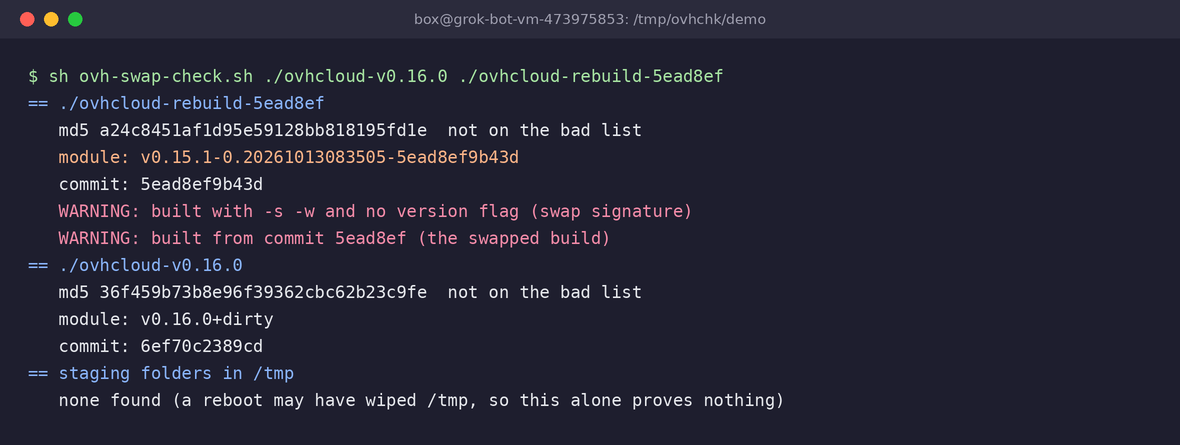
Notice the MD5 line for my rebuild says “not on the bad list”. That’s expected, because my file doesn’t contain the malware, and it’s also the lesson about hash lists in general. A hash only catches that exact file. The build-info check catches the pattern.
About the /tmp/envchecker-* folders. On many distros /tmp is a tmpfs or gets cleaned at boot or after a few days. If you’ve rebooted since October 19, an empty result proves nothing. On macOS look under $TMPDIR as well, not only /tmp.
For CI, search your job logs for releases/download/v0.11.0 through v0.15.0 around 12:47 to 14:21 UTC on the 19th. If you keep DNS or egress logs, look for 45.32.148.174 and for developer machines suddenly talking to Solana RPC endpoints, which the stealer used as part of its send-off. A laptop has no business doing that.
If you were hit
Rotate first, reinstall second. Reinstalling doesn’t take back a key that already left. And do the rotation from a different machine, because you can’t trust the one that ran the binary.
My order would be:
- OVHcloud API keys. The CLI keeps them in
~/.ovh.conf. Delete the old application credentials in your OVHcloud account and make new ones. - Cloud credentials: AWS access keys, gcloud logins, Azure tokens. Check CloudTrail or the equivalent audit log for use from addresses you don’t know since October 19.
- Kubernetes configs, container registry logins in
~/.docker/config.json, npm and Terraform tokens, anything in~/.netrc. - GitHub and GitLab tokens and stored git credentials.
- AI tool logins. Sign out of Claude Code, Cursor, OpenCode and the rest, revoke sessions where the provider lets you, and rotate any provider API keys those tools kept locally.
- SSH keys. Generating a new key isn’t enough. You have to remove the old public key from every server, and from GitHub and GitLab.
For SSH I’d also check whether anyone already used the stolen key. Get the fingerprint on your laptop, then search auth logs on the servers it opens:
# on the laptop
ssh-keygen -lf ~/.ssh/id_ed25519.pub

# on each server
sudo journalctl -u ssh -u sshd --since 2026-10-19 | grep 'Accepted publickey' | grep 'SHA256:<your fingerprint>'
Logins you can’t explain from that key after the 19th mean the problem has moved from your laptop to your servers. In that case also look at what changed on those servers: new lines in authorized_keys, new sudo rules, new users. This is the kind of thing I wrote sudodrift for. It’s a small open-source tool that snapshots sudo rules, SSH keys and SUID files and diffs them later. To be honest about its limit: it needs a snapshot from before the incident to tell you what’s new. If you don’t have one, take one now so the next comparison means something.
Then remove the bad binary, put v0.16.0 in its place, and check the archive against the release attestation:
gh release verify-asset v0.16.0 ovhcloud-cli_Linux_x86_64.tar.gz -R ovh/ovhcloud-cli
On my box that printed “Verification succeeded” for the Linux x86_64 archive, whose SHA-256 is 527fb1c9bde0680837601e08bc064783b57eb301ab5a81fb9c1fc17f466f2898. If you can’t say for sure the machine is clean after all this, wipe it and rebuild. That’s the boring answer and usually the right one.
The fix if you publish releases
This is the part that applies to far more people than the 250 who downloaded the bad build.
Turn on release immutability. Per GitHub’s docs, it’s under the repository’s Settings, in the Releases section, “Enable release immutability”. Org owners can set it for all repositories at once from the organization settings.
The catch is that it only protects releases created after you switch it on. You can see this on the OVHcloud repo right now:
gh api repos/ovh/ovhcloud-cli/releases --jq '.[] | [.tag_name, .immutable] | @tsv' | head -4
v0.16.0	true
v0.15.0	false
v0.14.0	false
v0.13.0	false
So after enabling it, cut a fresh release and point your install docs at it. Run that same command against your own repos. Any false on a release people still download is a file someone with write access can quietly replace.
A few more things I’d do:
- Stop treating a
checksums.txtthat sits in the same release as a security control. It catches a broken download. It does nothing against someone who can upload files, because they upload the checksum file too. - Publish attestations, so users have something to verify that the attacker can’t just re-upload.
- Make your install script check a hash or an attestation. OVHcloud’s didn’t check anything.
- Review who has write access. OVHcloud lets developers attach personal GitHub accounts to its org, and its advisory notes that most tech companies do the same. That personal account is only as safe as the laptop and the editor extensions on it.
And if you consume someone else’s binaries in CI, pin the hash yourself, in your own repo:
echo "527fb1c9bde0680837601e08bc064783b57eb301ab5a81fb9c1fc17f466f2898 ovhcloud-cli_Linux_x86_64.tar.gz" | sha256sum -c -
That one line is exactly what caught this attack. It’s annoying to update on every upgrade. I still think it’s worth it for anything that touches your cloud keys.
My take
The scary part for me isn’t the hour and a half. It’s the year before it. A color picker extension on a personal laptop turned into write access on a cloud provider’s official tool, and it sat there unnoticed for twelve months. I’ve installed editor extensions with less thought than I give a browser tab. I suspect most of us have.
OVHcloud’s response was decent. They were fast, they named the cause plainly, and they shipped a verifiable release the same day. I’d still like to see them say what kind of credential the attacker used, a token or something else. Their advisory only says “stolen keys”. Until they do, I’d assume any long-lived GitHub token on a developer laptop is a release key waiting to be misused, and scope yours down accordingly.
Sources
- OVHcloud, “ovhcloud-cli security incident - October 19th, 2026” (GHSA-862f-55f5-vmvw): https://github.com/ovh/ovhcloud-cli/security/advisories/GHSA-862f-55f5-vmvw
- StepSecurity, “OVHcloud CLI Compromised via GitHub Release Swap”: https://www.stepsecurity.io/blog/ovhcloud-cli-github-release-swap-glassworm
- The Hacker News, “Hackers Hijack Five OVHcloud CLI Releases to Distribute Secret-Stealing Malware”: https://thehackernews.com/2026/10/hackers-hijack-five-ovhcloud-cli.html
- Corgea, “OVHcloud CLI v0.11.0 to v0.15.0 GitHub release asset swap”: https://corgea.com/research/ovhcloud-cli-github-release-swap-glassworm-october-2026
- GitHub Docs, “Preventing changes to your releases”: https://docs.github.com/en/code-security/how-tos/secure-your-supply-chain/establish-provenance-and-integrity/prevent-release-changes
- OVHcloud CLI releases: https://github.com/ovh/ovhcloud-cli/releases
Subscribe to Weekly Breach Notes for one breach a week and the fix that goes with it.