The PingCAP Breach Went Through Support Tickets. Here's How to Find What You Pasted.
Some customers handed AWS keys and database passwords to PingCAP in support tickets. Here is how to find what you pasted and what to rotate.
The attacker never touched a customer database. They didn’t need to. Some customers had already handed over AWS keys and database passwords in help desk threads.
I have done it myself. A migration is stuck at 11 PM, the vendor engineer asks for the connection string, and you paste it into the ticket because the alternative is another day of back and forth. You mean to rotate it afterwards. You probably don’t.
That habit is the part of the PingCAP incident I care about most. PingCAP makes TiDB and runs the managed TiDB Cloud service. Over the last week it has admitted someone was loose in its internal network for roughly four weeks. One of the places they went through was the support queue.
What PingCAP and its investigators have confirmed
This is from PingCAP’s incident report (October 19), the customer actions page (October 20), the report by NebuSec, the outside firm PingCAP hired (October 21), and the CEO’s note (October 23).
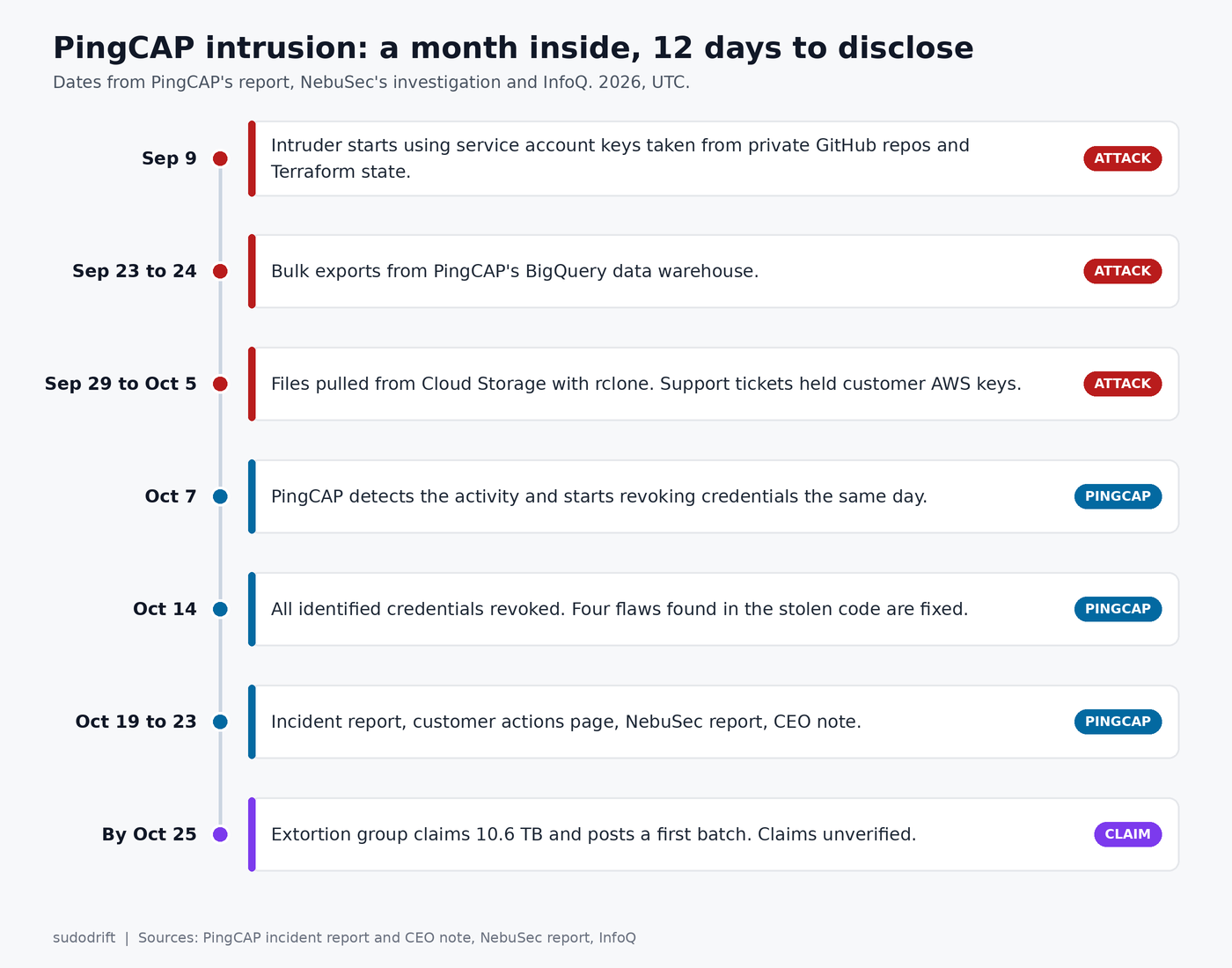
- Access ran from September 9 to October 7, 2026. PingCAP found out on October 7 and started killing credentials that day. It says every compromised credential it identified was dead by October 14.
- The way in was a compromised GitHub account. Private repos held service account keys in old commits and in plaintext Terraform state. NebuSec also found a Jira API token sitting in code or config. Those keys opened the door to PingCAP’s Google Cloud projects, its Jira, and the chat system its engineers use for alerts.
- Eight Google Cloud service accounts were abused. Warehouse tables were bulk exported on September 23 and 24, and files were pulled from Cloud Storage with rclone in late September and early October.
- What left the building: source code, account records (names, emails, org and project links), SQL editor history and errors, contacts, contracts, pricing and billing data, support tickets with their attachments, and chat history.
- NebuSec says the Jira tickets held credentials customers had shared during normal support work. That included AWS keys, and those keys reached S3 buckets with some customers’ TiDB diagnostic data.
- TiDB Cloud API keys in the stolen tables were encrypted. NebuSec says the encryption key did not leak. PingCAP’s CEO is explicit that this protection “does not apply to credentials that were shared in support materials.”
- Neither PingCAP nor NebuSec found evidence that data inside customer TiDB databases was accessed, or that the attacker kept a foothold in production.
PingCAP’s Japanese arm put the domestic count at up to roughly 50,000 personal records in its own notice. I have not seen a global number.
What is claimed but not confirmed
The extortion group FulcrumSec has taken credit and says it holds 10.6 TB. As InfoQ reported, the group claims more than 115,000 console API keypairs in plaintext, which flatly contradicts PingCAP. It also claims to hold around 1,800 external database endpoints from customer migration jobs, some with root or admin logins for MySQL and Aurora hosts. It says it began posting data in batches.
None of that is verified. I’m not linking the leak site. But I’d plan as if the migration job claim might be true, because checking costs you an hour and being wrong costs you a database.
Who should care
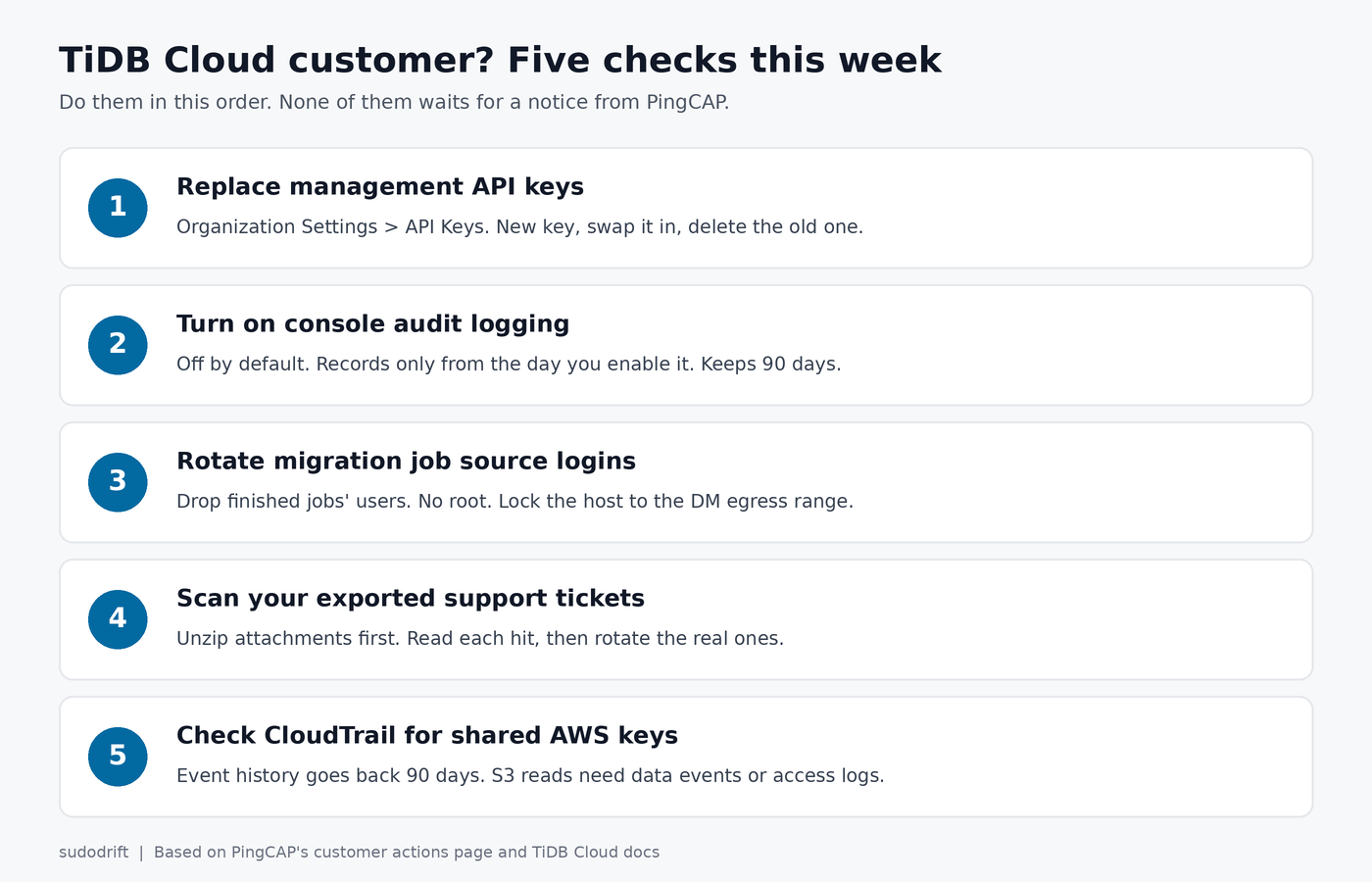
- Anyone with a TiDB Cloud organization. PingCAP is telling every customer to act now and not wait for a notice.
- Anyone who ever pasted a secret into a PingCAP support ticket or attached a log or config that had one. This is the group most at risk.
- Anyone who created a TiDB Cloud Data Migration job against their own MySQL or Aurora. The source login is stored on PingCAP’s side by design.
- Finance and ops people at those companies. Contracts, renewal dates and billing contacts leaked. That is enough for an invoice fraud email that sounds right.
Check 1: Replace your TiDB Cloud management API keys
PingCAP’s steps are simple. Only an Organization Owner can do this.
- In the console, pick the organization, then go to Organization Settings > API Keys.
- Make a new key with the smallest role that still works. Save the private key right away, because it is shown once.
- Swap it into every script, Terraform provider config and CI secret. Confirm each one runs.
- Delete the old key. If you think a key is being abused, delete it first and fix the breakage after.
Do this for every organization you own. While you’re on that page, delete keys nobody can explain.
Check 2: Turn on console audit logging (it is off by default)
TiDB Cloud has a console audit log that records API key changes, new users, migration jobs, IP access list edits and root password resets. It ships disabled. It only records events after you switch it on, and it keeps 90 days.
So here is the honest limit. If you never enabled it, you have no console record for September. Turn it on today anyway (Console Audit Logging > Settings). Then if a stolen key shows up next month, you will at least see CreateAPIKey, UpdateIPAccessList or SetRootPassword from an IP you don’t know. The export is JSON or CSV, so a quick filter on operator_ip and operator_type is easy.
Check 3: Rotate every migration job source login
If you ever used Data Migration, open each cluster’s Data > Data Migration page and write down the source host and user for each job, including finished ones. Then on each source MySQL or Aurora server:
-- who exists and from where
SELECT user, host, password_last_changed
FROM mysql.user
WHERE user NOT IN ('mysql.sys','mysql.session','mysql.infoschema');

-- what the migration user can actually do
SHOW GRANTS FOR 'dm_source_user'@'%';
What I’d change:
- If the job used
rootor an admin login, that is the first thing to rotate. PingCAP’s own docs only suggest root for testing. - Give the migration user only what the docs list:
SELECT,RELOAD,REPLICATION SLAVE,REPLICATION CLIENT, plusLOCK TABLESon RDS or Aurora. - Lock the host part to the egress range TiDB Cloud gave you, not
%. Or move to private link or VPC peering. - If the migration finished, drop the user. A finished migration does not need a live login.
ALTER USER 'dm_source_user'@'%' IDENTIFIED BY '<new long random password>';
-- or, when the job is done:
DROP USER 'dm_source_user'@'%';
On RDS and Aurora, pull the connection logs for that user since early September and look for sources that are not TiDB Cloud. If you don’t log connections, this is a good week to start.
Check 4: Find the secrets you sent support
This is the one people skip because there is no button for it. You have to go read your own ticket history.
Most help desks email you a copy of each reply, and many let you export your tickets. Pull everything from PingCAP support into a folder. Include attachments, since diag bundles and configs are where passwords hide. Then scan it. I used this small read-only script. It prints the file, line, kind and the first eight characters only, so the output is safe to paste into a team chat.
#!/bin/sh
# ticket-secrets.sh: find secret-shaped strings in exported support tickets.
# Read-only. Prints file, line, kind, and a masked value. Never the full value.
dir="${1:-.}"
grep -rnoE \
  -e 'AKIA[0-9A-Z]{16}' \
  -e 'ASIA[0-9A-Z]{16}' \
  -e '(mysql|postgres(ql)?|mongodb(\+srv)?)://[^:/ ]+:[^@ ]+@[^ "<]+' \
  -e '-----BEGIN [A-Z ]*PRIVATE KEY-----' \
  -e '(aws_secret_access_key|password|passwd|pwd|secret|token)[" ]*[:=][" ]*[^" ,<]{8,}' \
  "$dir" 2>/dev/null |
awk -F: '{
  file=$1; line=$2; v=substr($0, length(file)+length(line)+3)
  kind="other"
  if (v ~ /^AKIA/) kind="aws-key-id"
  else if (v ~ /^ASIA/) kind="aws-temp-key-id"
  else if (v ~ /:\/\//) kind="db-url"
  else if (v ~ /PRIVATE KEY/) kind="private-key"
  else kind="named-secret"
  printf "%-34s line %-5s %-16s %s****\n", file, line, kind, substr(v,1,8)
}'
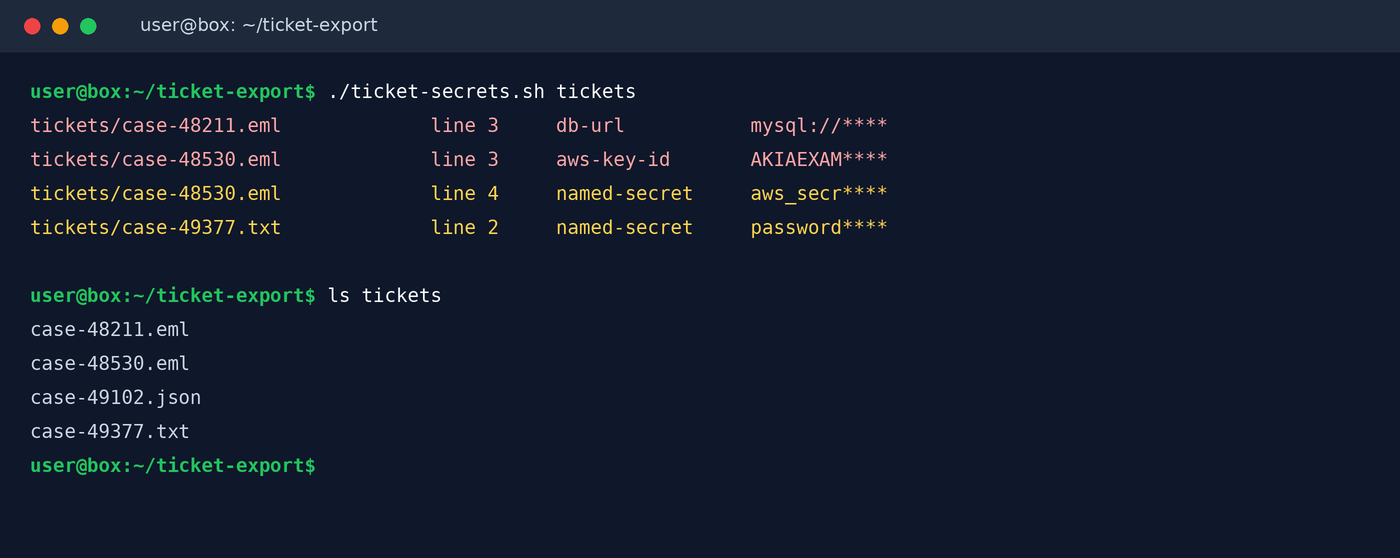
Limits, plainly. It is a regex scan. It will miss a password someone typed in a sentence, anything inside a zipped or binary attachment, and screenshots. It will flag some junk. Unzip the bundles first, then read the hits by hand. A purpose-built scanner such as Gitleaks or TruffleHog has far more rules if you want to run one over the same folder.
Check 5: If an AWS key was in there, see what it did
Rotating is the fix. But you also want to know if it was used, since NebuSec says shared AWS keys were used to reach buckets.
# is the key still active, and when was it last used
aws iam list-access-keys --user-name <user>
aws iam get-access-key-last-used --access-key-id AKIA...

# management events made with that key since the intrusion began
aws cloudtrail lookup-events \
  --lookup-attributes AttributeKey=AccessKeyId,AttributeValue=AKIA... \
  --start-time 2026-09-01T00:00:00Z \
  --query 'Events[].[EventTime,EventName,EventSource]' --output table
CloudTrail event history covers 90 days, so September is still in range today. September 9 rolls out of that window around December 8, so don’t sit on it. The catch is that event history only shows management events. Plain S3 object reads only show up if you turned on S3 data events or server access logs. If you didn’t, last used plus the bucket’s own logs (if any) is all you get.
Then deactivate the key, make a new one, and delete the old one:
aws iam update-access-key --access-key-id AKIA... --status Inactive --user-name <user>
aws iam delete-access-key --access-key-id AKIA... --user-name <user>
NebuSec also published six IP addresses the attacker used against PingCAP’s own cloud. Grep your CloudTrail, VPC flow logs and database logs for them. They are not proof of anything in your account. A hit would be worth a phone call, though.
Check 6: Tell finance before the phishing starts
Billing contacts, contract terms and renewal dates are in the stolen set. PingCAP warns about targeted phishing and I agree with them. Tell whoever pays the TiDB Cloud invoice that any change to bank details or any urgent renewal request gets confirmed by phone, using a number you already had.
What I’m changing in my own habits
Support tickets are a database. Someone else runs it, it sits there for years, and most staff can search it. I now treat anything I paste there as published.
When a vendor really needs access, I give them something that expires:
- AWS: a role they assume, with a short session and an external ID. Or at least a dedicated user with one policy that I delete when the ticket closes.
- MySQL: a throwaway user with
PASSWORD EXPIRE INTERVAL 1 DAYand only the grants the task needs, dropped afterwards. - Logs and configs: run them through a redaction pass before upload. The scan above works on a bundle before you send it, too.
I’ll admit this is slower at 11 PM. It is still faster than rotating fifty keys in a panic a year later.
If the thing that leaked was your password vault or a remote support box rather than a ticket reply, I put together a Vault Compromise Response Kit ($15). It is a vendor-neutral 72-hour response for a compromised vault, PAM or remote support box: blast-radius inventory, rotation order, MFA and security-key review, and message drafts.
If you want help finding keys on your own laptop, my free keydrift tool lists the keys sitting in shell histories, env files and tool configs like ~/.aws/credentials, masked, as a rotation list. Be clear about what it doesn’t do. It does not read help desk tickets or vendor systems, and it cannot tell you whether a key was used. It just tells you what to rotate on that machine.
I’ll update this post if PingCAP publishes customer counts or confirms anything FulcrumSec claims.
Sources
- PingCAP, Security Incident Report (October 19, 2026): https://www.pingcap.com/trust-hub/security/security-update-october-2026/
- PingCAP, Recommended Customer Actions (October 20, 2026): https://www.pingcap.com/trust-hub/security/customer-actions-october-2026/
- PingCAP, A Note from Our CEO (October 23, 2026): https://www.pingcap.com/trust-hub/security/ceo-note-october-2026/
- PingCAP Japan notice: https://pingcap.co.jp/trust-hub/security/security-update-october-2026/
- NebuSec, Investigating the PingCAP Security Incident (October 21, 2026): https://nebusec.ai/research/pingcap-security-incident/
- InfoQ, PingCAP Breach Exposes Customer Records and Source Code (October 25, 2026): https://www.infoq.com/news/2026/10/pingcap-cloud-data-breach/
- TiDB Cloud docs, Console Audit Logging: https://docs.pingcap.com/tidbcloud/tidb-cloud-console-auditing/
- TiDB Cloud docs, Migrate MySQL-Compatible Databases Using Data Migration: https://docs.pingcap.com/tidbcloud/migrate-from-mysql-using-data-migration/
- AWS docs, CloudTrail event history: https://docs.aws.amazon.com/awscloudtrail/latest/userguide/view-cloudtrail-events.html
- AWS CLI, get-access-key-last-used: https://docs.aws.amazon.com/cli/latest/reference/iam/get-access-key-last-used.html
Subscribe to Weekly Breach Notes for one breach a week and the fix that goes with it.